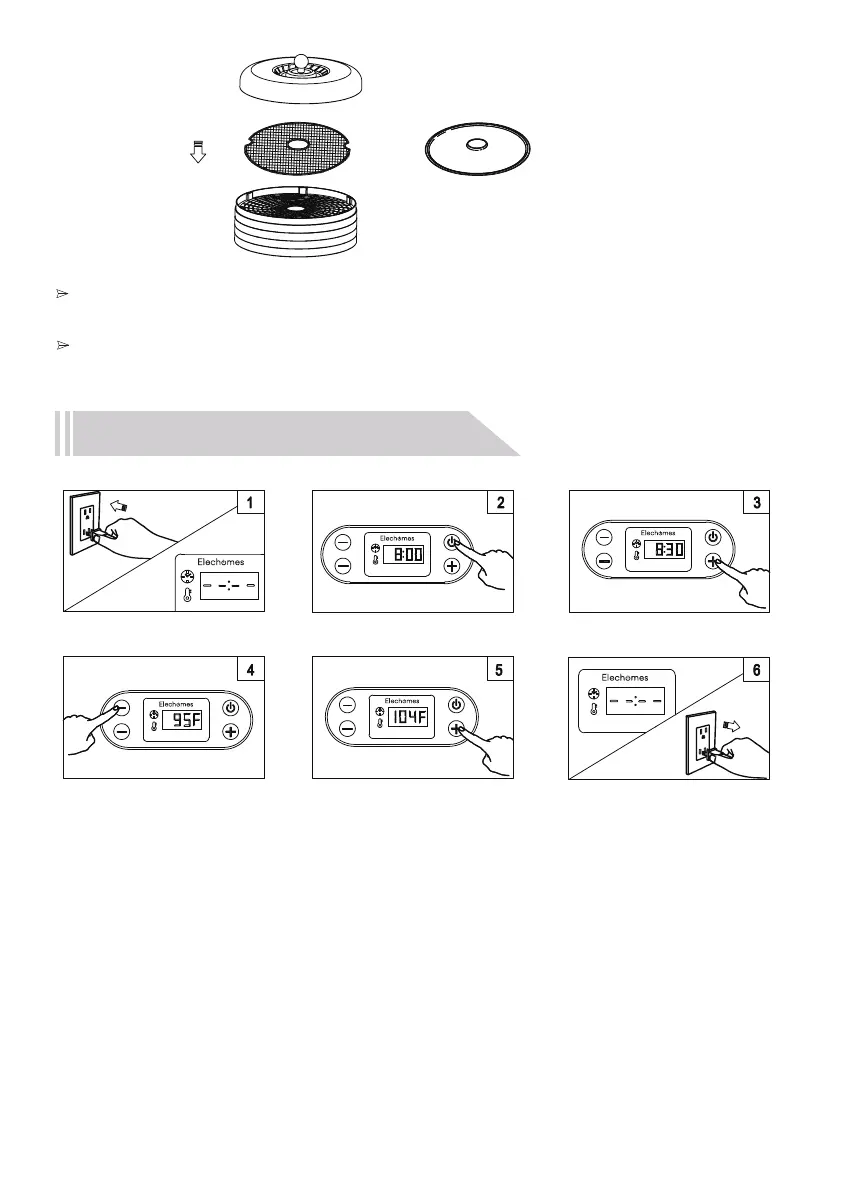
How To Use the Food Dehydrator
1.Connect the food dehydrator to a power outlet, then the LCD screen will display -- : --.
The device will then enter standby mode.
2.Press the Power button to begin the dehydrating process (default time: 8 hours).
3.Press the + or - button to increase or decrease the time from 30 minutes to 72 hours
(Time adjusts in 30 minute increments per button press).
4.Press the TIME/TEMP button to switch to temperature setting mode (default temperature: 95℉).
5.Press the + or - button to increase or decrease the working temperature from 95℉ to 158℉
(The temperature changes in 9℉ increments per button press).
6.The device will automatically stop working and enter standby mode when the time is up.
Unplug the device and let it air cool on the mesh tray before storage.
07
TIME
TEMP
TIME
TEMP
TIME
TEMP
TIME
TEMP
Note:
Before adding food to the tray, first put the mesh screen on the tray. For best results,
place the mesh screen in the top two trays . one of the topmost trays.
When using the fruit roll sheet, For best results, do not use more than two fruit roll sheets and
place in the top two trays.
or


 To Next Page