82 ELECRAFT
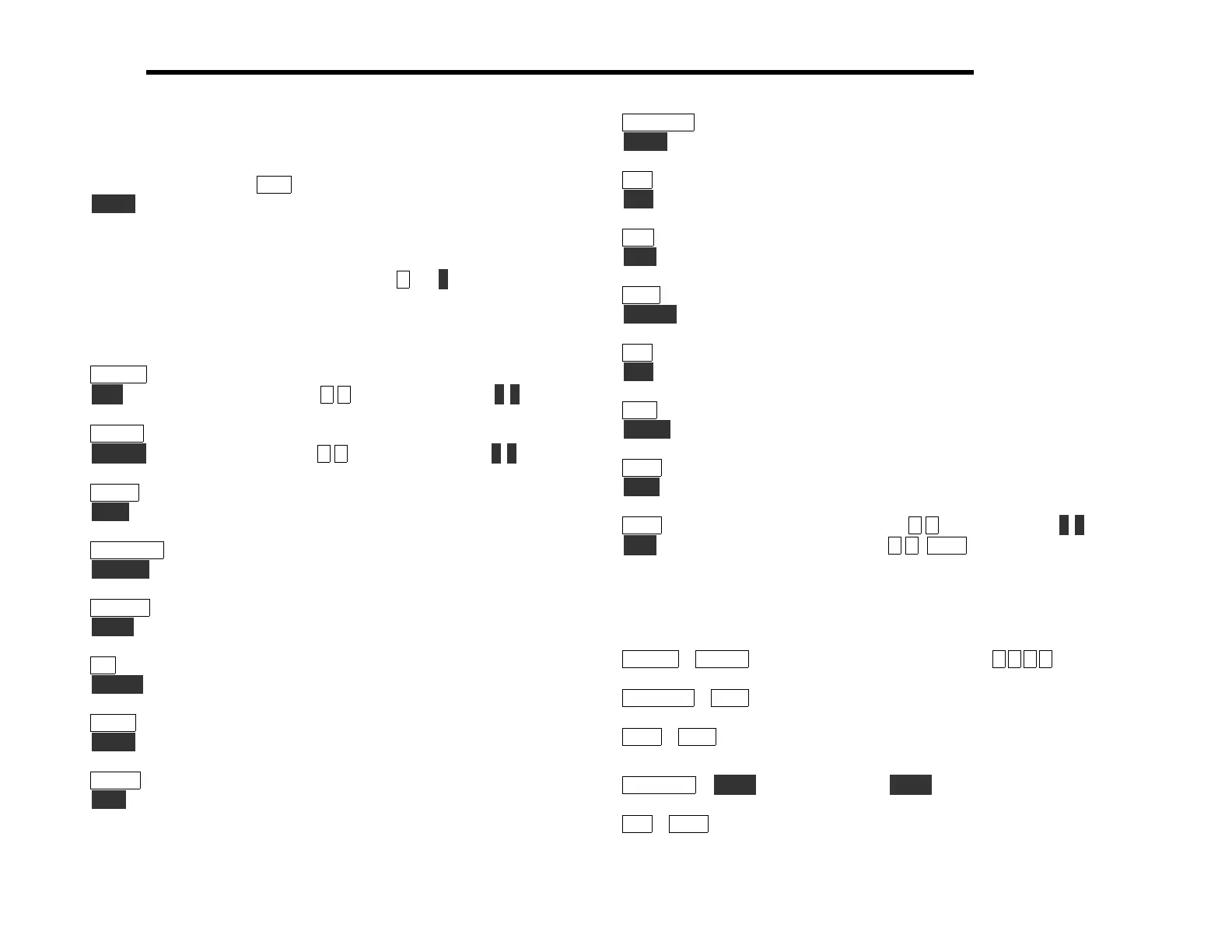
Switch Functions
Each pushbutton switch as two primary functions, indicated by the
upper and lower labels.
T A P a switch to access its upper function;
H O L D a switch for over 1/2 second to access its lower function.
Numeric Keypad: In addition to their tap/hold functions, ten of
the switches are labeled with digits 0 through 9. A digit can be
entered using either a TAP or HOLD (e.g.
5 , or 5 ). In some cases
the difference between the two is significant, as indicated below.
Tap and Hold Functions
B A N D + select next higher band
R C L recall memory #0 -9 (to start scan, use #0 -9 )
B A N D - select next lower band
S T O R E store memory #0 -9 (to start scan, use #0 -9 )
M E N U enter the menu
E D I T edit current menu parameter
D I S P L A Y select display mode (freq., voltage/current, time*)
R F / A L C select SSB transmit bargraph mode (RF or ALC)
A N T 1 / 2 toggle between ATU antenna jacks 1 and 2*
T U N E key transmitter; activates ATU if installed
N B select noise blanker mode (OFF/NB1/NB2)*
L E V E L toggle noise blanker threshold (low or high)*
R A T E select VFO tuning rate (see R A T E S menu entry)
L O C K lock/unlock VFO (DP flashes)
M O D E select operating mode (CW/LSB/USB)
V O X CW: oper/test; SSB*: PTT/speech 0.4/speech 1.0
*These functions require option modules; see page 110.
P R E / A T T turn on preamp or attenuator
S P O T CW audio spot signal on/off
R I T turn on RIT (see R I T menu entry, page 101)
P F 1 activate programmable function 1
A / B select A or B VFO
R E V temporary A/B VFO swap (used in SPLIT)
A G C select FAST/SLOW AGC
C W R V toggle between CW norm/reverse or USB/LSB
X I T turn on XIT (see R I T menu entry, page 101)
P F 2 activate programmable function 2
A = B set both VFO’s to current VFO frequency
S P L I T toggle between SPLIT and NORMAL transceive
X F I L select next crystal filter (FL1-4)
A F I L audio filter mode (OFF, AF1, AF2)*
M S G play or chain CW msg #0 -8 (to repeat, use #0 -8 )
R E C record CW message #0 -8 (M S G cancels record)
Two-Switch Combinations
Press and hold the two indicated switches simultaneously:
B A N D + + B A N D - direct frequency entry (e.g., #7 0 4 0 )
P R E / A T T + A G C AGC on/off (mode letter dec. pt. flashes)
X F I L + A G C display crystal filter # and bandwidth
(plus audio filter setting, if applicable*)
D I S P L A Y + T U N E override ATU T U N E power limit*
R I T + X F I L turn FINE RIT on/off (see page 99)



 To Next Page