EasyManua.ls Logo

ELECRAFT KX2 - User Manual

ELECRAFT KX2
75 pages
Print Icon
To Next Page IconTo Next Page
Loading...
ELECRAFT
Ò
KX2
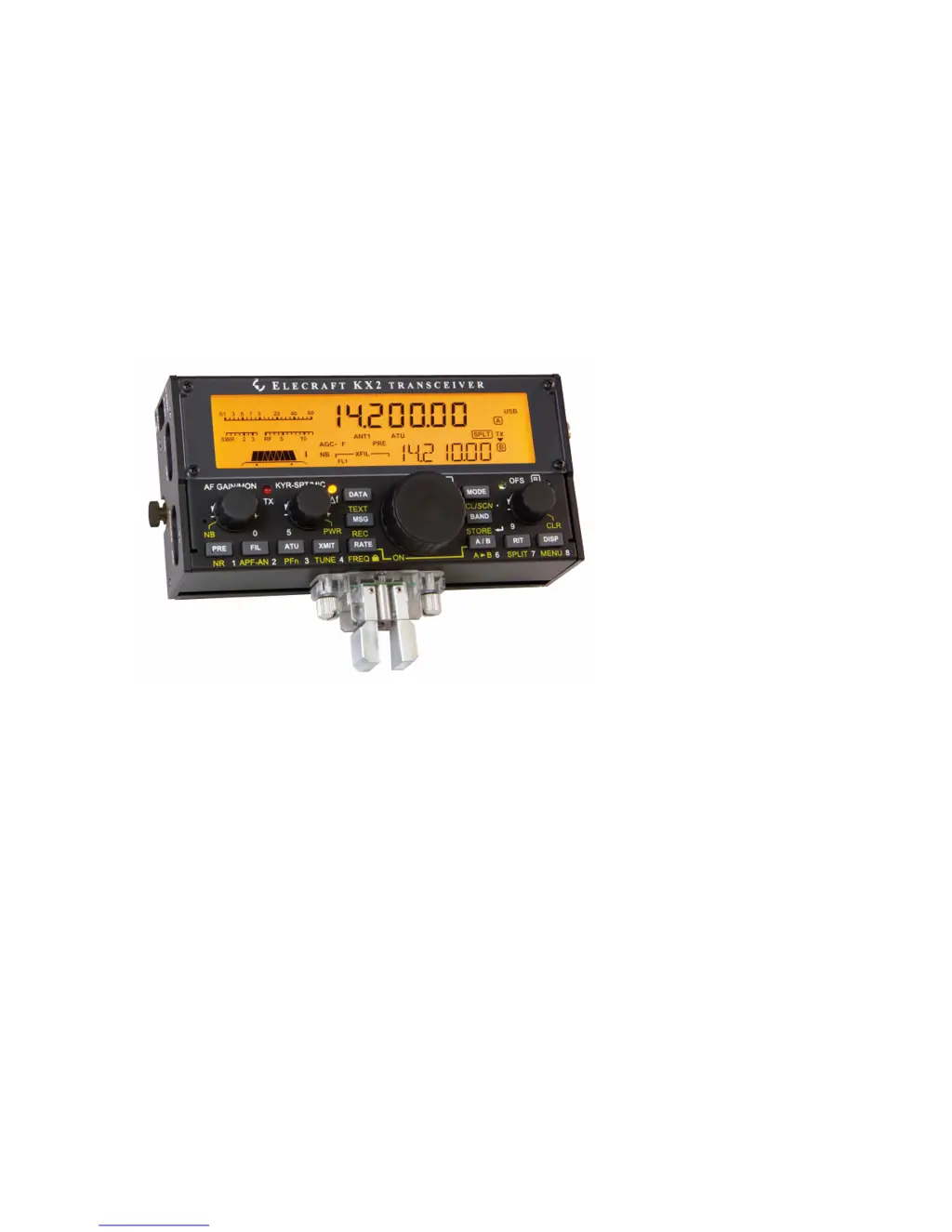
POCKET-SIZED, 80-10 M SSB/CW/DATA TRANSCEIVER
OWNERS MANUAL
Rev. A8, June 6, 2019 © 2019, Elecraft, Inc. All Rights Reserved

Other manuals for ELECRAFT KX2

Questions and Answers

Summary

Introduction

Key to Symbols and Text Styles

Explains symbols and text styles used in the manual.

Installation

Operating Position

Describes how to position the KX2 for optimal viewing and use.

Power Supply

Details requirements and connection for external power supply and internal battery.

Internal Battery

Using the Battery Safely

Amp Hour Metering

Preserving Clock Time During Charging

Utility Mounting Points (Bottom Cover)

CW Key;Keyer Paddle

Headphones and Speakers

Internal Microphone

External Microphone

Computer;Amp Keying (ACC)

Auxiliary Outputs (AUX)

Program;Test (PGM)

Antennas

General Antenna Information

Feedline

Discusses direct connection vs. coax/feedline, baluns, and Twin-lead.

Ground and Counterpoise Systems

Explains the need for ground/counterpoise and its connection methods.

Control Panel Reference

Receive

Lists controls related to receiver setup and operation.

Transmit

Lists controls related to transmitter setup and operation.

VFO A; Band; Mode

Explains controls for selecting VFO, band, and operating mode.

VFO B; Misc.

Lists controls for VFO B usage and miscellaneous functions.

Display (LCD)

VFO Icons

Shows that a VFO is locked.

Mode Icons

Indicates TX icon points to transmit VFO A or B.

Other icons

Lists and explains various other icons shown on the KX2 display.

Basic Operation

Getting Started

Steps to prepare the KX2 for initial use, including power and antenna.

Turning the KX2 On;Off

Instructions on how to properly power the KX2 on and off to save settings.

Switch TAP and HOLD Functions

Explains the dual function of switches (tap vs. hold) for activation.

AF Gain and other Knob Functions

Details the primary and secondary functions of the AF/MON knob and other small knobs.

Using the Configuration Menu

Guides users on how to navigate and use the KX2's configuration menu system.

Band Selection

Mode Selection

Direct Frequency Entry

VFO A and B

Tuning rates

Describes how to adjust tuning rates for VFO A and B using the RATE switch.

To lock VFO A

Instructions on how to lock VFO A to prevent accidental frequency changes.

To copy VFO As frequency to VFO B

How to copy VFO A settings to VFO B.

VFO A and B swap

How to exchange frequencies, modes, and settings between VFO A and VFO B.

Incremental Tuning (RIT and XIT)

F (Delta-F) LED

Indicates when RIT, XIT, or SPLIT is active.

To use RIT

Steps to activate and adjust RIT for fine tuning receive frequency.

To use XIT

Steps to activate and adjust XIT for fine tuning transmit frequency.

To zero the RIT;XIT offset

How to reset RIT/XIT offsets to zero using the CLR switch.

Special VFO B Displays

Receive Settings

AF Gain;Monitor Level Control

Controls receiver AF gain or monitor level, with tap and hold functions.

Preamp and Attenuator

Explains how to cycle through preamp and attenuator settings for optimal reception.

Filter Passband Control

Noise Reduction

Noise Blanking

Audio Peaking Filter (APF) and Notch Filter

CW;DATA Tuning Aid (CWT)

Spot and Auto-Spot

Transmit Settings

Keyer Speed-Spot;Mic Gain and Power Output

Sets keyer speed, mic gain, and power output for optimal transmit performance.

Transmit Controls and ATU Tuning

SSB Mode

VOX Setup

Configures VOX (voice-operated transmit) settings for SSB and data modes.

Transmit Metering

Explains how to switch transmit bar graphs between SWR/RF and CMP/ALC.

CW Mode

CW Receive Filtering

Adjusts filter passband for optimal CW reception based on conditions.

Off-Air Code Practice

Using the radio for code practice or keyer speed adjustment.

CW-Mode Menu Settings

Details menu settings for iambic keying, weight, and paddle configuration.

CWT, SPOT and Auto-Spot

Optimizes tuning and spotting for CW and data modes.

CW Text Decode;Display

Enables decoding of CW text and capturing it for logging.

CW;DATA Message Record;Play

AM Mode

Advanced Operating Features

Special VFO B Displays

Details various special information displays available on VFO B.

Frequency Memories

To store a general-purpose memory (00-99)

Step-by-step guide to storing memories in the 00-99 range.

To recall a general-purpose memory

Step-by-step guide to recalling stored memories.

To store a per-band quick memory

How to store quick memories (1-4) specific to bands.

To recall a per-band quick memory

How to recall per-band quick memories.

To erase a general-purpose memory

How to erase stored memories.

To add a text label to a general-purpose memory

How to add text labels to memories for identification.

Scanning

Channel Hopping

Audio Effects

Dual Watch

Allows listening to two frequencies simultaneously using stereo headphones.

Programmable Function Switch (PFn)

Receive Audio Equalization (RX EQ)

Transmit Audio Equalization (TX EQ)

SSB;CW VFO Offset

Data Modes

FSK D Mode (RTTY)

Easy-to-use RTTY mode, with details on text decode and tuning aid.

PSK D Mode (PSK31;PSK63)

Audio Data Modes (DATA A and AFSK A)

Text Decode And Display

Split Operation

Digital Voice Recorder (DVR)

Transmit Noise Gate

Cross-Mode Operation

Custom Power-On Banner

Logging (CW;Data Modes)

Transverter Bands

Transverter Band Setup

Details the five XV menu entries for setting up transverter bands.

Options and Accessories

AX1 whip

Describes the telescoping whip antenna for portable and field use.

MH3 hand mic

Details the MH3 microphone with PTT and VFO UP/DN buttons.

KXPD2 keyer paddle

Describes the compact keyer paddle that attaches to the KX2.

KXIO2 real-time clock module with 2 general-purpose outputs

Adds a real-time clock and two AUX outputs for external control.

KXAT2 wide-range internal automatic antenna tuner (ATU)

Provides internal ATU for matching non-resonant antennas.

KXPA100 100-watt amplifier

Details the 100W amplifier for increased output power.

CS40 and CS60 carrying cases

Describes carrying cases for the KX2 and accessories.

KX2 GNDPLUG

Mini-banana plug for quick-disconnect ground wire.

BNC-BP

Adapter for connecting wire antennas to the KX2.

Firmware Upgrades

Connecting the KX2 to a Computer

Guides on connecting the KX2 to a PC for firmware updates and utility use.

Checking your Firmware Revision

How to check the current firmware version installed on the KX2.

KX2 Firmware Self-Test

Runs a self-test to check for firmware errors and potential issues.

Forcing a Firmware Download

Procedure for recovering from an incompatible firmware version.

Remote Control of the KX2

Computer Control and Logging

Details software for remote control, logging, and contesting.

Automatic Antenna Control

Configuring the KX2 to send band data for external antenna controllers.

CW;DATA Terminal Applications

Using the KX2 Utility's terminal function for CW/PSK/RTTY communication.

Elecraft Frequency Memory Editor

Software for viewing and editing frequency memories.

Configuration

Option Module Enables

Details how to enable and configure installed option modules like ATU, KXIO2, KXPA100.

Menu Settings

Discusses various menu settings for personalizing the KX2's operation.

Auto Power-Off

Configures the automatic power-off feature to conserve battery life.

Low-Battery Warning

Sets the threshold for low-battery warnings to alert the user.

CW Iambic Mode

Selects Iambic keying mode (A or B) for CW operation.

Microphone Settings

Switch-Press Tones

Setting the Time

VFO Coarse Tuning Steps

TUNE Power Level

VOX (Voice Operated Transmit) Setup

Calibration

Reference Frequency

Details the procedure for calibrating the KX2's synthesizer using a signal source.

Receive Opposite Sideband

Transmit Bias

Transmit Gain

Automated Transmit Gain Calibration

Uses KX2 Utility for automated calibration of transmit gain.

Manual Transmit Gain Calibration

Provides steps for manual calibration across various bands.

Transmit Carrier

Transmit Opposite Sideband

Menu Functions

Menu Help Information

How to access help text for menu entries on VFO B.

Tech-Mode menu entries

Details tech-mode entries used for calibration and how to unlock them.

2 TONE

Enables a 2-tone generator for SSB transmit tests.

AF LIM

Sets an adjustable AF output limiter for use when AGC is off.

AFX MD

Selects the DELAY audio effect for acoustic space and reduced fatigue.

AGC MD

Allows operators to turn AGC off and control RF gain manually.

AGC SPD

AGC*THR

ALT MD

AM MODE

AMP HRS

ANT X SW

ATU DATA

ATU MD

AUTO INF

AUTO OFF

AUX 1 and AUX 2

BAT MIN

BKLIGHT

COR LVL

CW IAMB

CW KEY1

CW KEY2

CWT

CW WGHT

DUAL RX

FW REVS

KXIO2

LCDTEST

LED BRT

LOGGING

MIC BIAS

MIC BTN

MSG RPT

PA MODE

PITCH

REF CAL

RF GAIN

RS232

RTC ADJ

RX EQ

RXSBNUL

SER NUM

SW TEST

SW TONE

TECH MD

TIME

TUN PWR

TX BIAS

TX CMP

TXCRNUL

TX DLY

TX EQ

TX GAIN

TX GATE

TXSBNUL

VFO CRS

VOX DLY

VOX GN

VOX INH

VOX MD

WATTMTR

XIT

XVn ON

XVn RF

XVn IF

XVn PWR

XVn OFS

Troubleshooting

General

Addresses general issues like LCD display, power, error messages, and battery warnings.

General problem with transmit and;or receive

Covers common problems related to power supply, noise, or intermittent issues.

General problem with firmware behavior

Guides on troubleshooting firmware issues, checking menu settings, and updating firmware.

Transmit Troubleshooting

Power and Signal Issues

Covers TX LED, high current/SWR/temperature, and low power output issues.

CW and Voice Mode Issues

Addresses problems with CW transmit, mic usage, and SPLIT mode.

Receive Troubleshooting

Signal Level and Protection

Explains HI RFI, COR activation, and signal protection features.

Signal Quality Issues

Addresses weak signals, noise, and off-frequency reception below 3 MHz.

Receive Calibration and EQ

Covers issues related to REF CAL, RX EQ, and RF gain settings.

Spurious Signals (birdies)

Discusses inherent birdies and potential interference sources.

Parameter Initialization (EEINIT)

Error Messages (ERR nnn)

Troubleshooting steps

Provides specific steps for resolving error messages like ERR ATI, ERR ATR, ERR DS1, etc.

Scrolling Alert Messages

Theory Of Operation

RF Board

Describes the circuitry on the RF board, including filters, preamp, and mixer.

Control Panel (CP) Board

KX2 Block Diagram

Glossary of Selected Terms

A-to-D or ADC (analog-to-digital converter)

Defines an integrated circuit that converts analog signals to digital form.

AF, RF, and IF

Explains the different frequency ranges used in radio communication.

Attenuator

Defines a circuit that reduces signal levels for safe use.

ATU (automatic antenna tuner)

Defines a device that establishes an optimal match between a transmitter and antenna.

D-to-A or DAC (digital-to-analog converter)

Defines an integrated circuit that converts digital signals into analog form.

dB (decibel)

Defines a measure of signal increase or decrease relative to another signal.

DC-to-DC converter

Defines a device that converts one DC voltage into another.

DSP (digital signal processor)

Defines a specialized computer that processes signals digitally.

MDS (minimum discernable signal)

Preamp

SDR (software-defined radio)

VFO (variable frequency oscillator)

Specifications

GENERAL

General specifications including frequency range, modes, and dimensions.

RECEIVER*

Receiver specifications including sensitivity, rejection, audio output, and features.

TRANSMITTER*

Customer Service and Support

Technical Assistance

Provides contact information for email and telephone support.

Repair;Alignment Service

Instructions for returning the product for repair, calibration, or alignment.

Elecraft 1-Year Limited Warranty

ELECRAFT KX2 Specifications

General IconGeneral
ModesSSB, CW, Data
DisplayLCD
Supply Voltage9-15 V DC
Power OutputUp to 10 watts
Receiver Sensitivity0.2 uV for 10 dB S/N
Current Drain TX2.0 A (at 10 W output)
Weight13 oz (0.37 kg)
Operating Temperature-10°C to +50°C
Dimensions5.8 x 2.8 x 1.5 inches (147 x 71 x 38 mm)

Related product manuals