K3 KSYN3 Gain Modification Page 5 of 5
If your K3 is equipped with the K144XV 2-meter option, replace the module. Refer to Installing the
K144X V in the K3 in your K144XV Installation and Operation manual for details on reconnecting the
cables and mounting the module.
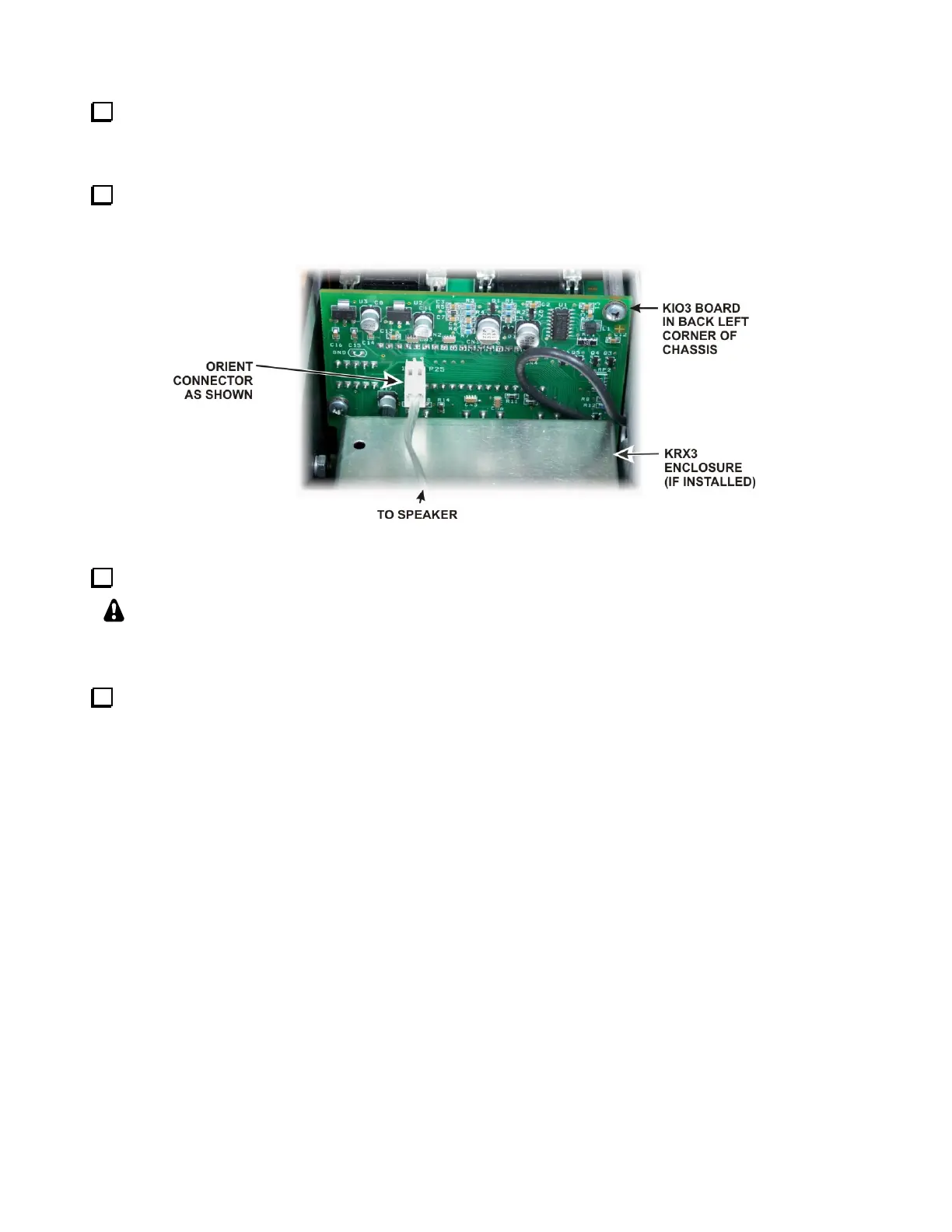
Hold the top cover above the K3, route the speaker wire under the stiffener bar and plug it into P25 on
the KIO3 board at the left rear of the K3 as shown in Figure 6. If the K144XV module is installed, the
cable connector will fit under the stiffener bar at the dimple in the top of the K144XV module.
Figure 6. Connecting Speaker Cable.
Replace the nine flat head screws in the top cover shown in Figure 1.
IMPORTANT: The cabinet screws are essential for the K3 shielding to work properly.
Leaving one loose may result in unwanted birdies in the receiver and other hard-to-
troubleshoot problems.
Update Firmware. This modification requires firmware rev 3.88 or later, available from the Elecraft
web site (www.elecraft.com). This revision controls the DDS range to ensure correct operation.
This completes your KSYN3 Synthesizer Modification.



 To Previous Page