ELECRAFT 13
Assembly Notes
Each step in the assembly process is accompanied by a check-box:
As you may have noticed already, the symbol below is used to alert
you to important information:
i
Do not skip any steps. You may adversely affect both the
performance and appearance of the kit by using the wrong
assembly order.
Installing Parts
Follow the instructions carefully about the position of parts. Many
parts must be positioned exactly as shown as instructed or the case will
not fit.
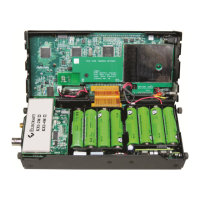
Before beginning assembly, you should review the photographs in
Appendix D to see what the completed PC boards look like. You'll
also find front and back views of each PC board in the Parts Placement
Drawings, Appendix F.
IC Sockets
Only one integrated circuit is mounted in a socket. Do not use a
different type of socket. The one supplied is a low-profile socket that
provides just enough room for the case to fit together.
Do not use sockets on any ICs other than the one provided. Mount the
other ICs directly on the board as instructed. Sockets will not allow the
cover to close. Also sockets in RF may cause improper circuit
operation due to increased lead inductance and capacitance.


 To Next Page