24 HOUR TIMER (If Fitted)
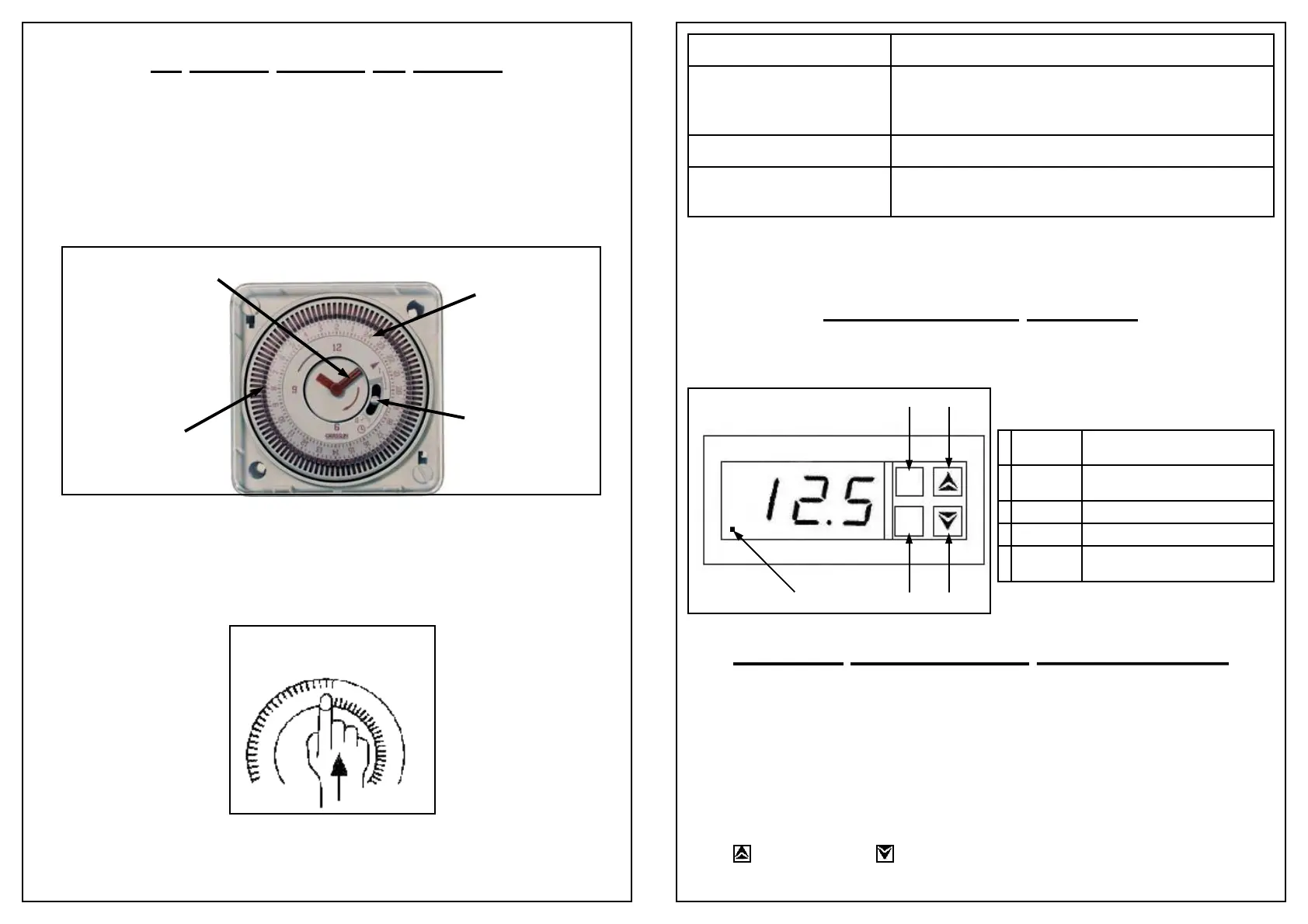
Setting Up - The Outer dial will need to be set to the current time (when the heater
has been installed and has a constant power supply). Rotate the minute hand slowly
in a clockwise direction, until the correct hour is located at the tip of the arrow
printed on the dial. See Figure 1 below.
Please note that the outer dial is printed with the 24 hour clock i.e. 8:00 am = 8 on
the dial. 8:00 pm = 20 on the dial.
Programming Guide - Tactic Synchronous & Quartz
Programming Switching Times - Once the outer dial has been set to the current
time you will need to position the appropriate tappets to your required on and off
times. The factory set position of all tappets is in the off position, to change any tap-
pets to the on position they must be switched away from the clock face.
See Figure 2 below.
Figure 2
Manual Override - Your 24 hour timer is also fitted with a manual override
switch that is built into the face of the dial illustrated in Figure 1 (top of this page).
This switch has 3 positions which are explained in the table on the following page.
Minute Hand (pointing to arrow printed on dial)
Outer
Dial
Override
Switch
Figure 1
Tappet
ON OFF
Important - The manual override positions are a fixed selection - i.e. the output of
the 24 hour timer will remain ON or OFF (as selected), until the switch is returned
DIGITAL THERMOSTAT INSTRUCTIONS
The digital thermostat fitted to your Elecro Aquatic heater, has been pre-
programmed with all the necessary parameters to ensure reliable service & opera-
tion.
All you need to do is set the temperature you would like to maintain in your pond
(This is called the set point*).
To display / modify the set point* temperature, press and release the P button (see
diagram on following page).
The pre-programmed set point temperature will be displayed.
Press (3) to increase or (2) to decrease the set point*.
TEMPERATURE DISPLAY
The digital thermostat displays the temperature in ˚C.
Switch Position Function
I = Top Position
Manual Override = ON: In this position the time clock
is by-passed, and will not affect the operation of the
heater.
¥ = Middle Position
24 Hour Timer = ON: Timed Operation Only.
0 = Bottom Position
Manual Override = OFF: In this position the heater
will not operate regardless of any other settings.
1 2
3 4
5
U
P
TLZ 11
OUT AL
1 P Button Used to display / modify the set point
temperature
2 Down
Button
Used to decrease the set point value
3 Up Button Used to increase the set point value
4 Not Used NOT USED
5 LED - OUT Indicates that the water has fallen below
the set point temperature.


 To Previous Page