The buzzer module is used for making sound in your project. It makes a
sound when activated by a logic HIGH signal. Connect the buzzer to any
port of Crowtail- Base shield for Micro:bit, you can easily make it sound with
setting the related port to logic HIGH. The buzzer module can also be
connected to an analog pulse-width modulation(PWM) output to generate
various tones, which means you can use it to create your own melody!
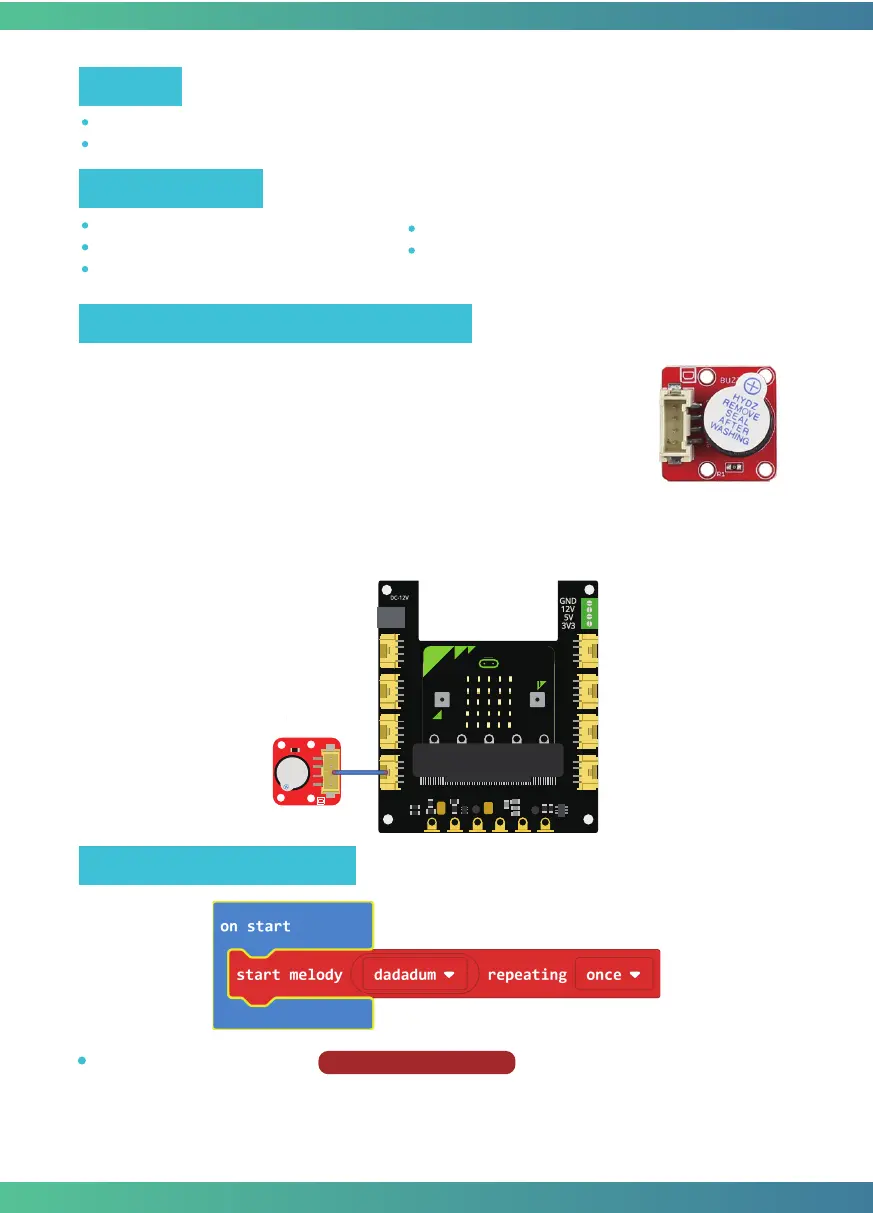
Connect Crowtail-Buzzer to P0 port of Crowtail-Base shield for Micro:bit. The hardware
connections are as follows:
Programming and note
Learn how the buzzer work and use it to play songs.
Learn how to run the code once at the beginning of the program.
Micro:bit x1
Crowtail-Base shield for Micro:bit x1
Crowtail-Buzzer x1
Crowtail-Cable x1
USB cable x1
Target
Hardware learning and connection
Required Parts
Start melody repeating:
The
Start Melody Repeating
block eliminates all of the frustra-
tion from getting music from a microcontroller. It is as simple as selecting one of the many
songs that were pre-programmed into MakeCode and repeating it as many times as possible!
Note that: There’s no other to run while the melody is playing. Which is called "blocking" code
and must be Considered in your program.
12



 To Next Page