Just like our brains, controllers play a very important role in remotely controlled cars. It is
responsible for telling the car what to do and how to do it. Why not try to use a micro:bit as a
controller to simulate how the car is controlled, such as lights, horns, steering, etc. This is what
we will do in this experiment.
Experiment 20 – Car remote control
Instruction
The circled position in the picture is the accelerometer on the
micro: bit. We can use this accelerometer to measure micro: bit
acceleration and detect micro: bit movement. It can also detect
other micro: bit gestures, such as shaking, tilting, and free fall.
Micro:bit x2
Crowtail-Base shield for Micro:bit x2
Crowtail-Touch Sensor x1
Crowtail-Switch x1
Crowtail-LED(Yellow) x1
Crowtail-Buzzer x1
Crowtail-9G Servo x1
Crowtail-Cable x4
USB cable x1
Required Parts
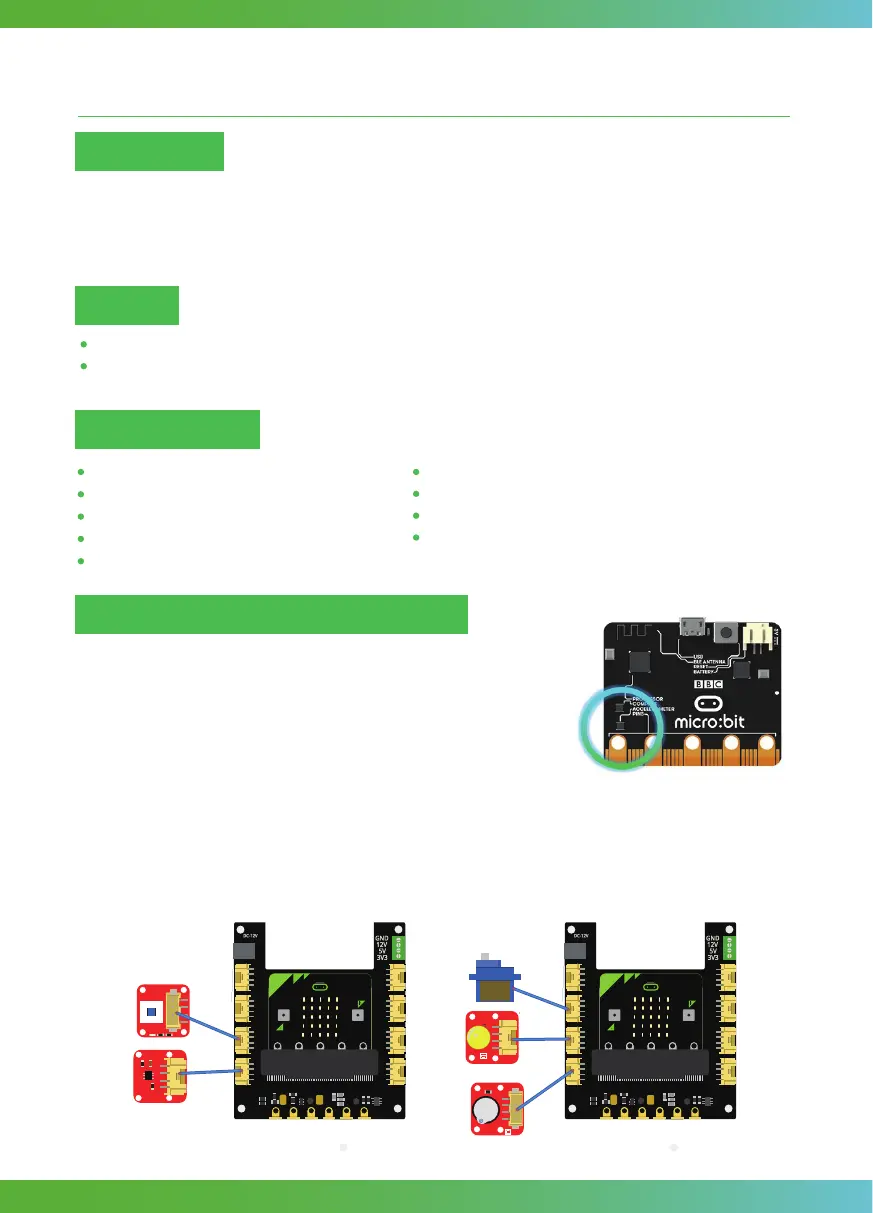
Connect Crowtail-Touch Sensor and Crowtail-Switch to P0 and P1 ports of Crowtail-Base shield
for Micro:bit(named bit1). Connect Crowtail-Buzzer, Crowtail-LED and Crowtail-9G Servo to P0,
P1 and P2 ports of Crowtail-Base shield for Micro:bit(named bit2). Note: You need to connect
12V power supply for bit2. The hardware connection are as follows:
Hardware learning and connection
Make a remote controller and simulate controlling the car.
Learn how to use gesture blocks to detect gestures you take when holding a micro: bit (such as
shaking a micro: bit)
Target
46



 To Next Page