The changing weather is so annoying, I even got a cold because of it! No, I have to think of a
way to remind myself of changes in the weather at all times. I have to pay attention to keep
warm and never catch a cold again. Less gossip, let’s make a weather station to ensure we can
obtain temperature and humidity anytime and anywhere to solve this problem!
Experiment 12 – Weather station
Instruction
Learn how Temperature&Humidity sensor work and use it to make a weather station.
Learn how to add an extension package.
Learn how to use two onboard buttons of micro:bit.
Micro:bit x1
Crowtail-Base shield for Micro:bit x1
Crowtail-Temperature&Humidity Sensor x1
Crowtail-Cable x1
USB cable x1
Target
Required Parts
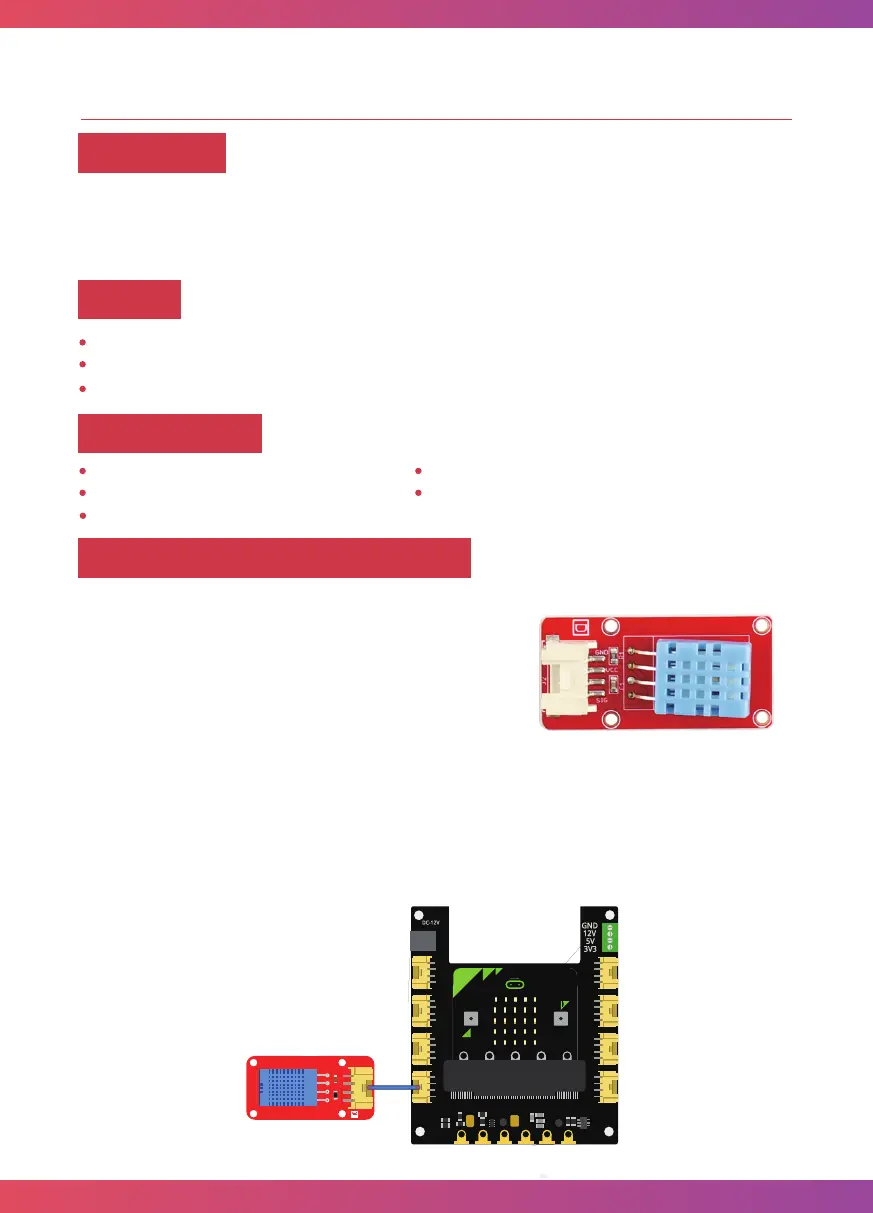
This module can help you detect the temperature and
humidity of the environment of your house. The
module contains a DHT11 temperature & humidity
sensor that is a complex sensor with a calibrated digital
signal out. It uses digital module acquisition technology
and temperature&humidity sensor technology. The
sensor consists of a resistance type moisture element
and an NTC temperature measuring element. Because of the single-wire serial interface, it is
easy to use the module.
Connect Crowtail-Temperature&Humidity Sensor to P0 port of Crowtail-Base shield for
Micro:bit. The hardware connections are as follows:
Hardware learning and connection
29



 To Next Page