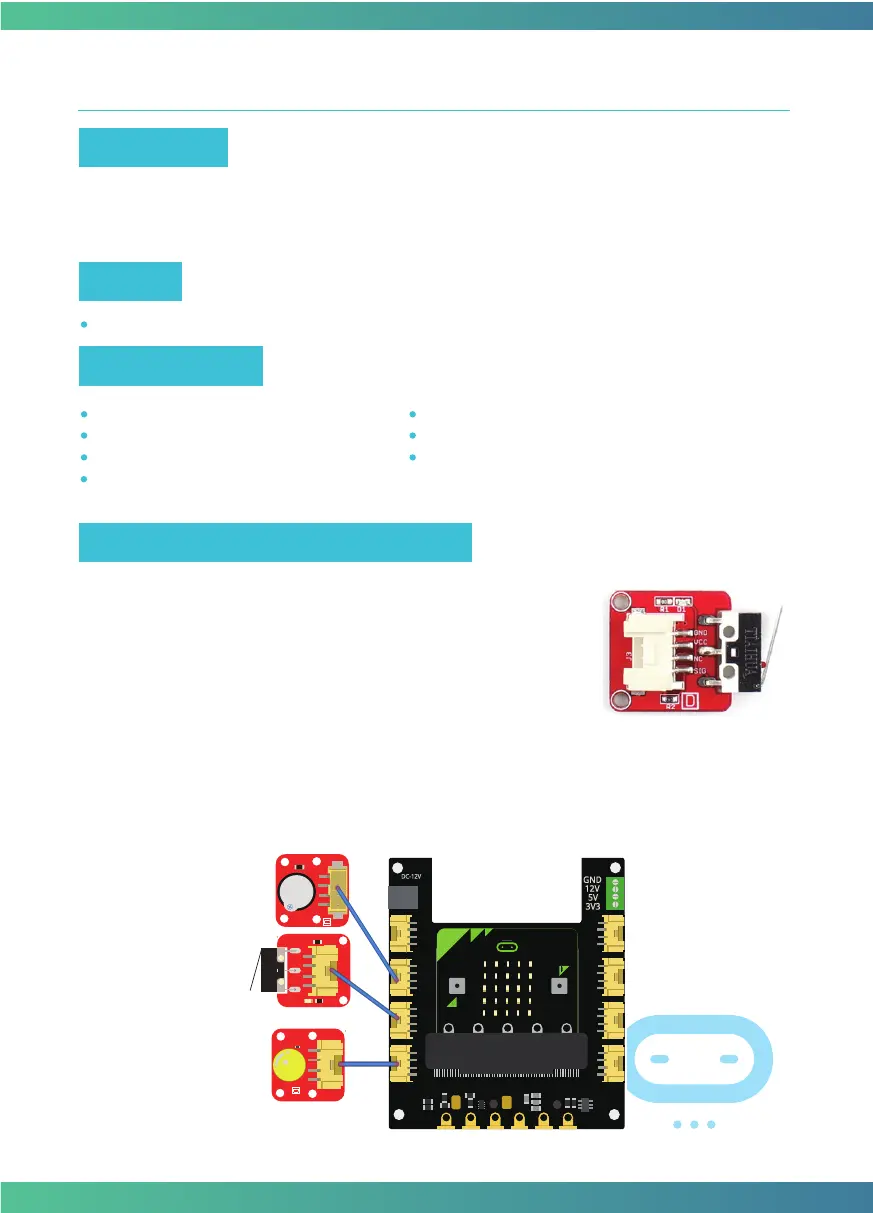
Connect the Crowtail-Collision Sensor, Crowtail-LED and Crowtail-Buzzer to P1, P0 and P2 ports
of Crowtail-Base shield for Micro:bit. The hardware connections are as follows:
This is a robot model car crashes or collision switch sensor module,
it usually outputs a logic HIGH signal, but when the sensor crash
something such as the wall, the on-board switch will be pressed,
and the module outputs a logic LOW signal. This module can be
installed into any mobile platform to achieve collision detection
function via 4 pin sensor cable and Micro:bit sensor expansion
board connector.
Hardware learning and connection
Learn how the collision sensor work and use it to make a collision detector with buzzer.
Micro:bit x1
Crowtail-Base shield for Micro:bit x1
Crowtail-Collision Sensor x1
Crowtail-Buzzer x1
Crowtail-LED(Yellow) x1
Crowtail-Cable x3
USB cable x1
Target
Required Parts
Do you know there is a collision sensor inside the car? It is used to detect collisions to make sure
the car can open airbag immediately and alarming after the impact. In this experiment, let's
make a collision detector to simply simulate the process of automobile collision detection.
Experiment 5 – Collision check
Instruction
15



 To Next Page