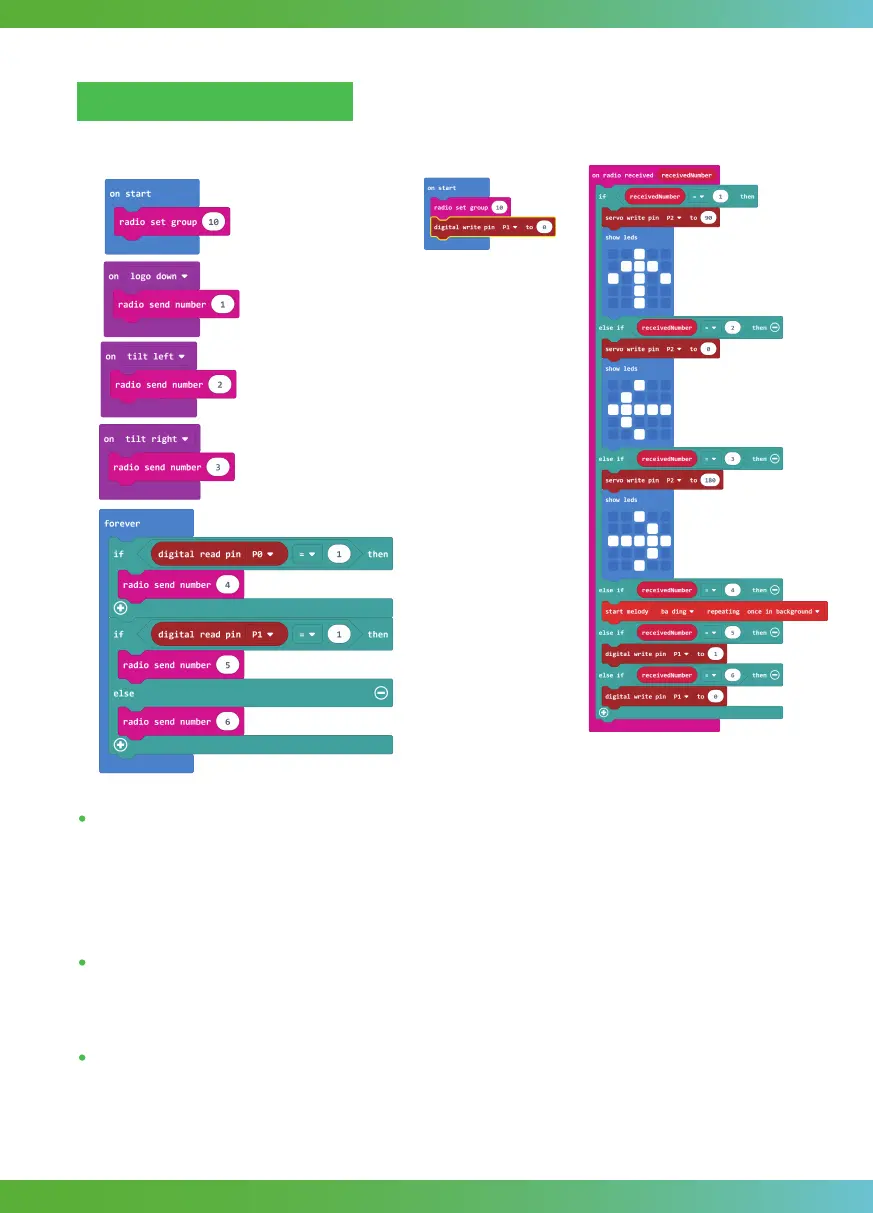
Send_code(bit1):
Receiver _code(bit2):
On Gesture: On logo down, on tilt left and on tilt right these three blocks are all called On
gesture block. This type of block will start an event handler(part of the program that will run
when something happens). This handler works when you do a gesture, for example, shaking
the micro:bit. In send_code, when bit1 logo down, we send 1; when bit1 tilts to the left, we
send 2; when bit1 tilts to the right, we send 3.
Show leds: This block is to shows a picture on the LED screen. There are 4 * 4 LEDs, you can
control any one of the LEDs above to draw your own picture. Here the picture we need to draw
is 3 direction arrows.
If…else if…: We use this statement to run the corresponding code based on different numbers
received by radio.
Programming and note
47



 To Next Page