1. Press F7 to enter OSD menu or set up option.
2. Press F8 or F9 to select the corresponding option or adjust parameter value.
3. Press F10 to return to previous step.
Note: Make sure the Fn shortcut key function is available.
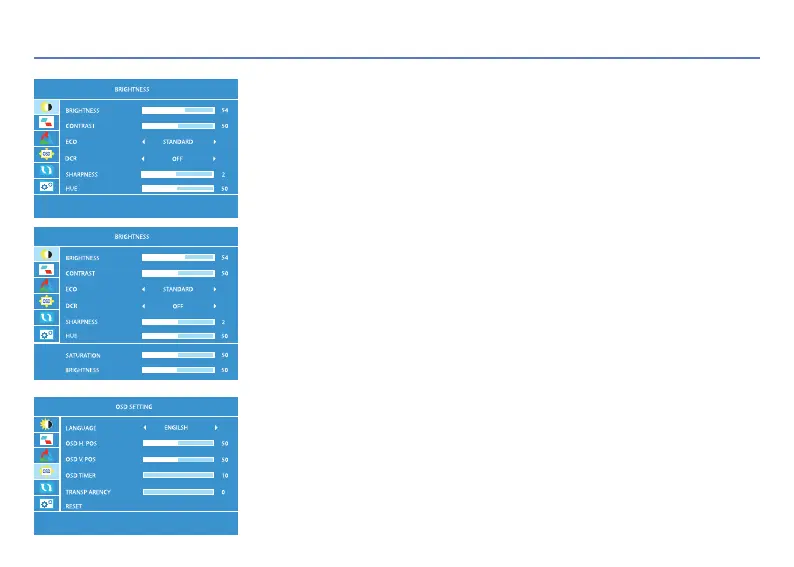
BRIGHTNESS
BRIGHTNESS: Adjustable range: 0-100 CONTRAST: Adjustable range: 0-100
ECO: STANDARD/RTS/FPS/MOVIE/GAME/TEXT
DCR: OFF/ON
SHARPNESS: Adjustable range: 0-4 HUE: Adjustable range: 0-100
SATURATION: Adjustable range: 0-100 BRIGHTNESS: Adjustable range: 0-100
06 OSD Settings
OSD SETTING
LANGUAGE: English, French, German, Simplified Chinese, ltalian, Spanish, Portuguese,
Turkish, Polish, Dutch, Japanese, Korean
OSD H.POS: Adjustable range: 0-100 OSD V.POS: Adjustable range: 0-100
OSD TIMER: Adjustable range: 10-60 TRANCPARENCY: Adjustable range: 0-100
RESET: Initialising the device
< 7 >


 To Next Page