17
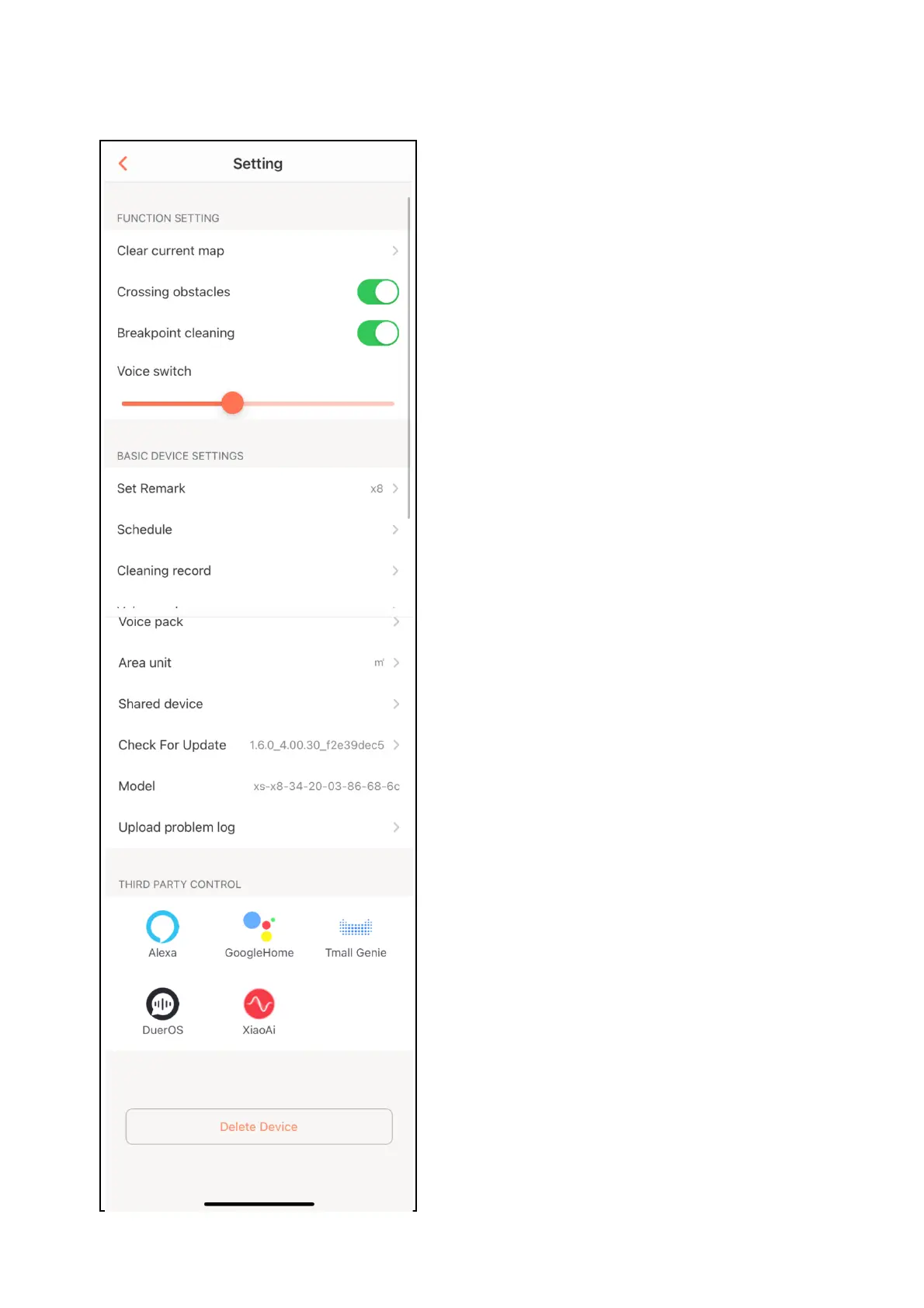
THE SETTINGS SCREEN
This screen gives you the option to adjust the volume of
the robot’s voice and update some of the device’s basic
settings.
Clear current map – clear map to start a new room.
Crossing Obstacles – whether to allow robot to cross
1cm doorways and other obstacles.
Breakpoint Cleaning – permit robot to break off from a
cleaning job to recharge then continue the remaining
clean.
Voice Switch - adjust the volume of the robot’s voice.
Set Remark – change the name of the Robot.
Schedule – set a schedule for the robot to clean in the
future.
Cleaning Record – a log of the work your robot has
done.
Voice Pack – install a different voice.
Area unit – choose between ft² or m².
Check for update – update to the latest firmware.
Shared device - share access to the controls of your
cleaning robot with friends and family.
Model – this is the full model number.
Upload problem log – upload error file for support.
Third Party Control - this allows the unit to be integrated
with your favourite home automation hardware such as
Google Home and the Amazon Echo.
EDULING


 To Next Page