18
Some typical examples of LOOP mode’s Page 1 display include:
L 2 4 P
Digit 1 Digit 2 Digit 3 Digit 4
F n S
Digit 1 Digit 2 Digit 3 Digit 4
Digit 1 – F or L: Digit 1 determines the relationship between Loop A and Loop
B’s length. When set to F, for Freeform, Loop A and B are completely indepen-
dent and may have different lengths that are unrelated to each other. When set
to L, for Loop Lock, Loop B’s length is always a multiple of a Loop A and the
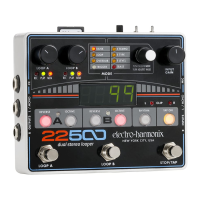
22500 automatically sets Loop B’s length when recording Loop B’s initial loop.
Digit 2 – blank, .5, 1, 2, …, 9, U: When Digit 1 is set to L, Digit 2 sets the
Loop Lock Multiple for Loop B. If Digit 1 is set to F, then Digit 2 is blank since a
Loop B’s length is not locked to Loop A.
Digit 2 has 10 numbers available, each signifying the loop multiple for Loop B,
for example .5x, 1x, 2x up to 9x. The numbers start with .5, where Loop B will
be half the length of Loop A. When Digit 2 is set to 1, Loop B’s length equals
Loop A’s length, when set to 2, Loop B is twice the length of Loop A and so on
up to 9x the length of Loop A.
Digit 2 has one other choice available which is the letter U. When set to U, you,
the user, can set the loop multiple as you create Loop B where the only
restriction is that the multiple must be a whole number. To end Loop B, when set
to U mode, press Loop B’s FSW, then the 22500 will continue recording Loop B
until it comes to the end of the current Loop A multiple.
Digit 3 – Quantize Modes – n, 2, 3, 4, 6, b: Digit 3 sets the Quantize mode
for both Loop A and Loop B. Quantize mode allows you to create loops that are
exact bar or beat lengths. For example, a loop that is exactly 4 bars in length,
with each bar 4 beats in length or a loop that is 6 beats long. Quantize is
disabled when Digit 3 is set to n (Non-Quantize), otherwise Quantize is enabled.
NOTE: Quantized loop lengths are synchronized to the 22500’s Rhythm drum
loop which must be playing in order to record a Quantized loop. The easiest way
to properly play in time with a Quantized loop is to play along with one of the
Rhythm loops. The 22500 does not start recording the first loop on a Quantized
loop bank unless the Rhythm loop is also playing. For example, if you press Loop
A’s FSW to begin recording a loop and the Rhythm loop is not playing, Loop A
remains in Record-Ready mode (REC LED blinking) until 1 bar or 1 beat after you
start Rhythm loop playback.


 To Next Page