REVERSE Button – Press the REVERSE button to play the loop in reverse. The
REVERSE button glows red when enabled. Reverse can be used at any time to
playback or overdub a loop.
½ SPEED Button – Pressing the ½ SPEED button causes the pitch of the loop
to go down one octave and the tempo is halved. If a loop is overdubbed during
half-speed mode, returning to normal speed playback causes the pitch of the
overdub to go up one octave and the tempo is doubled. The ½ SPEED button
glows red when enabled. ½ SPEED can be used at any time during playback or
while overdubbing a loop.
FX LED – Indicates when an effect is active. The FX LED automatically lights
when the REVERSE or ½ SPEED buttons are used and the STOP/FX footswitch is
programmed to operate in STOP mode. Alternatively, the FX LED will toggle
on/off each time the STOP/FX footswitch is pressed and programmed to operate
in FX mode.
MONO/L INPUT – ¼” Left Instrument/Line Input Jack. Plug the output of your
instrument or another effects pedal into this jack. If you use just one input we
recommend you use the MONO/L input. The input impedance presented at this
jack is 1MΩ. The maximum allowable signal level into this jack is +6 dBu. The
input is unbalanced.
R INPUT – ¼” Right Input Jack. Plug the output of your instrument or another
effects pedal into this jack. Use this jack for stereo recording. The input
impedance presented at this jack is 1MΩ. The maximum allowable signal level
into this jack is +6 dBu; it is an unbalanced input.
MONO/L OUTPUT – ¼” Left Output Jack. The Left output signal is sent
through this jack. The dry signal present at the Left input will be output on the
MONO/L Output jack. The source impedance of the MONO/L Output is
approximately 330Ω.
Note: the MONO/L OUTPUT jack also functions as a power switch when
powered from a battery. Disconnect the cable to save battery power when the
720 is not in use.
R Output – ¼” Right Output Jack. The Right output signal is sent through this
jack. The dry signal present at the Right input jack is output to the R Output
jack. The source impedance of the R Output is 330Ω.
4
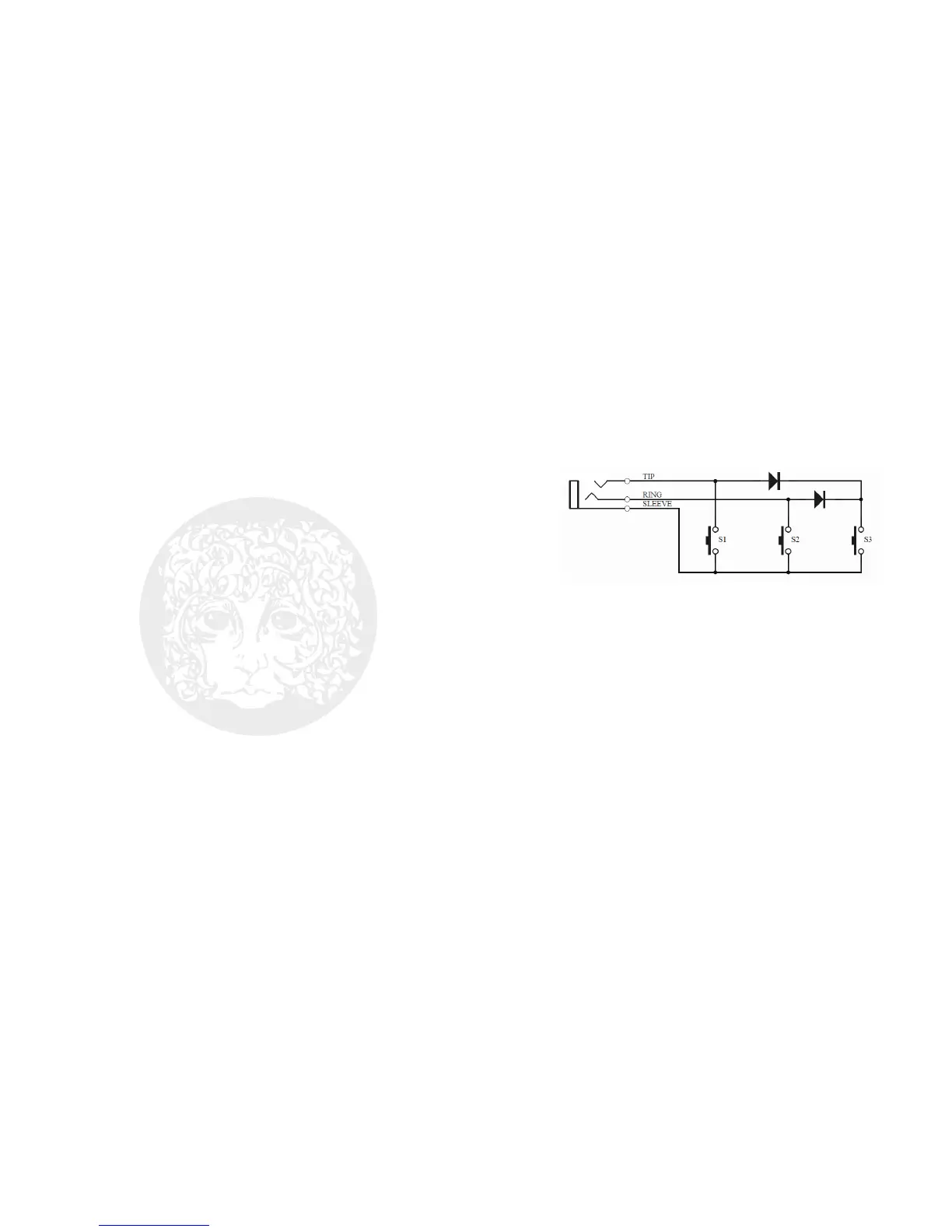
FC Jack – ¼” TRS Foot Controller Jack. Use this jack with popular three button
foot controller units to control the 720 bank up, bank down, and instant undo-
redo.
The Digitech
®
FS3X 3-Button Footswitch [see: http://digitech.com/en-
US/products/fs3x-3-button-footswitch] is recommended for this application. If
using this product, the following switch labels on the FS3X control the following
720 functions: DOWN advances the 720 bank down; UP advances the 720 bank
up; and, MODE will instantly undo or redo.
The circuit required for the foot controller is as follows:
TIP / S1 = Instant Undo-Redo
RING / S2 = Bank Down
Diode-AND TIP+RING / S3 = Bank Up
9V Power Jack – Plug the output of the supplied AC adapter into the 9V power
jack located at the top of the 720. The Stereo Looper 720 draws 60mA
typ./75mA max. at 9VDC with a center-negative plug. The Stereo Looper 720
accepts Boss
®
and Ibanez
®
style AC adapters.







 To Next Page