
 Need help?
Do you have a question about the Electro-Harmonix Q-Tron and is the answer not in the manual?
Details the one-year warranty, repair/replacement policy, and registration requirements.
Outlines FCC regulations for Class B digital devices and measures to mitigate radio interference.
Explains the Q-Tron's purpose as a musical expression tool controlled by playing dynamics.
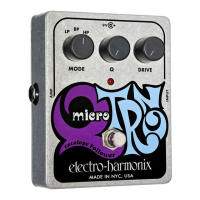
Defines the function of each control knob and switch on the Q-Tron pedal.
Step-by-step instructions for connecting and powering the Q-Tron, setting initial controls.
Specific settings to emulate the sound of a classic wah-wah pedal.
Provides control settings to achieve a vintage Mutron III-style filter effect.
Guidance on optimal Q-Tron settings for various instruments like guitar, bass, and keyboards.
Explores synergistic uses of the Q-Tron with other effects like distortion and octave dividers.
The Electro-Harmonix Q-Tron is an envelope-controlled filter designed to provide a wide range of musical expression through dynamic sound modification. This device utilizes the volume, or envelope, of an incoming audio signal to control a swept filter. As the input signal's volume increases or decreases, the pitch of the filter also changes, allowing for a highly interactive and expressive effect that responds directly to the user's playing dynamics. A strong attack from the user will result in a more dramatic effect, while softer playing will produce more subtle effects or no effect at all, giving musicians precise control over the intensity of the sound.
The Q-Tron features several controls that allow for extensive sound shaping. The Drive Switch (Up/Down) determines the direction of the filter sweep, offering flexibility in how the filter responds to the input signal. The Range Switch (HI/Lo) emphasizes different frequency characteristics; the "Lo" position highlights vowel-like sounds, while the "HI" position accentuates overtones. This allows users to tailor the filter's character to various instruments and musical styles.
The Gain Control (0-11) serves a dual purpose depending on the Boost Switch setting. In "Boost" mode, the Gain control acts as both a volume control and a filter sensitivity control, allowing users to adjust the overall output level and how responsive the filter is to their playing. In "Normal" mode, the Gain control functions solely as a filter sensitivity control, having no effect on the unit's output volume. The Boost Switch itself toggles between "Normal" mode, which disengages the internal pre-amp, and "Boost" mode, which activates it, providing an additional layer of tonal control and signal conditioning.
The Peak Control (0-11) is crucial for determining the frequency peak of the filter. Turning this control clockwise will create a more dramatic and pronounced effect, allowing for intense filter sweeps. The Mode Switch (LP, BP, HP, MIX) allows users to select the specific frequency range the filter will sweep in. "Low Pass" (LP) emphasizes the low frequencies, "Band Pass" (BP) focuses on the midrange, and "High Pass" (HP) targets the treble frequencies. The "Mix" mode combines the Band Pass effect with the dry instrument signal, offering a blended sound. Finally, the Bypass Switch (in/out) allows the user to engage or disengage the effect, providing a true bypass for the instrument's signal when the effect is not desired.
For optimal usage, the Q-Tron comes equipped with a 24-volt/100mA tip positive external power adapter (European models use a 24v DC/30mA tip positive adapter). It is critical to use only the supplied power adapter, as using an incorrect adapter can cause serious injury and damage the unit, voiding the warranty. Before use, it is recommended to set all controls to minimum. The instrument should be connected to the input jack and the amplifier to the effect out jack. The unit's power LED should illuminate, indicating it is receiving power.
To achieve a conventional wah-wah pedal sound, users can set the Drive Switch to "Up," Range Switch to "Low," Mode Switch to "BP," Peak Control to "Maximum," and Boost Switch to "Normal." The Gain control should then be varied until the Overload Indicator LED lights up on most notes played. If no effect is heard, the Bypass switch should be depressed to engage the effect. Experimenting with these settings will demonstrate how the Q-Tron reacts to playing dynamics. Adjusting the Gain and Peak controls will alter the amount and intensity of the effect, while the Range, Mode, and Drive controls can be used for tonal variations.
For a sound similar to an original Mutron III, the Q-Tron's controls should be set as follows: Drive Switch to "Down," Range Switch to "Low," Mode Switch to "BP," Peak Control to "Maximum," Boost Switch to "Boost." The Gain control should be varied until the Overload Indicator LED lights up only on the loudest notes played. Increasing the Gain in this setting will saturate the filter, producing the characteristic "chewy" Mutron-like sounds. The Peak control will vary the intensity of the effect, and the Range, Mode, and Drive controls can be adjusted for further tonal variations.
Due to its extended frequency response, the Q-Tron is versatile and can be used with a wide variety of electronic instruments. For rhythm guitar and bass, the "Lo" range is generally best, while "Hi" range is suitable for lead guitar, brass, and wind instruments. Both ranges work well with keyboards. The "Mix" mode is particularly effective with bass guitar, potentially requiring higher peak settings. The "Down" Drive switch position works well with bass guitar, while "Up" Drive is best for guitar and keyboards.
The Q-Tron can also be integrated with other effect pedals to create unique sound combinations. For instance, placing a Big Muff distortion pedal after the Q-Tron in the signal chain will significantly increase the intensity of the Q-Tron's effect. Placing the distortion before the Q-Tron, however, tends to flatten the dynamic response range. Combining two Q-Trons, one in the "Up" Drive position and one in the "Down" Drive position, can yield interesting results. When paired with an octave divider, placed before the Q-Tron in the signal chain, sounds similar to an analog synthesizer can be achieved, provided the octave divider maintains the natural envelope of the signal. Users are encouraged to experiment to discover their own unique sounds, as the Q-Tron is designed to provide a lifetime of playing pleasure when used properly.
Regarding maintenance and warranty, Electro-Harmonix offers a one-year warranty from the date of purchase, covering defects in materials or workmanship for original purchasers who bought their product from an authorized retailer. Repaired or replaced units will be warranted for the unexpired portion of the original warranty term. To register the product, users can visit http://www.ehx.com/product-registration or complete and return the enclosed warranty card within 10 days of purchase.
Should service be required within the warranty period, customers outside the USA and Canada should contact EHX Customer Service at info@ehx.com or +1-718-937-8300 for warranty repair information. USA and Canadian customers must obtain a Return Authorization Number (RA#) from EHX Customer Service before returning their product. The returned unit should include a written description of the problem, the user's name, address, telephone number, e-mail address, RA#, and a copy of the receipt showing the purchase date.
The device complies with FCC rules, specifically part 15 for Class B digital devices. This equipment generates, uses, and can radiate radio frequency energy. If not installed and used according to instructions, it may cause harmful interference to radio communications. If interference occurs, users are encouraged to try measures such as reorienting or relocating the receiving antenna, increasing the separation between the equipment and receiver, connecting the equipment to an outlet on a different circuit, or consulting a dealer or experienced radio/TV technician. Modifications not expressly approved by the manufacturer could void the user's authority to operate the equipment under FCC rules.
 General
| Effect Type | Envelope Filter |
|---|---|
| Bypass | True Bypass |
| Outputs | 1 x 1/4" |
| Input Impedance | 1 MΩ |
| Weight | 1.5 lbs |
| Controls | Gain, Peak, Range, Mode |
| Power Supply | 9V DC |
| Inputs | 1 x 1/4" |
| Output Impedance | 10 kOhms |





 To Next Page
