-OPERATION-
Your unit comes equipped with a 24-volt/100mA tip positive, external power adapter
(European models come equipped with a 24v DC/30mA tip positive adapter). Use only the
power adapter supplied. Using the wrong adapter can cause serious bodily injury. Using the
wrong adapter may also damage your unit and will void the warranty.
Make sure all controls are set at minimum. Connect your instrument to the input jack and your
amplifier to the effect out jack. The unit’s power LED should be lit.
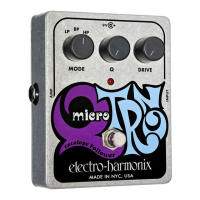
Set the Q-Tron’s controls to the following:
Drive Switch: Up
Range Switch: Low
Mode Switch: BP
Peak Control: Maximum
Boost Switch: Normal
Gain Control: See Below
Vary the Gain control until the Overload Indicator LED lights on most of the notes you play. If
no effect is noticeable, depress the Bypass switch to engage the effect. With this setting the
user should be able to approximate the sound of a conventional wah wah pedal. Experiment
with this setting to see how the
Q-Tron
reacts to playing dynamics.
Adjusting the Gain and Peak controls will vary the amount and intensity of the effect. For
tonal variations adjust the Range, Mode, and Drive controls.
To attain an effect similar to an original Mutron III, set the Q-Tron’s controls to the following:
Drive Switch: Down
Range Switch: Low
Mode Switch: BP
Peak Control: Maximum
Boost Switch: Boost
Gain Control: See Below
Vary the Gain control until the Overload Indicator LED lights on only the loudest notes you
play. Increasing the Gain will saturate the filter, yielding those famous, “chewy” Mutron-like
sounds. Adjusting the Peak control will vary the intensity of the effect. For tonal variations,
adjust the Range, Mode, and Drive controls.
-OPTIONS FOR USE-
Due to the
Q-Tron’s
extended frequency response, it can be used with a wide variety of
electronic instruments. Here are some setting tips for use with different instrument types:
Range Control
: Lo range is the best for rhythm guitar and bass. Hi range is best for lead
guitar, brass, and wind use. Both ranges work well with keyboards.
Mix Mode
: Works especially well with bass guitar (May require higher peak settings).
Drive Switch
: Down Drive works well with bass guitar. Up Drive is best with guitar and
keyboards.
The
Q-Tron
can also be used in conjunction with other effect pedals. Here are some
interesting combinations:
Q-Tron
and
Big Muff
distortion: Place the distortion after the
Q-Tron
in the signal chain.
The use of distortion will dramatically increase the intensity of the
Q-Tron’s
effect. You can
also place the Distortion before the
Q-tron,
but his combination tends to flatten the dynamic
response range of the effect.
Q-Tron
into another
Q-Tron
: Try this with one unit in the Up Drive position and one in the
Down Drive position.
Q-Tron
and octave divider: Place the octave divider before the
Q-Tron
in the signal chain.
Make sure to use an octave divider which maintains the natural envelope of the signal. This
combination will yield sounds similar to an analog synthesizer.
As always, experiment to achieve your own unique sound. When used properly, the
Q-Tron
will provide a lifetime of playing pleasure!






 To Previous Page