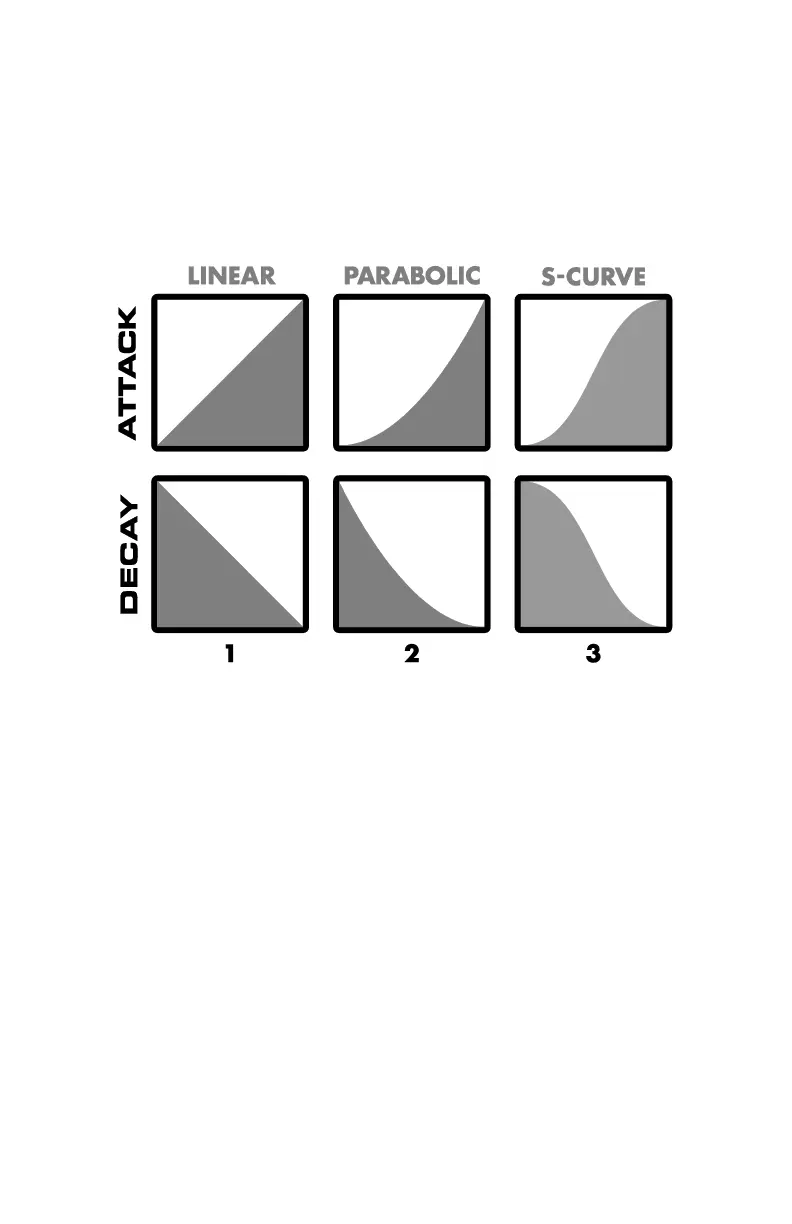
ADJUSTING ENVELOPE CURVES – MONO MODE ONLY!
The Attack Decay provides a choice of three different envelope curves for
the Mono mode volume envelopes. These curve choices do not apply to
POLY mode. The Attack (fade-in) and Decay (fade-out) curves can be
chosen independently.
The available curves are: linear, parabolic and s-curve:
To change the Attack envelope curve:
1. Press and hold the POLY and PRESET 2 buttons.
2. While holding both POLY and PRESET 2, press and release PRESET 1.
Then release POLY and PRESET 2.
3. Two of the PRESET buttons will light solid, and one will blink. The
blinking button represents the currently selected envelope curve.
4. PRESET 1 = linear, PRESET 2 = parabolic, PRESET 3 = s-curve.
5. Press and release the PRESET button corresponding to the envelope
curve you want for Attack. The pressed PRESET button will blink
rapidly to indicate that the envelope curve has been selected.
To change the Decay envelope curve:
1. Press and hold the POLY and PRESET 2 buttons.
2. While holding POLY and PRESET 2, press and release PRESET 3. Then
release POLY and PRESET 2.
3. Two PRESET buttons will light solid, and one will blink. The blinking
button represents the currently selected envelope curve.
4. PRESET 1 = linear, PRESET 2 = parabolic, PRESET 3 = s-curve.










 To Next Page