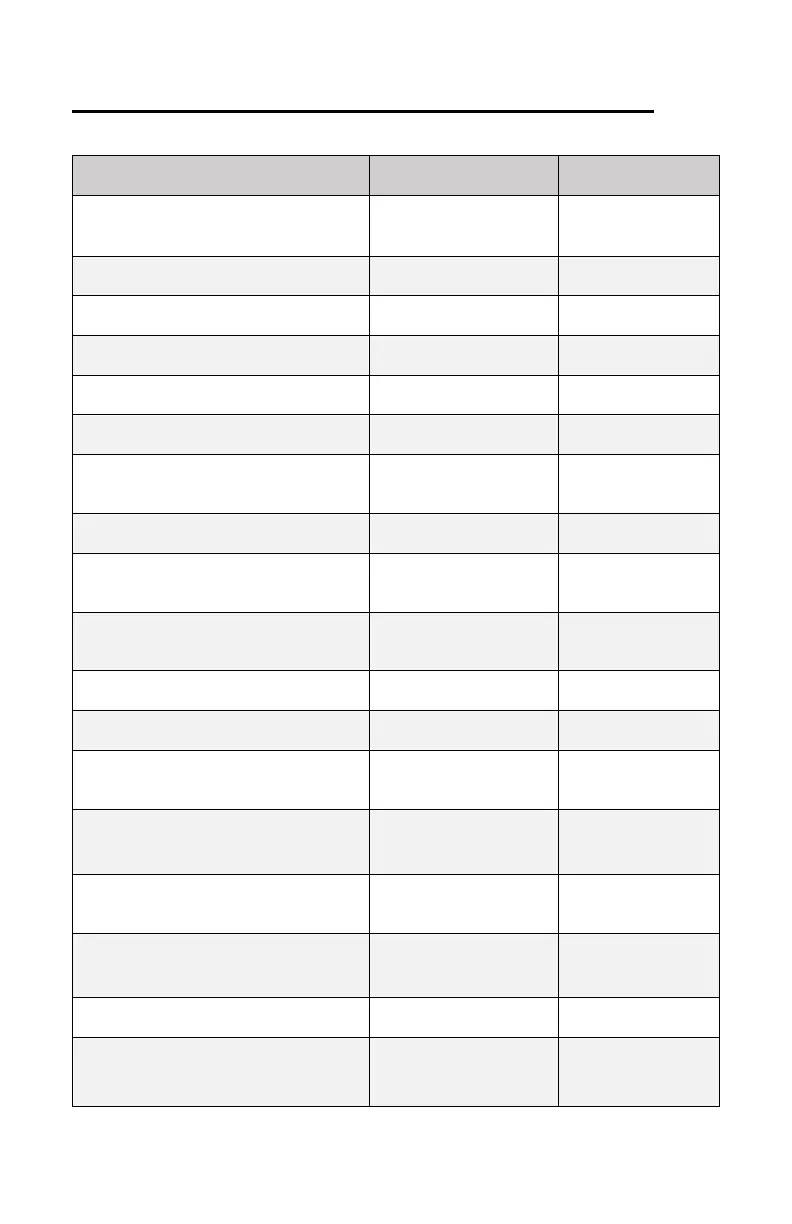
SECONDARY OPERATIONS REFERENCE – CONT.
Saves to Presets
or Global
PRESET 1 & Status LED
Slow blink. Blink speed increases as
you cycle through expression setting
Press PRESET 1 two
more times after initial
mode entry to exit.
PRESET 1, 2, or 3
Blink rapidly then blinking stops.
PRESET 1, 2, or 3
Lit solid.
PRESET 1, 2, or 3
LED unlit
PRESET 1, 2, or 3
Currently selected preset blinks.
PRESET 1, 2, or 3
Lit solid.
P LED
LED lit solid = FSW Control Enabled
LED off = FSW Control Disabled
Release FSW after P
LED changes state.
PRESET 1 fast blink = CE on
PRESET 3 slow blink = CE off
Release both
footswitches.
All PRESET LEDs light
Fast blink = Current Curve
Release all buttons
then press/release
button for curve choice
All PRESET LEDs light
Fast blink = Current Curve
Release all buttons
then press/release
button for curve choice
PRESET 2 & Status LED
Two LEDs blink at different rates.
PRESET 2 press and
release exits mode
Blend setting is
saved to presets
PRESET 3 & Status LED
Two LEDs blink at different rates.
PRESET 3 press and
release exits mode
Blend setting is
saved to presets
PRESET 2
Fast blink = Return -> Harmonix
Slow blink = Harmonix -> Send
Status LED
Fast blink = Return Bypass enabled
Slow blink = Return Bypass disabled
Blend setting is
saved to presets
Status LED
Fast blink = FSW Trigger enabled
Slow blink = FSW Trigger disabled
Blend setting is
saved to presets
PRESET 2
Fast blink = Ext. Trigger enabled
Slow blink = Ext. Trigger disabled
PRESET 1
Fast blink = Comp On, Slo = Comp Off
Hold BYPASS until one or more
PRESET LEDs blink
All user presets and
settings will be
erased.








 To Next Page