EasyManua.ls Logo

Electro-Harmonix Cathedral Stereo Reverb - User Manual

Electro-Harmonix Cathedral Stereo Reverb
14 pages
Print Icon
To Next Page IconTo Next Page
Loading...
1
CATHEDRAL
Stereo Reverb
Congratulations on your purchase of the Electro-Harmonix Cathedral Stereo Reverb. The
Cathedral is a digital reverb pedal with seven different types of reverb plus digital echo, all
of which work in true stereo.
Special Features of the Cathedral Stereo Reverb:
Two SPRING modes including the Spring reverb taken from the Holy Grail and a
new Accutronics Spring tank emulation.
Top notch, professional HALL, ROOM, PLATE and REVERSE reverb algorithms.
GRAIL FLERB mode is the Holy Grail Flerb with greater adjustability.
ECHO mode makes the Cathedral into a versatile two second digital delay.
Up to two Seconds of Pre-Delay, with Feedback allow for reverberant echoes.
Tap Tempo Footswitch sets the pre-delay time with your foot.
Instantaneous infinite reverb by pressing and holding the TAP FSW.
Tone controls on the reverbs allow for further refinement of the sound.
True stereo in and out.
Ultra low noise and transparent signal path
Studio quality A/D and D/A converters.
Save and load up to 8 presets: 1 preset for each different mode.
Note: This equipment has been tested and found to comply with the limits for a Class B
digital device, pursuant to part 15 of the FCC Rules. These limits are designed to provide
reasonable protection against harmful interference in a residential installation. This
equipment generates, uses and can radiate radio frequency energy and, if not installed and
used in accordance with the instructions, may cause harmful interference to radio
communications. However, there is no guarantee that interference will not occur in a
particular installation. If this equipment does cause harmful interference to radio or
television reception, which can be determined by turning the equipment off and on, the user
is encouraged to try to correct the interference by one or more of the following measures:
• Reorient or relocate the receiving antenna.
• Increase the separation between the equipment and receiver.
• Connect the equipment into an outlet on a circuit different from that to which the receiver
is connected.
• Consult the dealer or an experienced radio/TV technician for help.
Modifications not expressly approved by the manufacturer could void the user's authority to
operate the equipment under FCC rules.
WARNING:
Use only the
US96DC-200BI
adapter
the
Cathedral Stere
o
Reverb comes supplied with.
Do not use any other AC adapters. Using other
AC adapters, even those made by Electro-Harmonix, could cause harm to the
unit, the adapter or you. The Cathedral does not use batteries.
Question and Answer IconNeed help?

Do you have a question about the Electro-Harmonix Cathedral Stereo Reverb and is the answer not in the manual?

Summary

Quick Start Guide

Basic Spring Reverb Setup

Connect the pedal and set up a basic spring reverb sound.

Saving a PRESET

Procedure to save current effect settings as a preset.

Loading a Preset

Procedure to recall saved effect presets.

MODES

CONTROLS, INDICATORS and I;O

MODE KNOB

Functionality of the mode selection and preset knob.

PRE-DELAY KNOB

Control for pre-delay time in reverb modes and delay time in echo.

FEEDBACK KNOB

Controls the amount of signal fed back into the delay block.

DAMPING;TONE KNOB

Shapes frequency response across different modes.

REVERB KNOB

Controls reverb decay time or flanger modulation rate.

Presets

PRESET SAVE PROCEDURE

Step-by-step guide to saving effect settings.

PRESET LOAD PROCEDURE

Steps to load a previously saved preset.

Overview

The Electro-Harmonix Cathedral Stereo Reverb is a versatile digital reverb pedal designed to enhance your audio with a rich array of reverberation effects and digital echo, all operating in true stereo. This pedal offers musicians a comprehensive sonic palette, allowing for precise control over various aspects of the reverb and delay.

Function Description

The Cathedral Stereo Reverb provides eight distinct modes, each offering a unique sonic characteristic. These modes include two types of Spring reverb, Hall, Room, Plate, Reverse, Grail Flerb, and Echo.

  • GRAIL SPRING: This mode replicates the classic Spring reverb sound found in the Holy Grail pedal. It offers additional control over reverb time and tone, which are typically fixed on the original Holy Grail. By setting the REVERB TIME and DAMPING/TONE knobs to 12 o'clock and FEEDBACK and PRE-DELAY to zero, you can achieve a sound identical to the Holy Grail spring.
  • ACCU SPRING: A newly designed spring reverb model specifically for the Cathedral, emulating a medium decay, 17-inch Accutronics spring tank with six springs. This mode allows for adjustable tone and reverb time to suit your preferences.
  • HALL: This mode delivers a smooth and lush reverb algorithm. You can precisely set the reverb time to achieve the desired decay rate for your music. The DAMPING/TONE knob acts as a damping control, influencing both the tonal and spatial characteristics of the reverb.
  • ROOM: Similar to the HALL mode but designed to produce a smaller sounding space, the ROOM algorithm provides a medium-sized room effect. The DAMPING knob again controls the tonal and spatial aspects of the reverb.
  • PLATE: An emulation of the metal plate reverbs commonly used in high-end recording studios of the 1960s and 70s. The Cathedral's Plate reverb offers a very smooth, tonally balanced sound, suitable for various instruments and vocals. The DAMPING knob allows for control over the tonal and spatial characteristics.
  • REVERSE: This mode emulates the reverse reverb trick often used in studios, where a note's reverb fades in before the note is played. Since the Cathedral operates in real-time, it creates reverse reverb after a note is played. The REVERB TIME knob controls the fade-in length, and the DAMPING/TONE knob acts as a tone control, adjusting the high-frequency response of the reverb.
  • GRAIL FLERB: This mode is derived from the Flerb setting of the Holy Grail. Unlike the original, the Cathedral provides greater adjustability by offering dedicated knobs for the flanger block's modulation rate and resonance. The REVERB TIME knob controls the modulation rate, while the DAMPING/TONE knob controls the resonance.
  • ECHO: This mode transforms the Cathedral into a versatile digital echo unit. It allows for tap tempo delay, adjustable delay time via the PRE-DELAY knob, and control over the number of repeats using the FEEDBACK knob. The DAMPING/TONE control can apply a low-pass or high-pass filter to the echo repeats, and the REVERB TIME knob can smear the repeats to create a more reverb-like effect.

Usage Features

The Cathedral features a set of intuitive controls for shaping your sound:

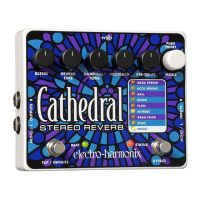
  • MODE Knob: This white rotary encoder allows you to cycle through the eight reverb and echo modes. Turning it clockwise moves up the LED ladder (from ECHO to GRAIL SPRING), while turning it counter-clockwise moves down (from GRAIL SPRING to ECHO). The MODE knob also functions as a push switch for saving and loading presets.
  • PRE-DELAY Knob: In all modes except ECHO, this knob sets the pre-delay time for the reverb block, introducing a delay between the played note and the onset of reverb. In ECHO mode, it sets the delay time for the echoes. The total range for pre-delay and delay is from 0 to 2 seconds, increasing clockwise.
  • FEEDBACK Knob: This knob controls the amount of signal sent from the output of the delay block back to its input. In modes with discrete echoes, turning this knob clockwise will produce multiple echoes.
  • DAMPING/TONE Knob: This knob offers frequency shaping for your reverb or echoes. Its function varies by mode:
    • DAMPING (HALL, ROOM, PLATE): Increases or decreases the damping applied to the reverb, affecting high-frequency content and spatial characteristics.
    • TONE (GRAIL SPRING, ACCU SPRING, REVERSE): Adjusts the treble response of the reverb. Clockwise rotation brightens the sound, while counter-clockwise darkens it. 12 o'clock applies no filtering.
    • RESONANCE (GRAIL FLERB): Controls the feedback amount for the flanger portion of the effect, creating a sharper flanger sound as it's turned clockwise.
    • LOWPASS/HIGHPASS FILTER (ECHO): The left (counter-clockwise) side controls low-pass filtering, reducing high frequencies. The right (clockwise) side controls high-pass filtering, reducing low frequencies.
  • REVERB KNOB: In most modes (except GRAIL FLERB and ECHO), this knob controls the length of the reverb decay, from very short to infinite. When set to infinite, the reverb will not decay, creating a constant volume wash.
    • GRAIL FLERB: This knob sets the flanger's modulation rate. From full counter-clockwise to approximately 11 o'clock, it operates in Filter Matrix mode, allowing manual control over the flanger's sweep. From 11 o'clock to full clockwise, it controls the flanger's modulation rate.
    • ECHO: This knob sweeps between discrete echoes (full counter-clockwise) and reverberant echoes (full clockwise).
  • BLEND Knob: This is a wet/dry control for the effect outputs. Minimum counter-clockwise yields 100% dry signal, while maximum clockwise yields 100% wet signal. Settings in between provide a mix.
  • TAP / INFINITE Footswitch: This footswitch serves two functions:
    • TAP Tempo Function: Briefly pressing it two or more times sets the pre-delay or delay time (in ECHO mode) based on the average time between taps.
    • INFINITE Reverb Function (all modes except ECHO): Pressing and holding for more than 350ms activates infinite reverb, creating a non-decaying reverb wash. The input signal is disconnected, allowing you to play over the infinite reverb without adding new notes.
    • INFINITE Repeat Function (ECHO mode): Pressing and holding for more than 350ms activates infinite repeats, looping the audio in the delay loop continuously. The input signal is disconnected, allowing you to play new notes over the repeated loop.
  • BEAT LED: This LED blinks at the rate of the current pre-delay time setting. If the pre-delay time is below 50ms, it will appear to be lit solid.
  • BYPASS Footswitch / STATUS LED: This footswitch toggles between effect mode and bypass mode. The STATUS LED being lit indicates effect mode, while off indicates bypass mode. In bypass mode, input jacks are directly connected to output jacks.
  • MONO/L and R INPUT Jacks: The Cathedral supports full stereo input. For mono use, the MONO/L input is recommended.
  • MONO/L and R OUTPUT Jacks: The Cathedral provides true stereo output. For mono use, the MONO/L output is recommended. In Mono to Stereo ECHO mode, delays will ping-pong between outputs unless a plug is inserted into the R Input.

Maintenance Features

The Cathedral Stereo Reverb incorporates a preset system for convenient recall of your favorite sounds.

  • Saving Presets: You can save one preset for each of the eight modes. To save a preset, configure your desired sound, then press and hold the MODE knob for at least 3 seconds. All mode LEDs will blink rapidly for 1 second, then stop blinking. Upon releasing the MODE knob, the PRESET LED will light up solid, indicating the preset has been saved for the currently active mode. The Cathedral will remember saved presets even after power disconnection. Saving a preset captures the settings of all five black knobs and any tapped-in delay time.
  • Loading Presets: To load a previously saved preset, turn the MODE knob to the mode where the preset was saved, then press and release the MODE knob. The PRESET LED will light up, indicating the preset is loaded. Note that the physical knob positions will no longer reflect the loaded effect.
  • Preset Interaction: If you move a knob after loading a preset, its new position will override the preset's stored value for that knob. The PRESET LED will blink rapidly to indicate that a knob has been moved.
  • Unloading Presets: To restore the current knob positions to represent what you hear, you can unload a preset by either pressing and releasing the MODE knob or turning the MODE knob to another mode.

Electro-Harmonix Cathedral Stereo Reverb Specifications

General IconGeneral
TypeReverb
ManufacturerElectro-Harmonix
True BypassYes
ModesHall, Room, Plate, Reverse, Spring
Power Supply9V DC power supply (included)
Weight1.5 lbs
Inputs1 x 1/4" (mono), 1 x 1/4" (stereo)
Outputs1 x 1/4" (mono), 1 x 1/4" (stereo)

Related product manuals