
 Need help?
Do you have a question about the Electro-Harmonix Intelligent Harmony Machine and is the answer not in the manual?
Introduction to the Intelligent Harmony Machine (IHM) and its capabilities.
Details essential power requirements and potential damage from incorrect use.
Controls for setting the musical key, including knobs and toggle switches.
Button for momentary mode and knob for selecting harmony/pitch shift intervals.
Knobs for mix and volume, plus output jacks and footswitch.
Connection point for the 9VDC power supply.
Instructions on powering the unit and switching between Intelligent and Polyphonic modes.
Details on generating diatonic harmonies in a set key.
Instructions for polyphonic pitch-shifting effects.
Customizing the pitch sweep transition time in momentary mode.
Guidance on selecting keys and signal path placement.
Details on product warranty, registration, and service.
Information regarding FCC rules and potential radio frequency interference.
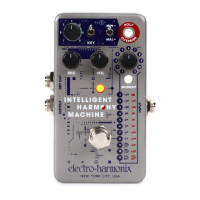
The Electro-Harmonix Intelligent Harmony Machine (IHM) is a compact, harmony-generating, polyphonic pitch-shifting pedal designed for use with electric guitars, basses, and other electronic instruments. It's engineered to produce authentic-sounding diatonic harmonies, which are harmonies within a specific key that track single notes played on your instrument. Beyond diatonic harmonies, the IHM also offers polyphonic pitch-shifting, allowing for fixed pitch shifts that are independent of the key, applicable to both single notes and chords. This versatility makes it a powerful tool for musicians looking to add depth and texture to their sound.
The IHM operates in two distinct modes: Intelligent Mode and Polyphonic Override Mode. Switching between these modes is done via the POLY-OVERRIDE button. When this button is illuminated, the IHM is in Polyphonic Override Mode; when off, it's in Intelligent Mode.
In Intelligent Mode, the IHM focuses on generating diatonic harmonies based on single notes. It's crucial for your instrument to be in tune (A440) for optimal performance in this mode, as playing multiple notes or chords will not yield good results. The key for the harmonies is set using a seven-position rotary KEY knob in conjunction with two toggle switches to its right. One toggle switch sets the sharp or natural variation of the key, while the other (MAJ/MIN) determines whether the key is major or minor. For example, setting the KEY knob to "C" and both toggle switches to their downward positions (natural and MAJ) sets the key to C major. Moving the toggle switches to their upward positions (# and MIN) would set the key to C# minor. The harmony interval is selected using an eleven-position INTERVAL SELECT knob. The specific note generated by the IHM depends on the key, interval settings, and the note played. For instance, in C major with a 3rd Up interval, playing a C note will generate an E (a major third up), while playing a D will generate an F (a minor third up), maintaining diatonic harmony within the C major key. Intelligent Mode also offers secondary interval options for positions 9, 10, and 11, which generate two harmony voices. To access these, you hold down the POLY-OVERRIDE button until it blinks, then press and release it to cycle through slow, medium, and fast blinking speeds, each corresponding to different secondary interval settings. These settings are saved internally.
In Polyphonic Override Mode, the IHM functions similarly to a pitch shifter, allowing for polyphonic pitch-shifts on both single notes and chords, without the need to set a specific key. The pitch-shift interval is again selected with the eleven-position INTERVAL SELECT knob. The MAJ/MIN toggle switch in this mode can be used for intervals 3, 4, 7, and 8 (3rds and 2nds) to set whether the pitch-shift interval is major or minor. One notable setting in this mode is the "Doubler," which outputs the effect signal at the same pitch as the input, simulating two guitarists playing the same part simultaneously.
The IHM features several controls for shaping your sound. The MIX knob adjusts the blend between the dry (unaffected) signal and the effect (harmony or pitch-shifted) signal, ranging from fully dry to fully effected. The VOL knob controls the overall output volume of the IHM.
A key feature is the MOMENT button, which, when illuminated, puts the IHM into momentary mode. In this mode, the effect is active only while the footswitch is held down. When the MOMENT button is off, the IHM operates in latching mode, where a single press and release of the footswitch toggles the effect on and off. A red LED indicates when the IHM is active. The IHM also offers a "Momentary Pitch Sweep Time" option. By default, pitch changes are instant in momentary mode. To introduce a sweep, hold the MOMENT button until it blinks, then use the VOL knob to adjust the sweep time. Turning the VOL knob clockwise increases the sweep time, while turning it fully counterclockwise disables the sweep. This setting is also saved internally.
Connectivity includes an INPUT jack for your instrument, an OUTPUT jack for the main effect signal, and a DRY OUT jack. The DRY OUT jack provides a buffered version of the dry input signal at all times, offering additional routing flexibility. For instance, you can set the MIX knob to maximum to send only the wet signal to the OUTPUT jack, while the DRY OUT jack provides the unaffected signal, allowing for separate processing or amplification of each.
For power, the IHM can use a 9V battery or the included 9VDC center-negative power supply. Plugging into the INPUT jack activates power when using a battery, so it's recommended to remove the input cable when not in use to conserve battery life. To change the 9-volt battery, you must remove the four screws on the bottom plate of the IHM, then carefully remove the plate to access the battery. It's advised not to touch the circuit board during this process to avoid damage. When initially powered up, whether by AC adapter or battery, the IHM takes two to three seconds to turn on.
Experimenting with the IHM's placement in your signal path can significantly alter its sound. Placing it after distortion pedals can lead to a more "realistic" sound, mimicking multiple guitars. Conversely, placing it before distortion can "glue" the harmonies together, making it sound like a single, unified instrument. Similarly, if you're having trouble generating desired harmony notes in Intelligent Mode, trying different key settings can often yield the desired results, as harmony notes are generated relative to the selected key.
 General
| Technology | Digital |
|---|---|
| True Bypass | Yes |
| Key Selection | 12 keys |
| Expression Pedal Input | Yes |
| Controls | Harmony, Key, Scale |
| Inputs | 1 x 1/4" (instrument) |
| Power Supply | 9V DC power supply (not included) |
| Dimensions | 2.25 inches |
| Scale Selection | Major, Minor, Harmonic Minor |




 To Next Page