3
signal passes through a high quality buffer circuit before it is output from the OUTPUT jack.
The buffer circuit requires power to hear your instrument in bypass mode.
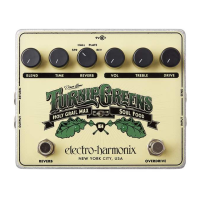
9V Power Jack – Plug the output of the supplied AC adapter into the 9V power jack
located at the top of the Turnip Greens. The Turnip Greens draws 125mA at 9VDC with a
center negative plug. The Turnip Greens accepts Boss
®
and Ibanez
®
style AC Adapters.
REVERB DESCRIPTIONS
SPRING – Spring Reverb is a simulation of the spring reverb found in many classic guitar
amps. In SPRING mode, the TIME knob controls both the size of the springs and the
overall decay time. As you turn the TIME knob clockwise, the spring reverb gets bigger and
longer.
HALL – is a simulation of the reverberations heard in large spaces such as a concert hall or
cathedral. In HALL mode, the TIME knob controls the decay time of the reverb. As you turn
TIME clockwise, the reverb time increases creating a larger reverberant space. Using the
TIME control you can obtain reverb spaces ranging from a room to a large hall.
PLATE – is an emulation of a metal plate reverb commonly found in high end recording
studios during the 1960s and ‘70s. The Plate reverb is a very smooth, tonally balanced
sounding reverb that sounds great on many different instruments, especially vocals. Turn
the TIME knob clockwise to increase the decay time of the PLATE reverb. When TIME is
maxed, the PLATE reverb creates a very long reverb decay; holding each note for over 30
seconds.
REVERSE – Reverse Reverb is an emulation of the reverse reverb trick commonly
performed in studios, where a note’s reverb fades-in, in reverse of course, before the note
is actually struck. The HG Max works in real time and cannot create backwards reverb for a
note before it is actually played so the REVERSE reverb in the HG Max will create reverse
reverb after the note is sounded. The length of time between playing a note and hearing
the reverse reverb completely fade-in is set by the TIME knob. The further you turn TIME
clockwise, the longer the note will take to fade-in. For short TIME settings, the REVERSE
mode can sound like a slap-back echo.
REMOVING BOTTOM COVER
To flip the internal Bypass Mode switch, you must remove the 4 screws on the bottom of
the Turnip Greens. Once the screws are removed, you can take off the bottom plate and
adjust the switch. Please do not touch the circuit board while the bottom plate is off or you
risk damaging a component.
4
- WARRANTY INFORMATION -
Please register online at http://www.ehx.com/product-registration or complete and return the enclosed
warranty card within 10 days of purchase. Electro-Harmonix will repair or replace, at its discretion, a
product that fails to operate due to defects in materials or workmanship for a period of one year from
date of purchase. This applies only to original purchasers who have bought their product from an
authorized Electro-Harmonix retailer. Repaired or replaced units will then be warranted for the
unexpired portion of the original warranty term.
If you should need to return your unit for service within the warranty period, please contact the
appropriate office listed below. Customers outside the regions listed below, please contact EHX
Customer Service for information on warranty repairs at info@ehx.com or +1-718-937-8300. USA and
Canadian customers: please obtain a Return Authorization Number (RA#) from EHX Customer
Service before returning your product. Include with your returned unit: a written description of the
problem as well as your name, address, telephone number, e-mail address, and RA#; and a copy of
your receipt clearly showing the purchase date.
United States & Canada
EHX CUSTOMER SERVICE
ELECTRO-HARMONIX
c/o NEW SENSOR CORP.
55-01 2ND STREET
LONG ISLAND CITY, NY 11101
Tel: 718-937-8300
Email: info@ehx.com
Europe
JOHN WILLIAMS
ELECTRO-HARMONIX UK
13 CWMDONKIN TERRACE
SWANSEA SA2 0RQ
UNITED KINGDOM
Tel: +44 179 247 3258
Email: electroharmonixuk@virginmedia.com
This warranty gives a purchaser specific legal rights. A purchaser may have even greater rights
depending upon the laws of the jurisdiction within which the product was purchased.
To hear demos on all EHX pedals visit us on the web at www.ehx.com
Email us at info@ehx.com
FCC COMPLIANCE
Note:
This equipment has been tested and found to comply with the limits for a Class B digital device,
pursuant to part 15 of the FCC Rules. These limits are designed to provide reasonable protection against
harmful interference in a residential installation. This equipment generates, uses and can radiate radio
frequency energy and, if not installed and used in accordance with the instructions, may cause harmful
interference to radio communications. However, there is no guarantee that interference will not occur in
a particular installation. If this equipment does cause harmful interference to radio or television
reception, which can be determined by turning the equipment off and on, the user is encouraged to try
to correct the interference by one or more of the following measures:
•
Reorient or relocate the receiving antenna.
•
Increase the separation between the equipment and receiver.
•
Connect the equipment into an outlet on a circuit different from that to which the receiver is
connected.
•
Consult the dealer or an experienced radio/TV technician for help.
Modifications not expressly approved by the manufacturer could void the user's authority to operate the
equipment under FCC rules.


 To Previous Page
 Loading...