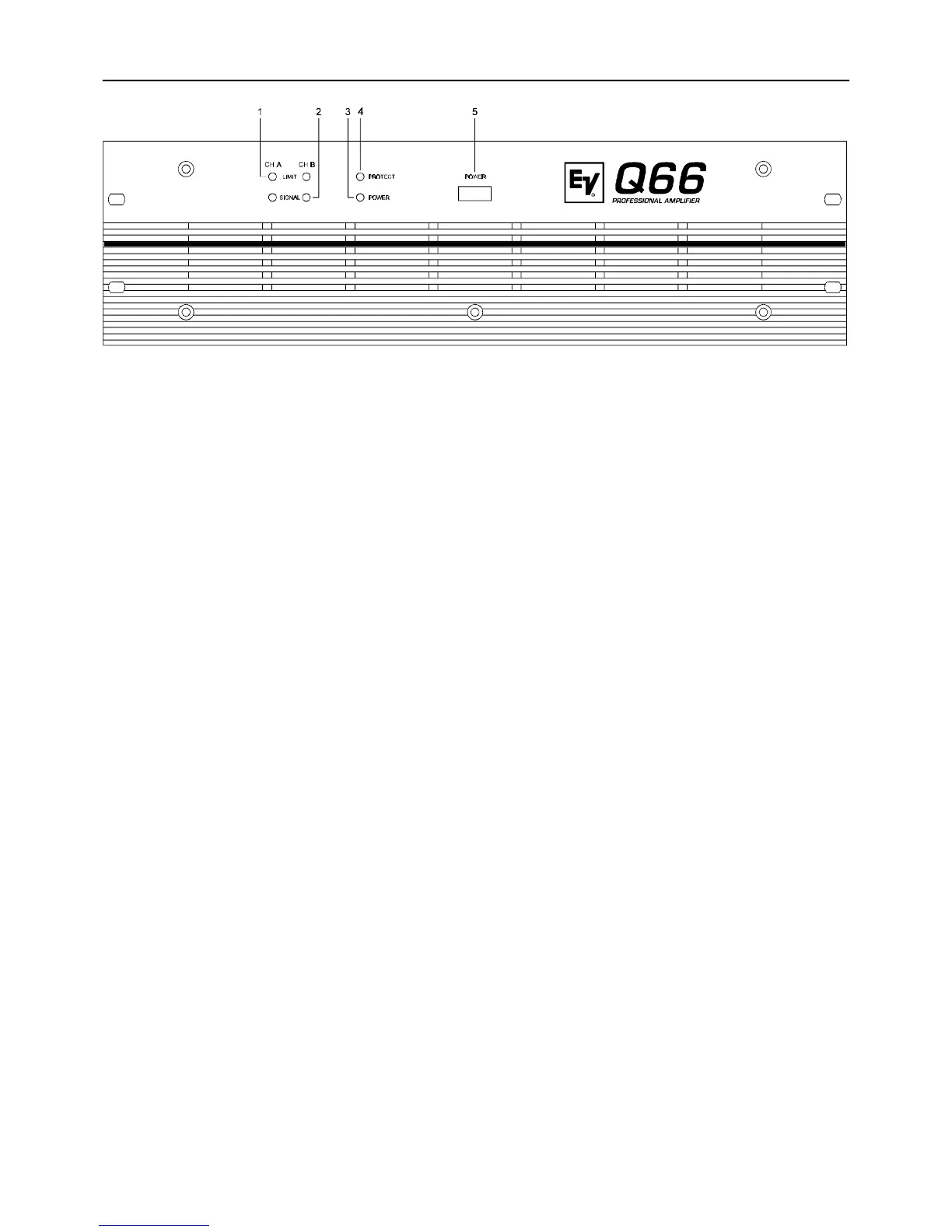
1. LIMIT
This indicator lights when the amplifier enters clipping and the internal limiter is activated. Short-term indication is problem-free.
Anyway, if this indicator lights continuously, reducing the overall volume is recommended to avoid that the connected loudspeaker
systems are getting damaged from overload.
2. SIGNAL INDICATOR
This indicator lights when an output signal is present. In case of short-circuited speaker cabling or one of the amplifier’s protection
functions is engaged the indicator is off, showing that there is no signal outputted.
3. PROTECT
If this indicator lights during operation, one of the amp’s internal protection functions against thermal overload, short-circuit,
occurrence of HF or DC at the output … has been engaged. The cause that let the amplifier enter the protection mode – e. g. a
short-circuited speaker cable – has to be eliminated. In case of thermal overload you have to wait until the power amplifier returns
into normal operation mode.
4. POWER ON INDICATOR
This LED lights when the appliance’s power switch has been engaged. If the indicator does not light after you have engaged the
power switch, either the amplifier is not connected to the mains or the internal mains fuse is blown and has to be replaced.
5. POWER SWITCH
Using the POWER switch you turn the amplifiers power on. To eliminate unwanted noise and knacks in the connected speaker
systems, loudspeaker output switching is performed delayed via relays. An initial current inrush limiter prevents the mains fuse
from being blown during power-on.
FRONT PANEL
4



 To Next Page