Setup and Configuration
1. Connections:
Note: Be sure that the power switch is in the off position before connecting and configuring
system.
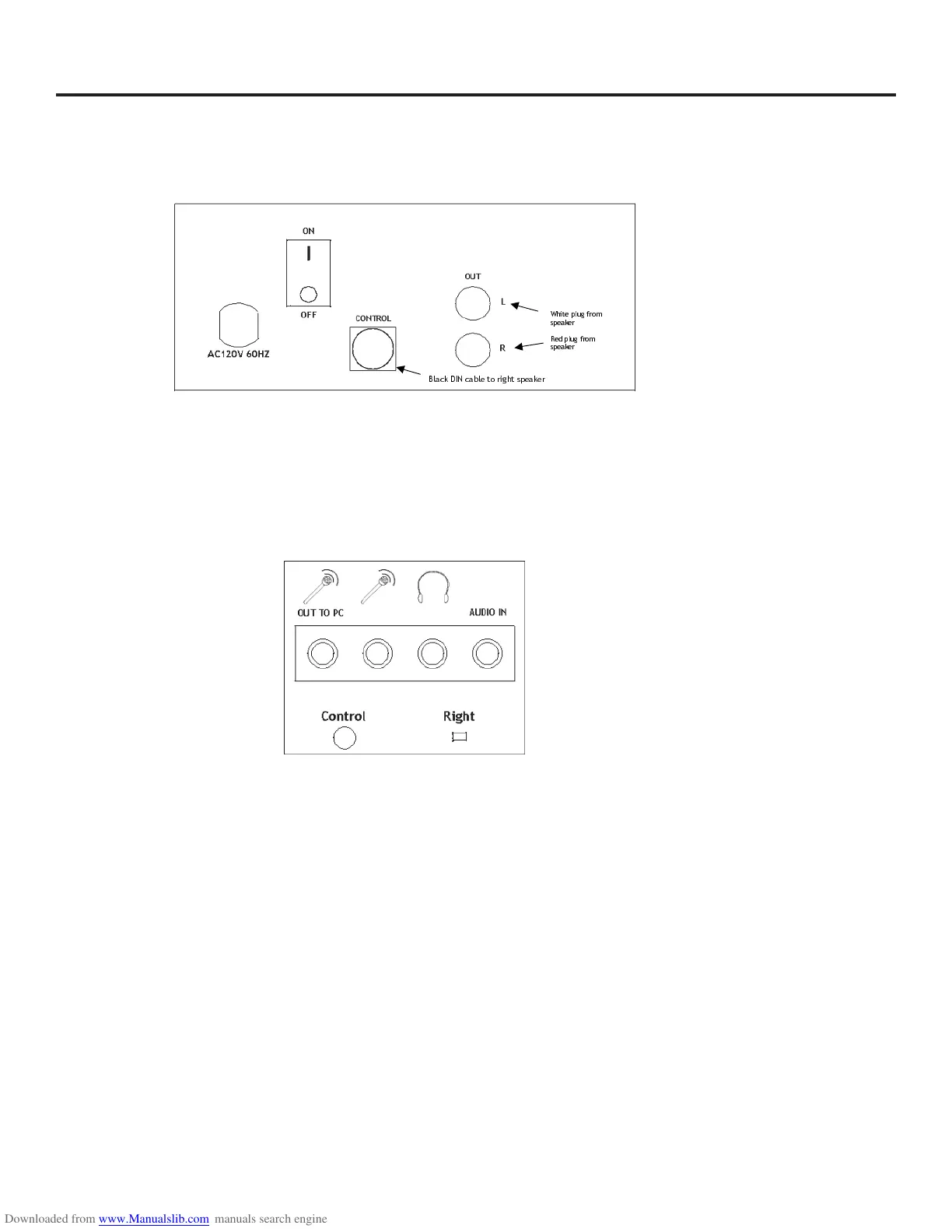
a. Connect the right speaker (red plug) to the subwoofer (red jack).
b. Connect the left speaker (white plug) to the subwoofer (white jack).
c. Connect the subwoofer control cable (Black DIN) to the right speaker.
d. Connect the AC power cord on the subwoofer to a wall outlet.
e. Connect the right speaker to the PC, using the supplied connector cable
i. Green plug to soundcard (green speaker jack)
ii. Green plug to Audio In jack on right speaker
f. The following are optional:
i. Connect headphones to the orange headphone jack on the right speaker.
ii. Connect a microphone to the pink microphone jack on the right speaker
iii. Connect the supplied microphone cable (pink plugs) to the microphone out to PC
(pink) jack on the right speaker. Connect the other end of the supplied microphone
cable to your sound card's microphone input jack.
:KLWHSOXJIURP
VSHDNHU
5HGSOXJIURP
VSHDNHU
%ODFN',1FDEOHWRULJKWVSHDNH



 To Next Page