5
ENG
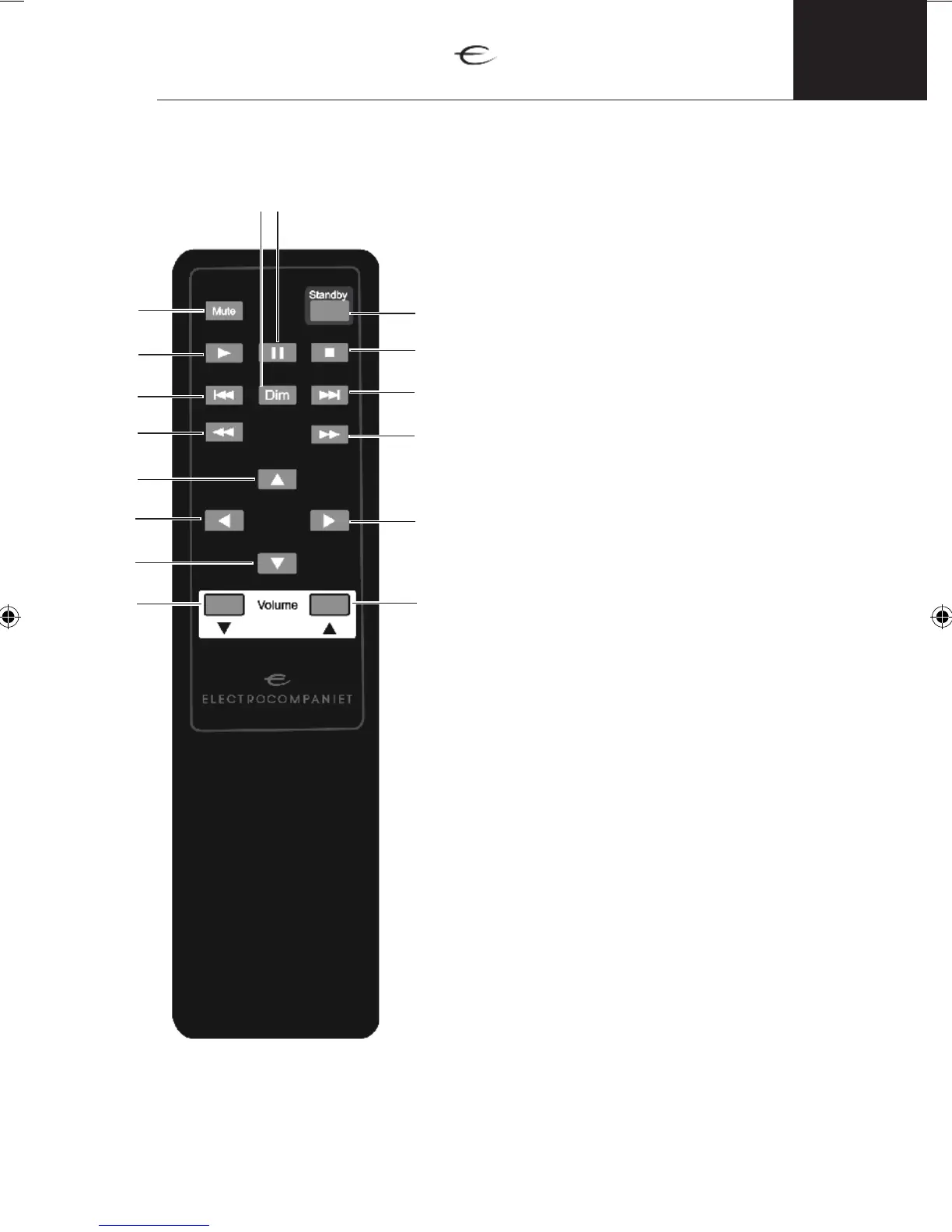
1. Vol. Down - Press to decrease the volume.
2. Arrow down – Press to decrease the volume.
3. Arrow left – Previous input.
4. Arrow up – Increase the volume level.
5. Double arrow left – no function.
6. Previous track – previous track from PC.
7. Play – Start playback from PC.
8. Mute – on/off the mute.
9. Dim – to dim the display in 5 steps:
off, 25%, 50%, 75%, 100% of brightness.
10. Pause – pause playback from PC.
11. Standby – on/off standby mode.
12. Stop – stop playback from PC.
13. Next track – next track from PC.
14. Double arrow right – no function.
15. Arrow right – Next input
16. Vol. Up – Increase the volume level.
Remote control illustration
1
3
5
6
7
8
9 10
11
12
13
14
16
15
2
4


 To Next Page