17
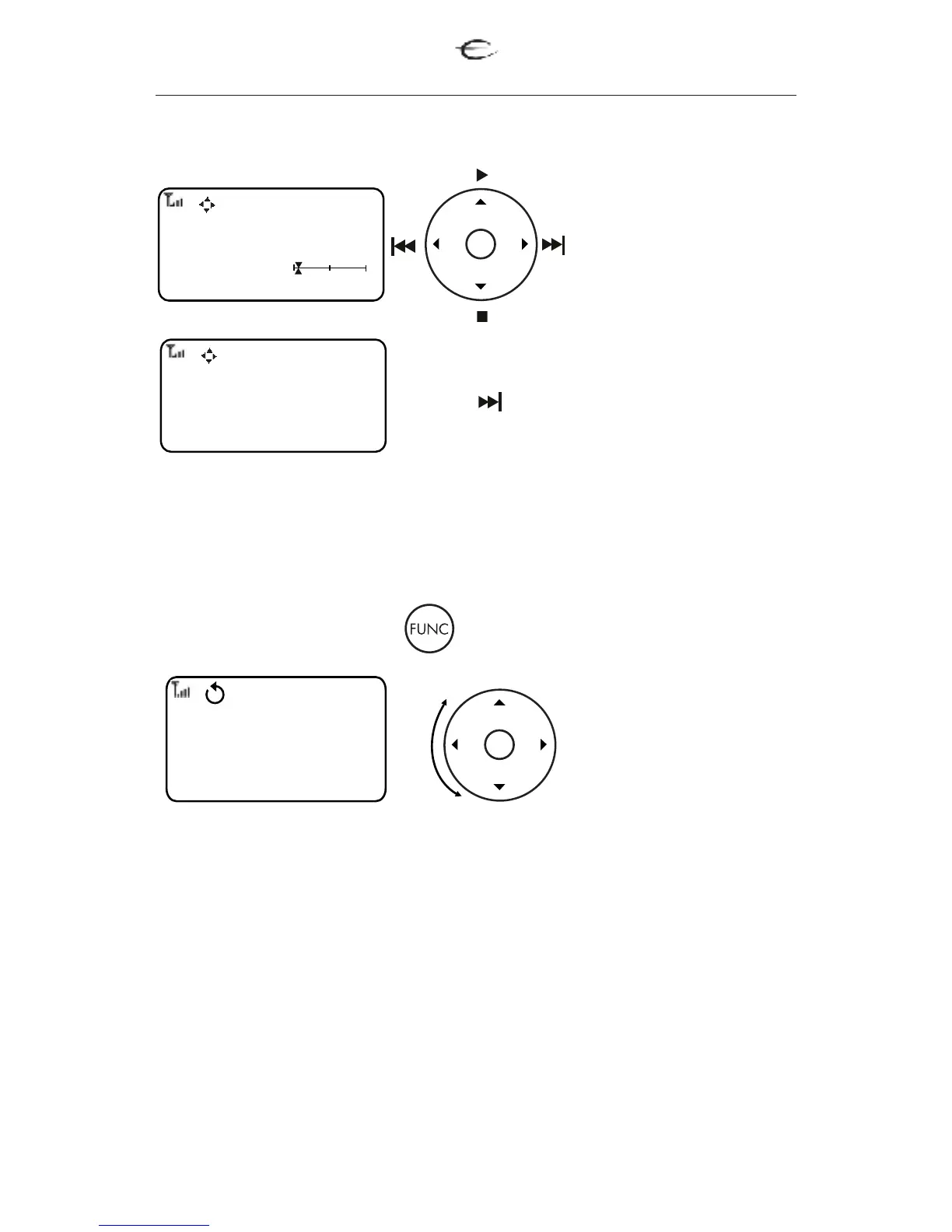
Scroll the wheel to change between the tracks. Press OK to confirm
your selection.
CD players
3.1 EMP 1/S SACD player
Use the LEFT/RIGHT
UP/DOWN for
Previous, Next, Play
and Stop.
Press and hold the
NEXT button to come
in track selection menu
For extra functions press button
1.Power - Power ON/OFF the EMP 1/S.
2.Shuffle - Plays tracks in random order.
3.Repeat - Repeats the one track or all tracks.
4.A-B - Repeats a specific segment.
5.Audio - Changes the Hybrid SA-CD playback layer
6. Scan - Plays the first 6 seconds or less of each track/chapter.
Scroll the wheel to
select the desired
menu. Press OK to
confirm your selection.
For EJECT the cd, please press and hold the "STOP" button.
EMP 1
12 02:56
1.2
NORMAL OSD EXTRA
EMP 1
Track: 1
NORMAL OSD EXTRA
EMP 1
Top menu
Menu
Setup
NORMAL OSD EXTRA


 To Next Page