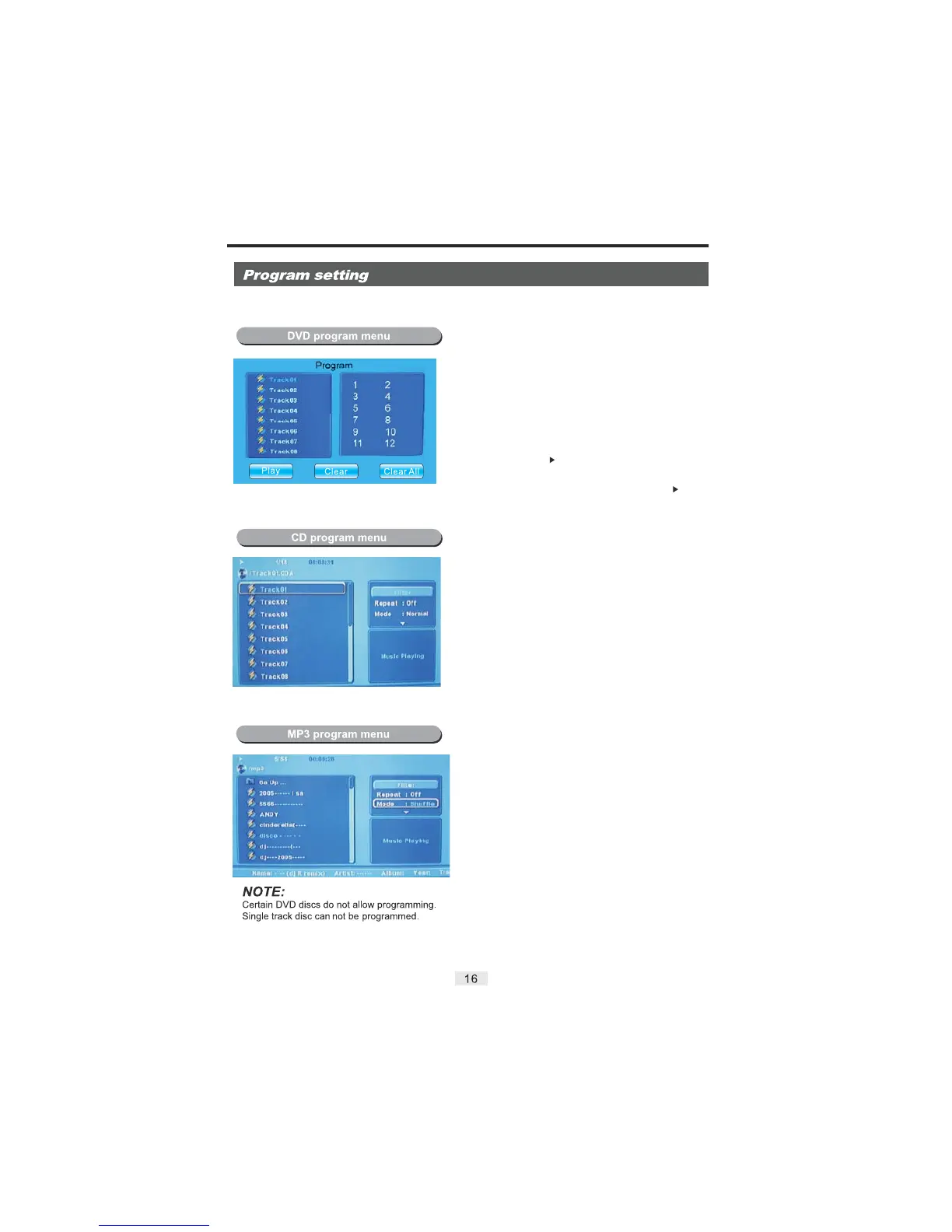
This Program Function is used to play a DVD, CD and MP3 disc in a desired sequence automatically.
Loading a DVD disc.
PROGRAM
DIRECTIONAL
CLEAR
ENTER
PROGRAM
ENTER/
STOP
1) Press the button and a DVD program menu
Will appear.
2) Use the numeric keys to input the Title and Chapter
numbers.
3) Use the buttons to select the next
program input.
Repeat step 2 until the programming is completed.
To clear the last input, press the button.
To clear all the inputs, highlight the “Clear All” icon and
press the / button to confirm.
To exit the Program Menu, press the
button.
4) Highlight the "Play" icon and press the
button to begin program playback.
5) Press the button twice to cancel the program.
Loading a CD disc.
1) Place a CD disc into the DVD player.
2) Press the buttons to move the indicator
to "Edit Mode", and then press the button. Move
the pointer to the left side to begin selecting songs.
3) Use the buttons to highlight and then
select your favourite songs.
4) Select the "Add to Program" icon to add your songs to
your play list. Select the "Program View" Icon to display
your selected songs. Press the button to load the
songs.
5) You can delete the songs you have chosen by selecting
"Clear Program".
Note: The "Clear Program" Function can only be used
while the disc is stopped.
LEFT/RIGHT
ENTER
DIRECTIONAL
PLAY
Loading an MP3 disc.
LEFT/RIGHT
ENTER
DIRECTIONAL
PLAY
1) Place an MP3 disc into the DVD player.
2) Press the buttons to move the indicator
to "Edit Mode", and then press the button. Move
the pointer to the left side to begin selecting songs.
3) Use the buttons to highlight and then
select your favourite songs.
4) Select the "Add to Program" icon to add your songs to
your play list. Select the "Program View" Icon to display
your selected songs. Press the button to load the
songs.
5) You can delete the songs you have chosen by selecting
"Clear Program".
Note: The "Clear Program" Function can only be used
while the disc is stopped.


 To Next Page
 Loading...