29
Cooking Instructions
To set Keep Warm to turn ON automatically
1. Arrange interior oven racks and place food in oven. Set the oven
properly for Timed Bake (see page 25, steps 1 to 9) or Delayed
Timed Bake (see page 26-27, steps 1 to 12).
2. Press or .
"UPPER"
and
"WARM"
will flash and
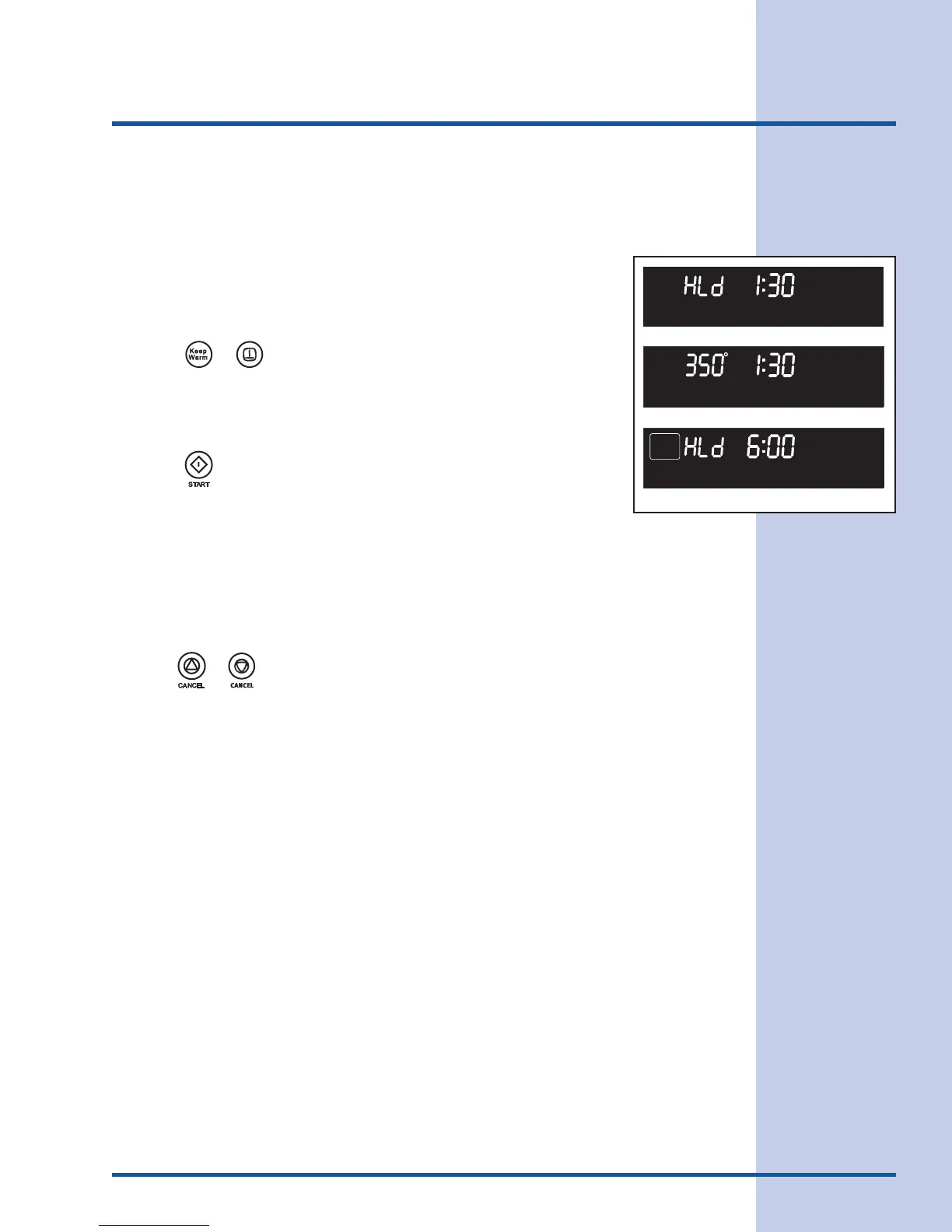
"HLd"
will
appear in the display (Figure 1)
Note: If no pad is touched within 25 seconds the request to turn ON
the Keep Warm feature and all functions previously programmed
will be cleared.
3. Press .
"UPPER"
and
"WARM"
will stop flashing and remain in
the display. Also the temperature programmed will appear in the
display (Figure 2).
4. When the Timed Bake has finished, the Keep Warm mode will turn
ON automatically.
"350°"
,
"BAKE"
and
"TIMED"
will disappear.
"HLd"
will appear.
"UPPER"
and the oven icon will remain in the display
(Figure 3).
Note: The Keep Warm feature will automatically turn OFF after 3
hours.
Pressing or at any time will stop all oven baking operations.
Figure 2
Figure 3
UPPER
ROAST
LOCKED
WARM
BAKE
DELAY
CONV
BROIL
TIMED
UPPER
TIMER
REMOVE
LOWER
DOOR
RACKS
CLEAN
CONV
BROIL
TIMED
WARM
BAKE
DELAY
LOWER
ROAST
LOCKED
UPPER
ROAST
LOCKED
WARM
BAKE
DELAY
CONV
BROIL
TIMED
UPPER
TIMER
REMOVE
LOWER
DOOR
RACKS
CLEAN
CONV
BROIL
TIMED
WARM
BAKE
DELAY
LOWER
ROAST
LOCKED
UPPER WARM
BAKE
DELAY TIMED
Figure 1





 To Next Page