S31EUK4090SY(2)99-01
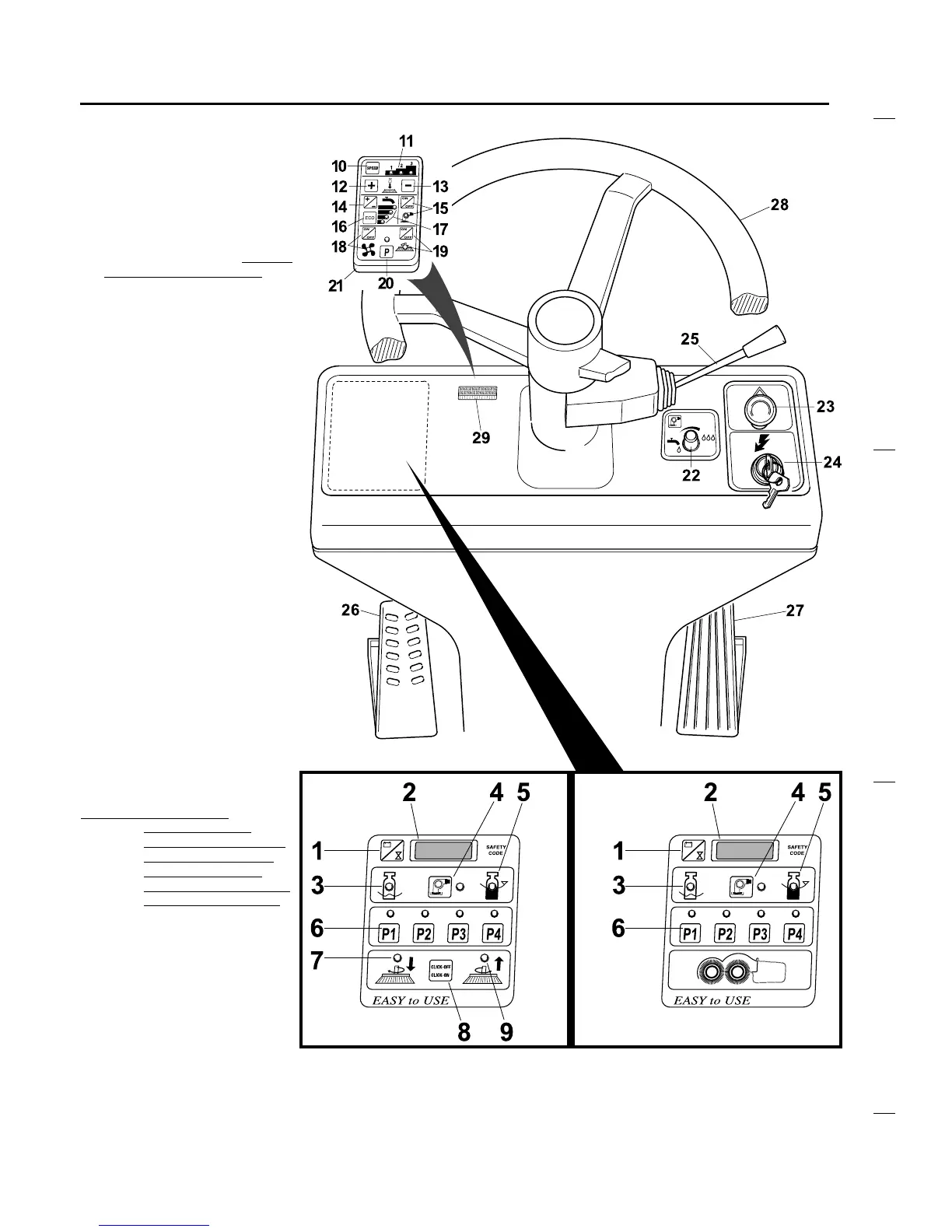
DESCRIPTION OF COMMANDS AND
CONTROL PANEL
4
CONTROL PANEL FOR
MODEL
AR 4095 FREE SCRUB
1
- Button for selection of display data
2
- Display
3
- Indicator: solution tank empty
4
- Tank emptying pump (optional): On/
Off button and indicator
5
- Indicator: recovery tank full
6
- Buttons and indicators for selection
of automatic working programs
7
- Click-Off indicator
8
- Click-Off/ Click-On button (Not used
on model AR 4095 Free Scrub)
9
- Click-On indicator
10
- Forward speed selection button
11
- Forward speed indicators
12
- Brush pressure increase
13
- Brush pressure decrease
14
- Electrovalves On/Off (Incr./decrease
of solution flow)
15
- Solution pump: On/Off button and
indicator
16
- On/Off of ECO function
17
- Solution flow indicators(electrovalves
On/Off)
18
- Suction motor: On/Off button and
indicator
19
- Brush motors: On/Off button and
indicator
20
- On/Off button and indicator of the
Programming Function
21
- Removable programmer
22
- Additional adjustment of solution flow
23
- Emergency stop button
24
- On/Off master key
25
- Lever for selection of forw./rev.
speed, front light On/Off and horn
26
- Rear brakes pedal
27
- Forw./rev. speed accelerator
28
- Steering wheel
29
- Connector for removable
programmer
NOTE
: The On/Off and ECO buttons (16)
enable the corresponding
function when pressed the first
time and disable it when pressed
the second time.
WARNING
: The connection/
disconnection of the
removable programmer 21
in/from the connector 29
must be done with the
machine turned Off (master
key 24 in the Off position).
CONTROL PANEL FOR
MODELS
AR 4090 EASY
AR 4100 EASY



 To Next Page