Settin Surface Controls
Setting the Wave-TouchTM
cooktop
Setting cooktop elements
• If needed, wake the control panel.
• Touch the ON OFF key for the desired heating
zone.
• If the heating zone has morethan one burner ring
size available, press and continue to press the
BURNER SIZE key for the desired heating zone
to change the ring size.
• Press the desired power level key (hi+, meal or
Io-) or for more precise level settings use the hi+
or Io- keys to make specific level changes.
Hot Element (HE) Message
After using any of the radiant element positions the
ceramic cooktop will become very hot. Even after
turning the control off, the cooktop will remain hot
for some time.
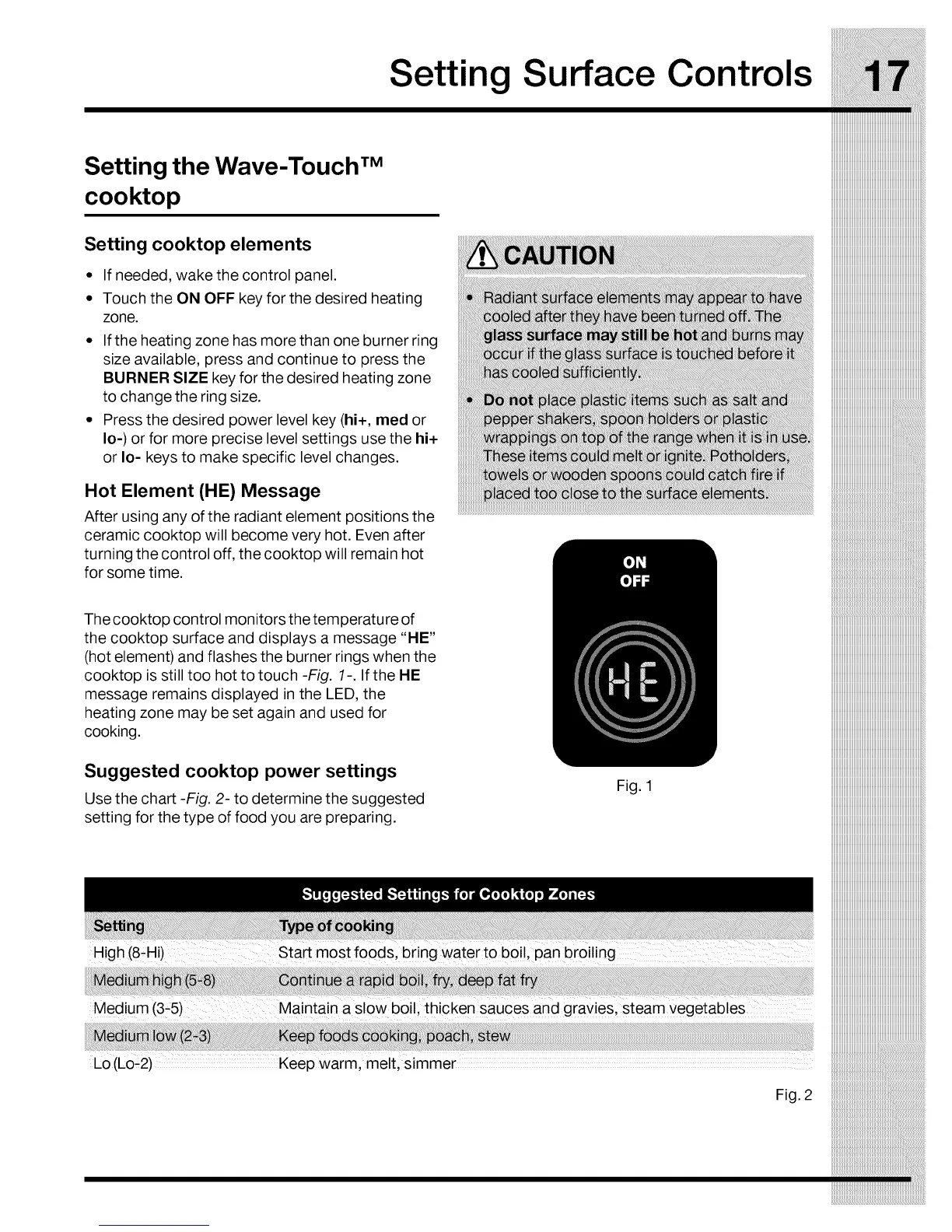
Thecooktop control monitors thetemperature of
the cooktop surface and displays a message "HE"
(hot element) and flashes the burner rings when the
cooktop is still too hot to touch -Fig. 1-. If the HE
message remains displayed in the LED, the
heating zone may be set again and used for
cooking.
Suggested cooktop power settings
Use the chart -Fig. 2- to determine the suggested
setting for the type of food you are preparing.
Fig. 1
IIIIIIIIIIIIIIIIIIIIIIIIIIIIIIIIIIIIIIIIIIIIIIIIIIIIIIIIIIIIIIIIIIIIIIIIIIIIIIII
High (8-Hi)Start most foods, bring water to b0il' Pan broiling ````````````````````````````````````````````````````````````````````___
iiiiiiiiiiiiiiiiiiiiiiiiiiiiiiiiiiiiiiiiiiiiiiiiiiiiiiiiiiiiiiiiiiiiiiiiiiiiiiii
iiiiiiiiiiiiiiiiiiiiiiiiiiiiiiiiiiiiiiiiiiiiiiiiiiiiiiiiiiiiiiiiiiiiiiiiiiiiiiii
iiiiiiiiiiiiiiiiiiiiiiiiiiiiiiiiiiiiiiiiiiiiiiiiiiiiiiiiiiiiiiiiiiiiiiiiiiiiiiii
iiiiiiiiiiiiiiiiiiiiiiiiiiiiiiiiiiiiiiiiiiiiiiiiiiiiiiiiiiiiiiiiiiiiiiiiiiiiiiii
iiiiiiiiiiiiiiiiiiiiiiiiiiiiiiiiiiiiiiiiiiiiiiiiiiiiiiiiiiiiiiiiiiiiiiiiiiiiiiii
Lo(Lo_2) Keepwarm, melt, simmer
Fig. 2



 To Next Page