Setting Oven Controls
Setting the probe
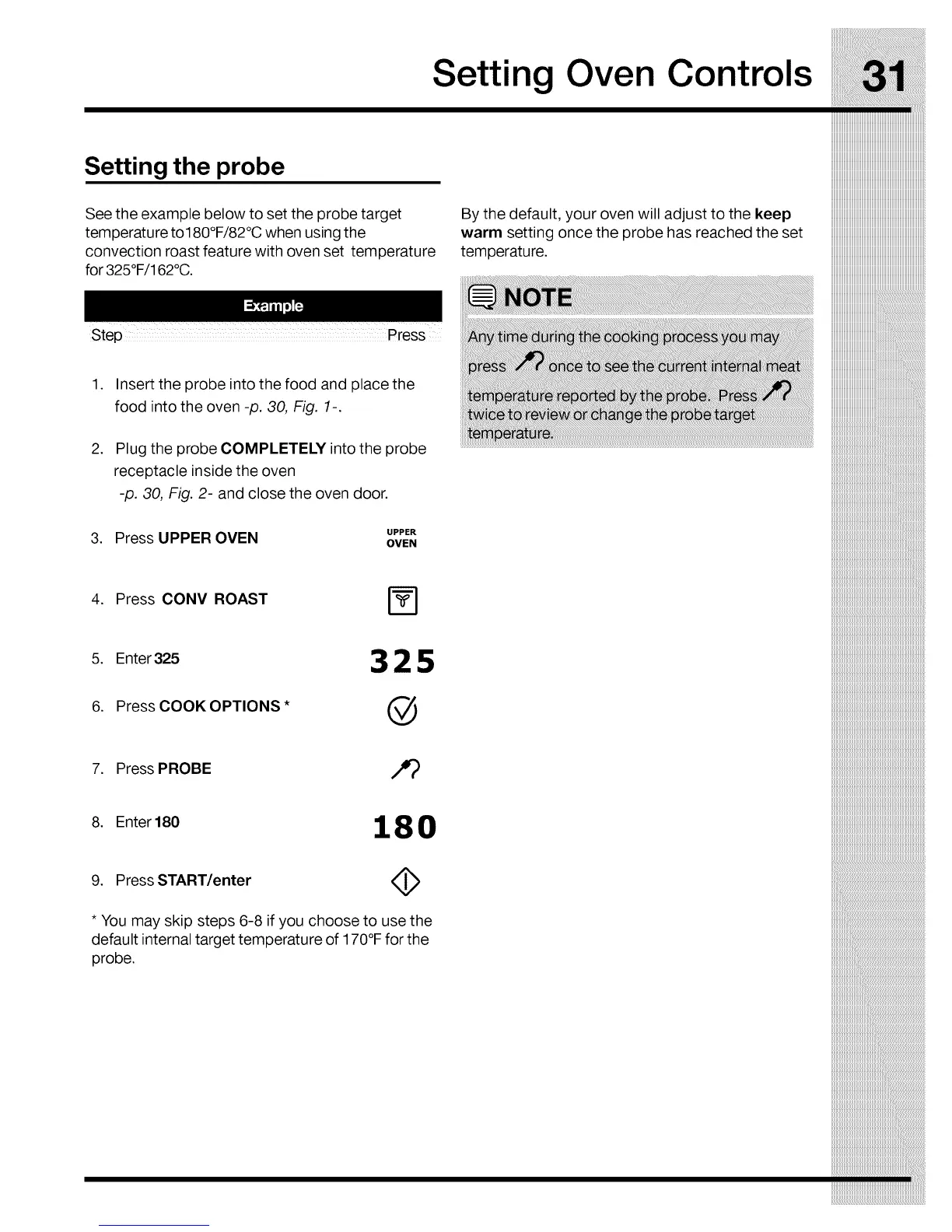
See the example below to set the probe target
temperature to180°F/82°C when using the
convection roast feature with oven set temperature
for 325°F/162°C.
Step Press
By the default, your oven will adjust to the keep
warm setting once the probe has reached the set
temperature.
.
.
Insert the probe into the food and place the
food into the oven -p. 30, Fig. 1-.
Plug the probe COMPLETELY into the probe
receptacle inside the oven
-p. 30, Fig. 2- and close the oven door.
3. Press UPPER OVEN UPPER
OVEN
4. Press CONV ROAST
5. Enter 325 3 2 5
6. Press COOK OPTIONS* @
7. Press PROBE
8. Enter 180 1 8 0
9. Press START/enter
* You may skip steps 6-8 if you choose to use the
default internal target temperature of 170°F for the
probe.



 To Next Page