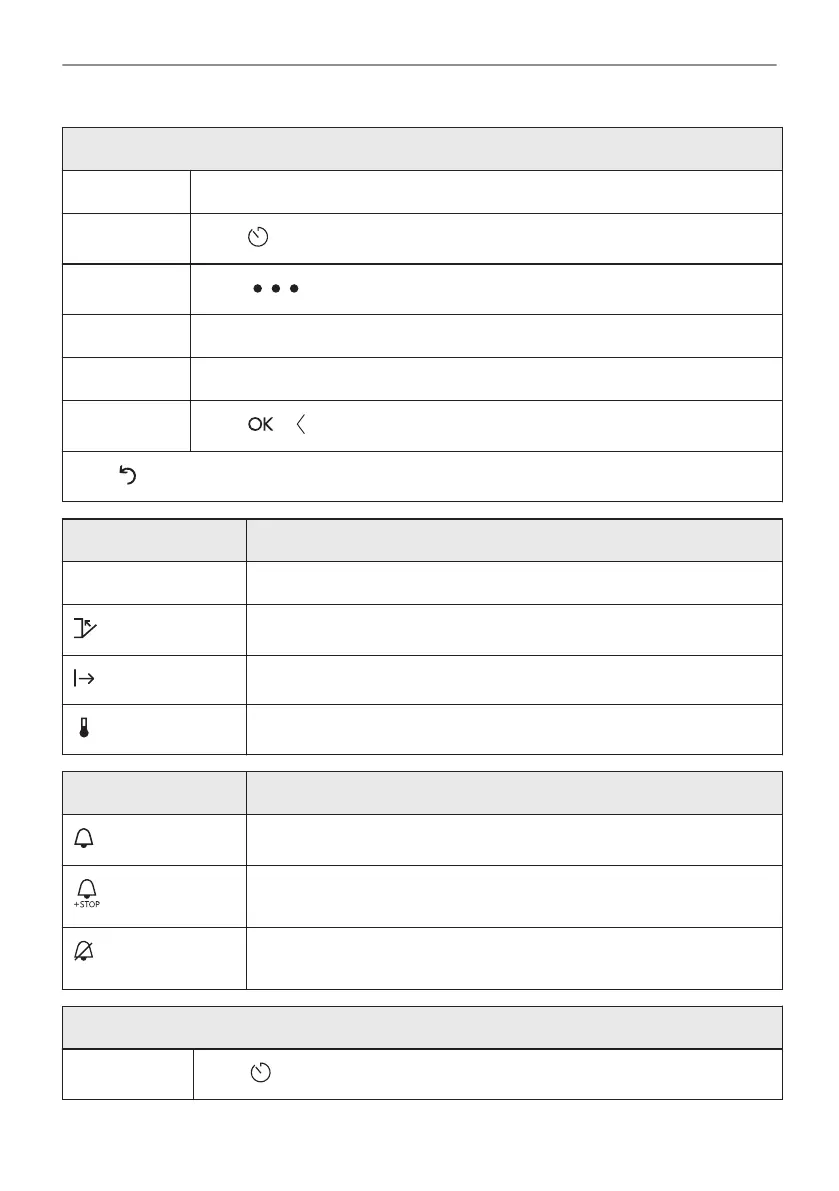
How to choose cooking start / end option
Step 1 Choose a heating function and set the temperature.
Step 2
Press to set cooking time.
Step 3
Press .
Step 4 Press Start criteria / End action.
Step 5 Choose the preferred Start criteria / End action.
Step 6
Press or .
Press to cancel chosen starting or end option.
Start criteria Comment
- The timer starts when you turn it on.
The timer starts after closing the door.
The timer starts when cooking starts.
The timer starts when the oven reaches the set temperature.
End action Comment
When the set cooking time ends, the signal sounds.
When the set cooking time ends, the signal sounds. Cooking stops auto‐
matically.
When the set cooking time ends, the display shows the message with‐
out a sound signal.
How to delay start and end of cooking
Step 1
Press on the display.
23/56
CLOCK FUNCTIONS



 To Next Page