You can enable and disable the reminder in the menu: Setup.
11.5 How to remove and install: Door
You can remove the door and the internal glass panels to clean them. The number of glass
panels depends on a specific model.
The door is heavy.
Step 1 Open the door fully.
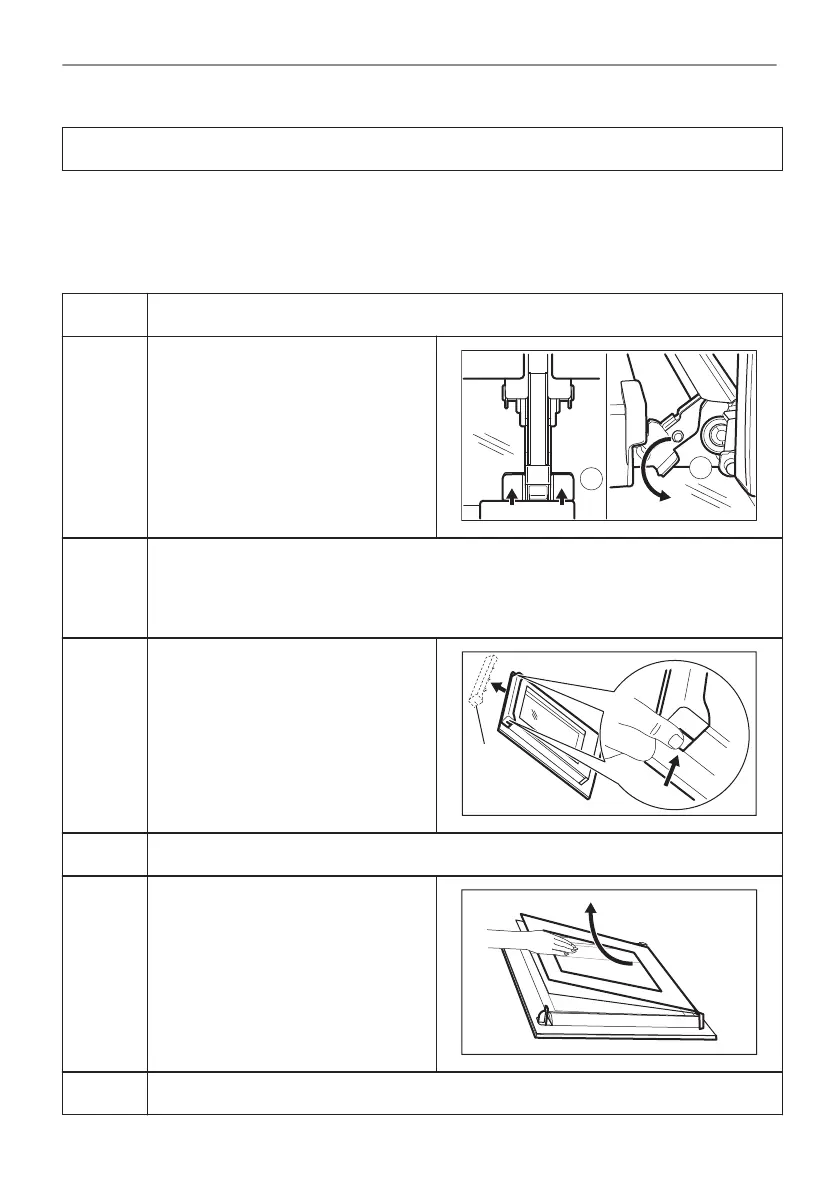
Step 2 Fully press the clamping levers (A)
on the two door hinges.
Step 3 Close the oven door to the first opening position (approximately 70° angle).
Hold the door with one hand on each side and pull it away from the oven at an up‐
wards angle.
Put the door with the outer side down on a soft cloth on a stable surface.
Step 4 Hold the door trim (B) on the top
edge of the door at the two sides and
push inwards to release the clip seal.
Step 5 Pull the door trim to the front to remove it.
Step 6 Hold the door glass panels on their
top edge one by one and pull them
up out of the guide.
Step 7 Clean the glass panel with water and soap. Dry the glass panel carefully.
40/56
CARE AND CLEANING



 To Next Page