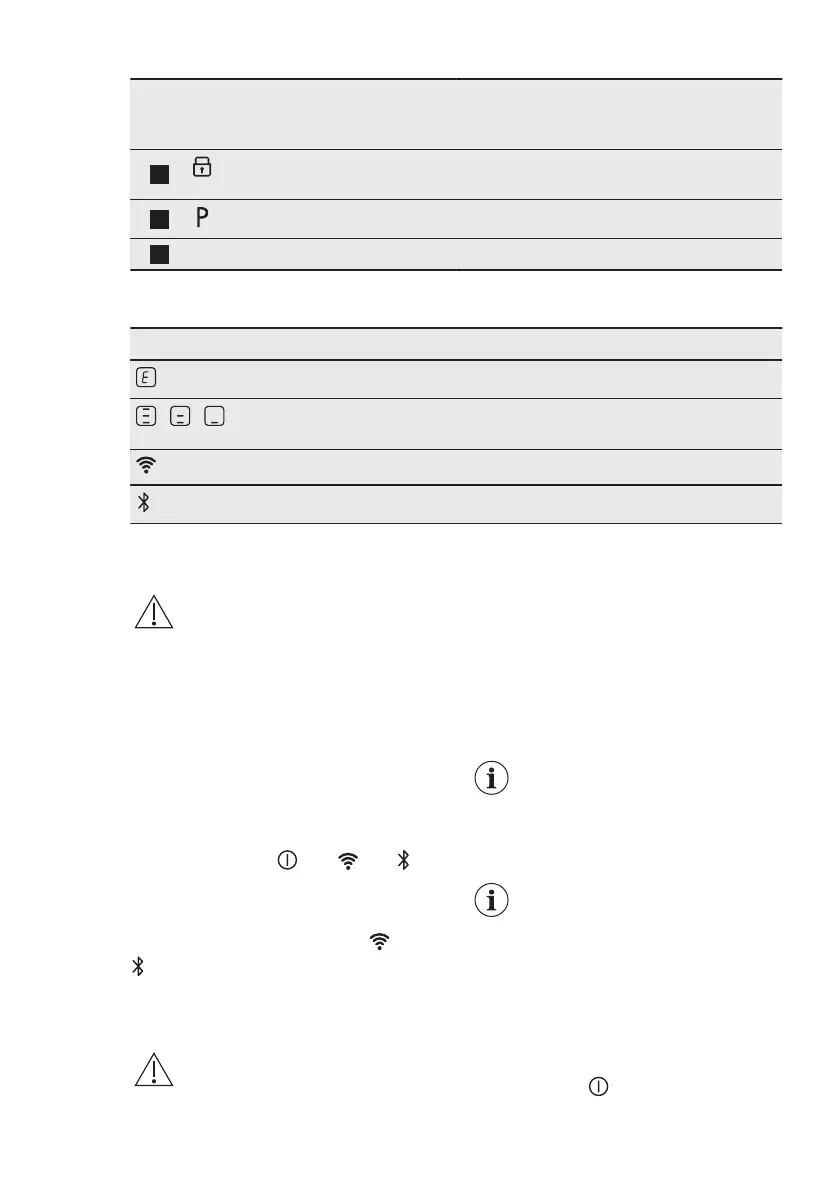
Sen‐
sor
field
Function Description
13
Lock / Child Safety De‐
vice
To lock / unlock the control panel.
14
PowerBoost To activate the function.
15
- Hob control bar To set a heat setting.
4.4 Display indicators
Indicator Description
+ digit
There is a malfunction.
/ /
OptiHeat Control (3 step Residual heat indicator): continue cook‐
ing / keep warm / residual heat.
Wi-Fi is in the process of connecting.
Bluetooth is in the process of connecting.
5. BEFORE FIRST USE
WARNING!
Refer to Safety chapters.
5.1 Wireless / app connection
In order to use the app the hob needs to
be onboarded. Onboarding can be done
with Wi-Fi or Bluetooth (recommended).
1. Download My Electrolux Kitchen from
the app store.
2. Open the app and register to get an
account.
3. Add a new appliance.
4. Press and hold until and
start to blink.
5. Follow the instructions in the app to
complete the onboarding process.
When onboarding is completed and
stop blinking.
Changing the network
In order to change the network you have
to forget the current network and start
the onboarding process again.
1. Go to Menu > User settings >
Onboarding and change the setting
from On to Off.
Refer to "Menu
structure".
The network is forgotten.
2. Open the app and start the
onboarding process again.
Refer to "Wireless / App
connection".
6. DAILY USE
WARNING!
Refer to Safety chapters.
6.1 Activating and deactivating
Press and hold to activate or
deactivate the hob.
ENGLISH 13



 To Next Page