13
Controls
IQ-Touch
TM
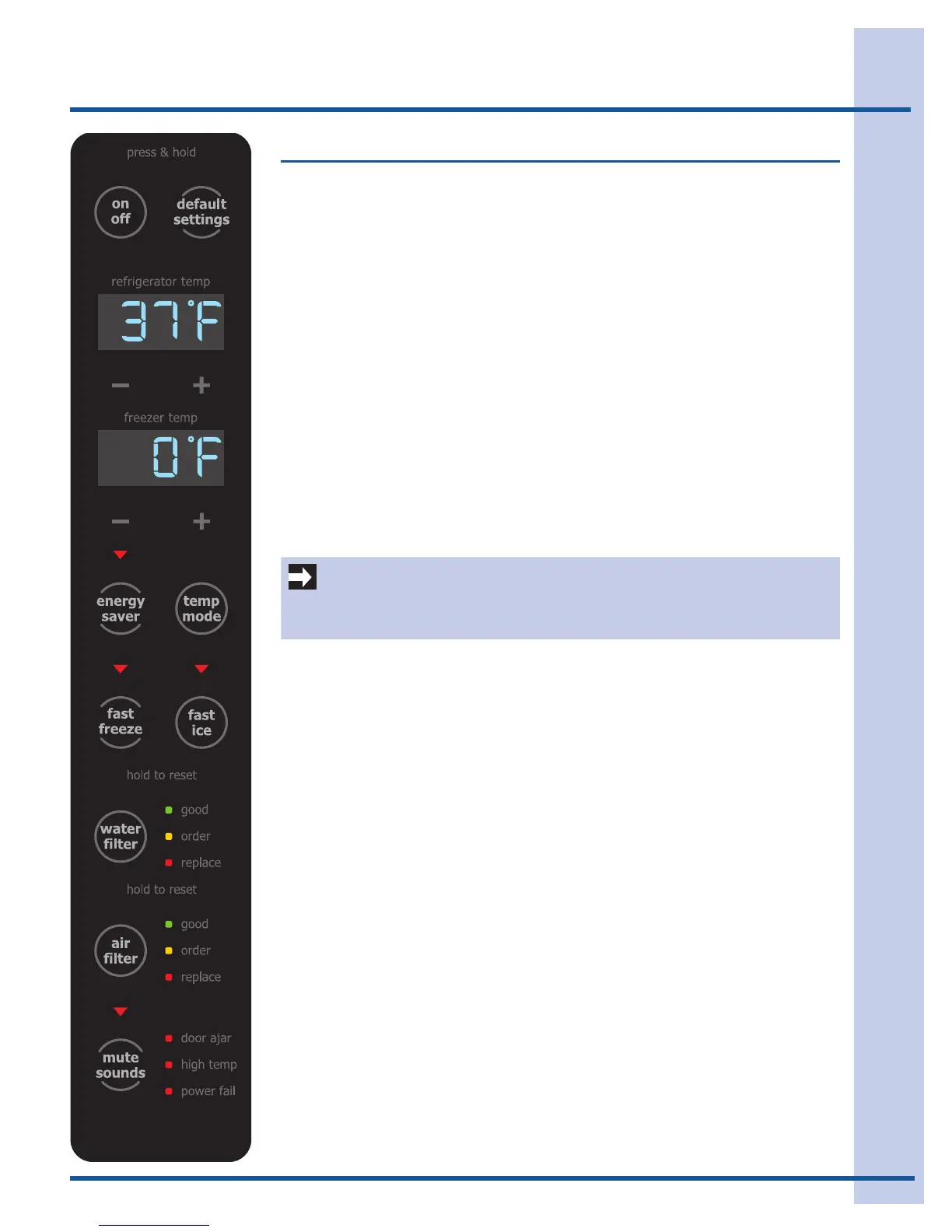
Aredindicatorlightwillbeilluminatedabovemostactivefeatures.
Touch the icon to activate the options below.
fast freeze Activates a faster rate for freezing food.
fast ice Increases the production of ice
energy saver Conserves energy by increasing the time between automatic defrost. This feature is
automatically activated during long periods between door openings. Energy saver
is manually activated when the red indicator is lit.
water filter Press and hold for three (3) seconds to reset after filter change.
air filter Filter condition status is always displayed when door is open. Press and hold for
three (3) seconds to reset after filter change.
temp mode Touch to toggle display from Fahrenheit to Celsius.
mute sounds Tones emitted by each key press can be turned off based on user preference. The
sounds are muted when the red indicator is lit. Warning signals will stay active.
default settings Resets all refrigerator settings such as temp, temp display and tones to their fac-
tory default settings.
on off Press and hold for three (3) seconds to turn off the cooling system to clean the
refrigerator. It also turns off the ice maker. The temperature displays will read OFF.
Setting cooling temperatures
Press the + or – indicator to adjust the temperature to the desired setting.
The temperature display will begin to blink with the first touch. The display will time
out after 10 seconds and return to the basic display.
Alarms
IMPORTANT
Pressing the system on/off icon does not turn off power to your refrigerator. You
must unplug the power cord from the wall outlet.
Door Ajar If the door has been left open for an extended period of time, an alarm will sound
and the door ajar indicator will display on the bottom display of the control panel.
The alarm is turned off by closing the door. The mute sounds key will blink to
prompt the reset of any active alarms. Press this key to reset any system alarms.
High Temp In the event of a high temperature condition, the temperature display will blink and
display “HI”. After 20 minutes, the alarm will sound and the high temp indicator
will be red on the bottom of the control panel. The mute sounds icon will illumi-
nate until pressed, acknowledging the alarm, at which time the highest temperature
reached will be displayed and the refrigerator will resume normal operation. In
case the high temp alarm is not acknowledged at the first alarm sound time out,
when the door is first opened, the alarm sound will be repeated.
Power Fail In the event of a power failure, the power fail alert will be displayed and the
temperature display will blink until the mute sounds icon is pressed, acknowledg-
ing the alarm. Other modes may be turned off until the alarm is acknowledged. The
power fail alert is turned off and the refrigerator will resume normal operation. The
high temp alarm may also be illuminated until a safe operating range tempera-
ture has been reached.
The item(s) shown in
this drawing must not
contain formaldehyde,
cadmium or asbestos.
General Tolerances
Theoretical Flat Area
Angles
1°
Lengths and Diameters
.0050
.010
.02
Four Deci Plcs
Three Deci Plcs
Two Decimal Plcs
Developed Flat Area
Part characteristics
classification
Draft angles (not shown) 0.5°
Part characteristics
classification
CRITICAL
MAJOR
A - HIGH GLOSS > 80 @ 20°
B - GLOSS
50-80 @ 60°
C - SEMI-GLOSS
35-50 @ 60°
D - SATIN
10-35 @ 60°
E - FLAT MAX 10 @ 85°
F - MATTE MAX 5 @ 85°
FINISH SPECIFICATIONS
_
+
_
+
_
+
This drawing contains confidential information and is the property of
Electrolux Major Appliances NA without whose permission it may
not be copied, shown, or handed to a third party or otherwise used
and it is to be returned promptly upon request to Electrolux
Major Appliances NA which is responsible for the drawing
SCALE: 75%
NUM VARIANT COLOR 1 COLOR 2 COLOR 3 COLOR 4 COLOR 5 COLOR 6
American
Method
A
Electrolux ICON
CD-09-0681
Overlay- Door Edge Control
Refrigerator, Bottom Mount
Notes:
1. Reproduction of art for decoration purposes, use MA-09-0681-A.
2. For main display see CD 06-0427.
3. MAs must not be altered or changed by anyone other than IDC personnel. Vendor
must use native MA file format to produce the part, provided by IDC NA.
4. This CD must not be altered or changed by anyone other than IDC personnel and is
for design specifications only. Vendors must not use the CD image to create the parts.
5. All revisions must be done by IDC personnel only. Production parts must match the
MA and meet the design specifications on the CD.
6. This CD is to be checked for accuracy by EMA engineering before being released to
purchasing and vendors.
7. Vendors are to check the MA to the CD for accuracy before making production tooling.
8. Front surface is a critical appearance area and must be approved by Quality Eng.
Dept. through a PPaP submittal.
9. Part must be properly protected during shipment to prevent damage.
11/01/09
Sandy Chase L.Brundin
Drn. Appr. Date
Number
Part
Product
Rev. Modifications Signature Request Date
Brand
ELECTROLUX MAJOR APPLIANCES NORTH AMERICA
101 Masters Blvd.; Anderson, SC 29621; USA
01 BLACK EWC 7802 NCS 3500 NCS 6500 TR 118 TR 118 xxxxxx
Black Light Gray Med Gray Dark Display Tint xxxxxxx
5A - LED tint
LED COLORS / Assembly Overlay Part
1A - Background
4A - display window tint
5A - LED tint
2A - Touchpad text and symbols
3A - secondary text
3A - ‘-’ and ‘+’




 To Next Page