5.2 First Connection
Before the first use you have to set:
Language Display contrast Display Brightness Time of day
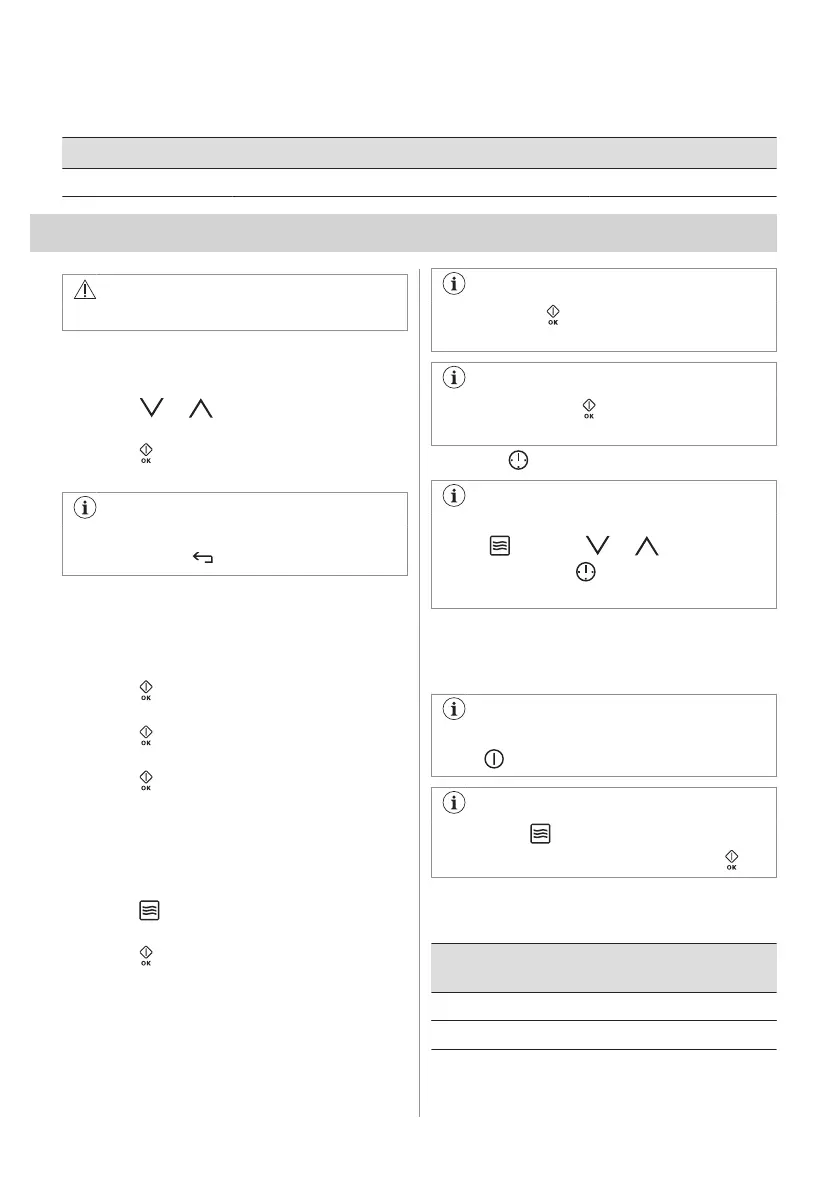
6. DAILY USE
WARNING!
Refer to Safety chapters.
6.1 Navigating the menus
1. Turn on the oven.
2. Press or to select the menu
option.
3. Press to move to the submenu or
accept the setting.
At each point you can go back to the
main menu with .
6.2 Setting a heating function
1. Remove microwave bottom glass plate.
2. Turn on the oven.
3. Select the menu: Heating Functions.
4. Press to confirm.
5. Select a heating function.
6. Press to confirm.
7. Set the temperature.
8. Press to confirm.
6.3 Setting the Microwave function
1. Remove all accessories.
2. Insert microwave bottom glass plate.
3. Turn on the oven.
4. Press to turn on the Microwave
function.
5. Press . The function: Duration is set to
30 seconds and the microwaves starts to
operate.
Each press of adds 30 seconds to the
time of the function: Duration.
If you do not press , the oven turns off
after 20 seconds.
6. Press to set the function: Duration.
You can change the microwave power
(press and then or ) and the
function: Duration any time when the
Microwave function works.
7. When the set time ends, a signal sounds
for 2 minutes. The Microwave function
turns off automatically. Press any symbol
to stop the signal.
To turns off the Microwave function,
press .
If you press or open the door, the
function stops. To start it again, press .
The maximum time of microwave functions
depends on microwave power you set:
MICROWAVE POW‐
ER
MAXIMUM TIME
100 - 600 W 90 minutes
More than 600 W 7 minutes
ENGLISH 11







 To Next Page