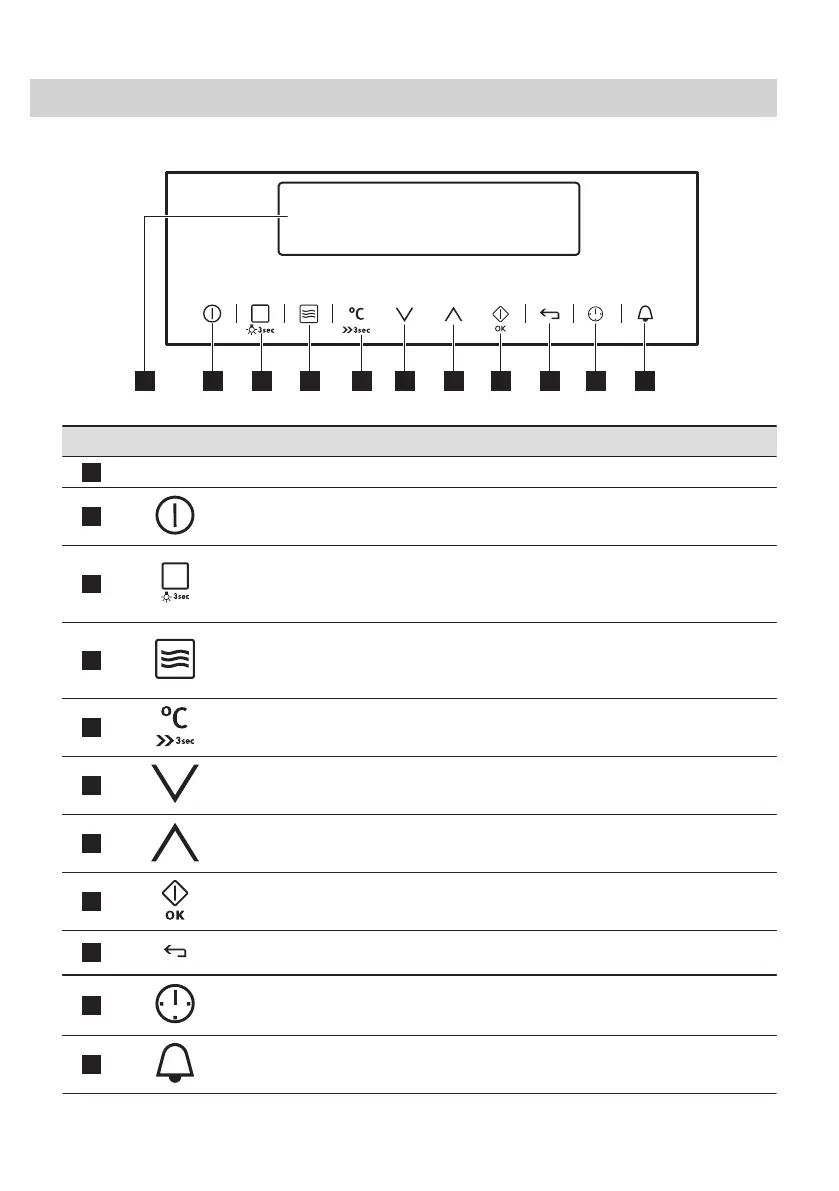
4. CONTROL PANEL
4.1 Electronic programmer
Use the sensor fields to operate the appliance.
Sensor field Function Comment
1
-
Display Shows the current settings of the appliance.
2
ON / OFF To turn on and off the oven.
3
Heating Functions
or Recipes
Press the sensor field once to choose a heating function or the
menu: Recipes. Press the sensor field again to switch between
the menus: Heating Functions, Recipes. To turn on or turn off
the light, touch the field for 3 seconds.
4
Microwave function To activate the Microwave function. You can use it when the ap‐
pliance is deactivated. When you use the Microwave function
with the function: Duration for more than 7 minutes and in Com‐
bi mode, the Microwave power cannot be more than 600 W.
5
Temperature selec‐
tion
To set the temperature or show the current temperature in the
oven.
6
Down To move down in the menu.
7
Up To move up in the menu.
8
OK / Microwave
Quick Start
To confirm the selection or settings. To activate the Microwave
function. You can use it when the appliance is deactivated.
9
Back To go back one level in the menu. To show the main menu,
touch the field for 3 seconds.
10
Time and additional
functions
To set different functions. When a heating function operates,
touch the sensor field to set the timer or the functions: Function
Lock, Favourites, Heat + Hold, Set + Go.
11
Minute Minder To set the function: Minute Minder.
ENGLISH 9







 To Next Page