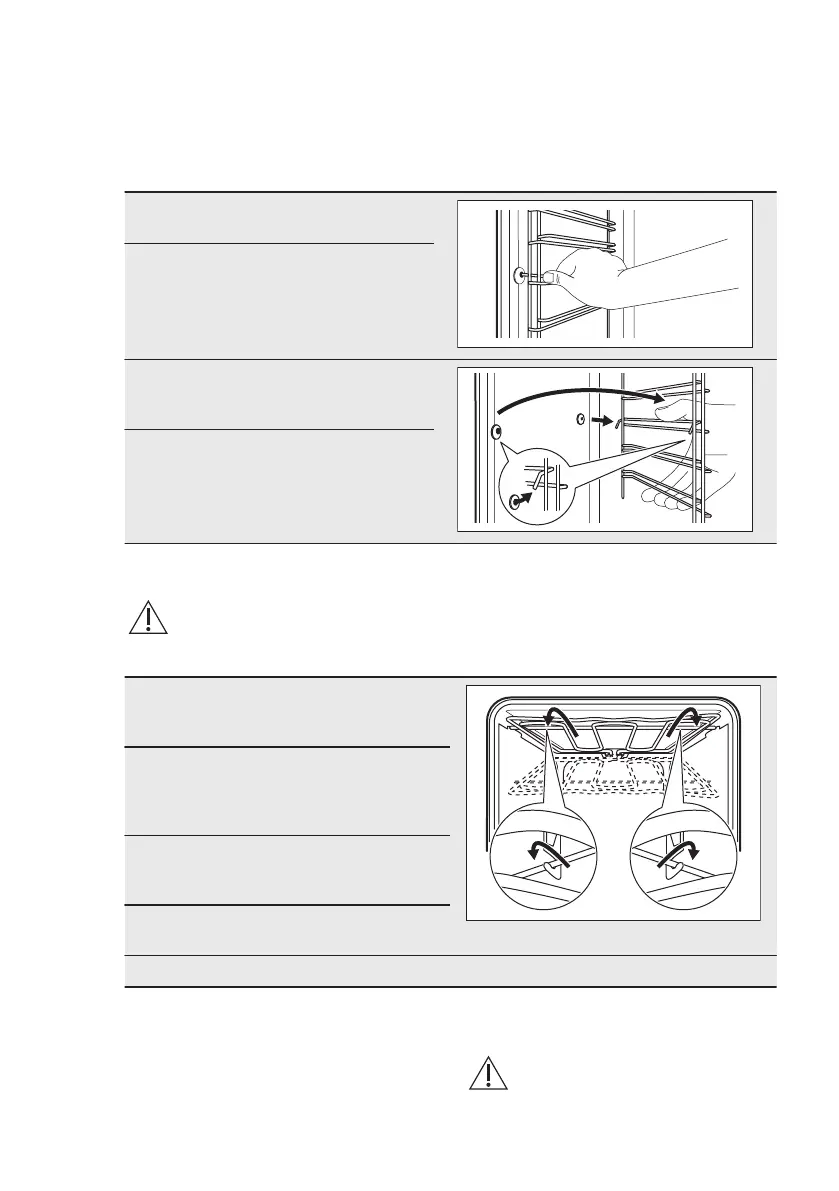
11.2 How to remove: Shelf
supports
Remove the shelf supports to clean the
oven.
Step 1 Turn off the oven and wait
until it is cold.
Step 2 Pull the front of the shelf
support away from the side
wall.
Step 3 Pull the rear end of the shelf
support away from the side
wall and remove it.
Step 4 Install the shelf supports in
the opposite sequence.
11.3 How to remove: Grill
WARNING!
There is a risk of burns.
Step 1 Turn off the oven and wait un‐
til it is cold to clean it.
Remove the shelf supports.
Step 2 Grab the grill corners. Pull it
forwards against the spring
pressure and out of two hold‐
ers. The grill folds down.
Step 3 Clean the oven ceiling with
warm water, a soft cloth and a
mild detergent. Let it dry.
Step 4 Install the grill in the opposite
sequence.
Step 5 Install the shelf supports.
11.4 How to remove and install:
Door
You can remove the door and the
internal glass panels to clean it. The
number of glass panels is different for
different models.
WARNING!
The door is heavy.
www.electrolux.com28



 To Next Page