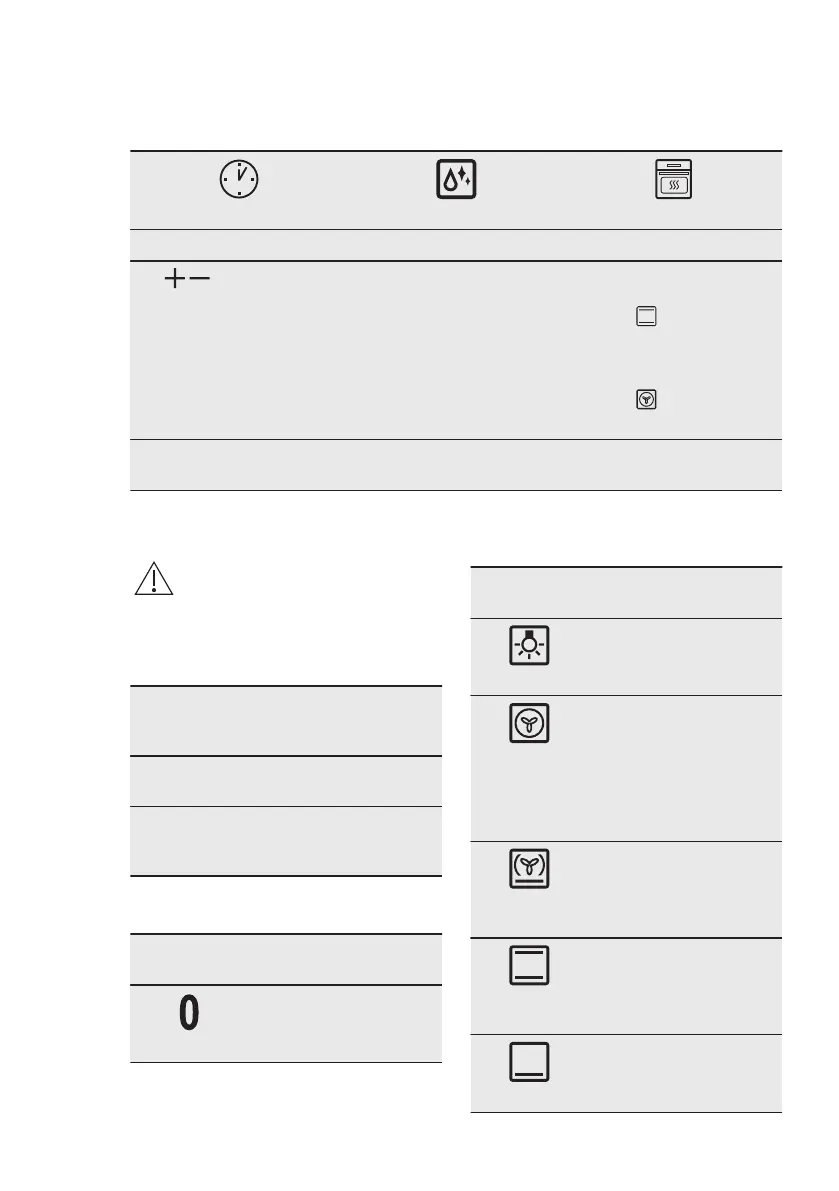
5.1 Before first use
The oven can emit an odour and smoke during preheating. Make sure that the room is
ventilated.
Step 1 Step 2
Step 3
Set the clock Clean the oven Preheat the empty oven
1. , - press to set the
time. After approxi‐
mately 5 sec., the
flashing stops and the
display shows the time.
1. Remove all accesso‐
ries and removable
shelf supports from the
oven.
2. Clean the oven and the
accessories with a soft
cloth, warm water and
a mild detergent.
1. Set the maximum tem‐
perature for the func‐
tion: .
Time: 1 h.
2. Set the maximum tem‐
perature for the func‐
tion: .
Time: 15 min.
Turn off the oven and wait until it is cold. Place the accessories and the removable
shelf supports in the oven.
6. DAILY USE
WARNING!
Refer to Safety chapters.
6.1 How to set: Heating
function
Step 1 Turn the knob for the heat‐
ing functions to select a
heating function.
Step 2 Turn the control knob to se‐
lect the temperature.
Step 3 When the cooking ends,
turn the knobs to the off po‐
sition to turn off the oven.
6.2 Heating functions
Heating
function
Application
Off position
The oven is off.
Heating
function
Application
Light
To turn on the lamp.
True Fan
Cooking
To bake on up to three
shelf positions at the
same time and to dry
food.
Set the temperature 20
- 40 °C lower than for
Conventional Cooking.
Pizza Func‐
tion
To bake pizza. To make
intensive browning and
a crispy bottom.
Conventional
Cooking
To bake and roast food
on one shelf position.
Bottom Heat
To bake cakes with
crispy bottom and to
preserve food.
ENGLISH 9



 To Next Page