Watt
min gr
- Press button with your finger tip –> set within 5 seconds!
Start-up
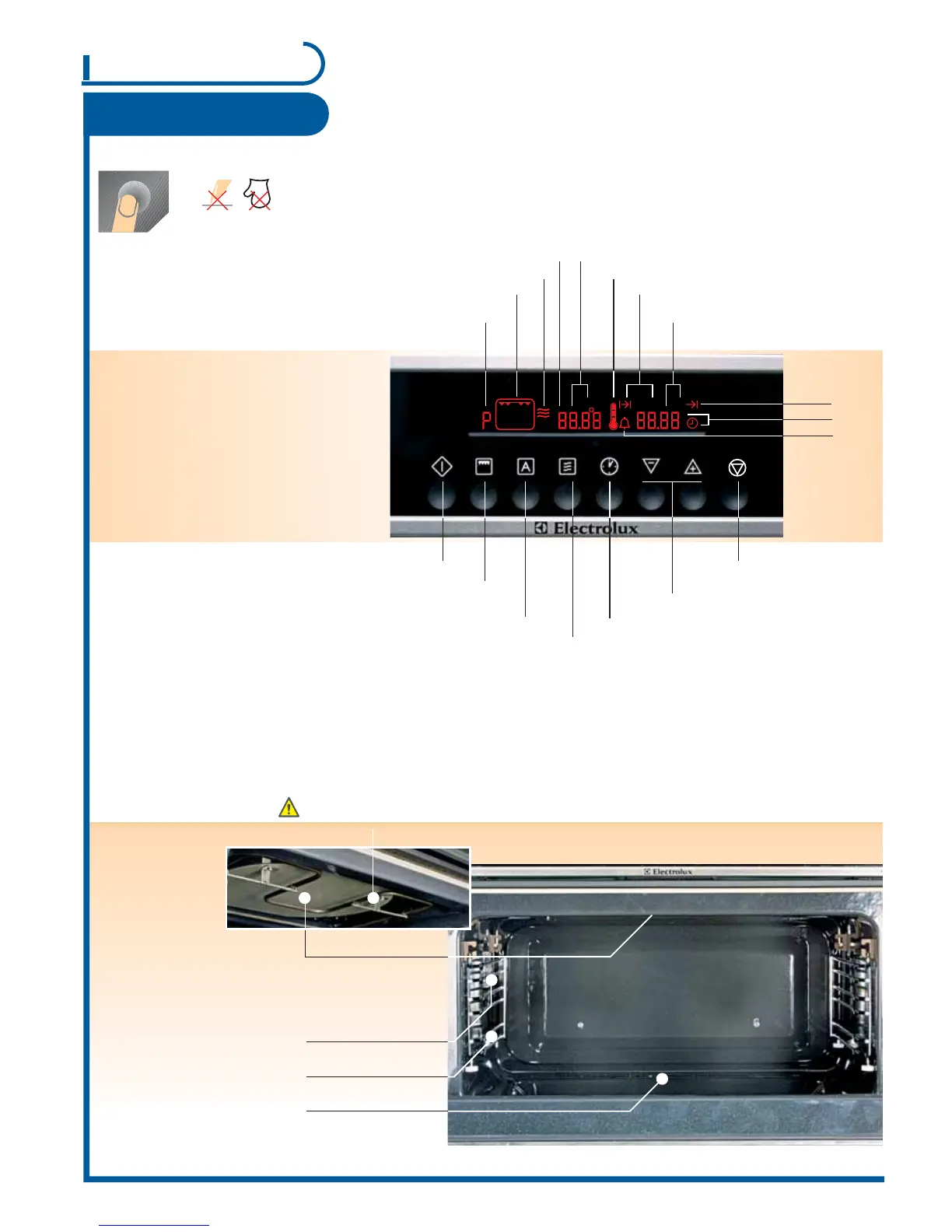
Control panel
Use
P =Memory function
(d =Demo function)
Do not place aluminium foil / aluminium tray on the oven base!
Baking area
Have you already set the time? See page 7
Surface grill function
Automatic programme /
memory function
Microwave functions
Clock functions
Setting
temperature and time
Oven functions
Microwave functions
Thermometer symbol
Weight display
End
Time
Short time
Duration
Stop/reset
Start
Microwave power
P =Automatic programme 1-10
Microwave generator
Griddle guides
(3 slot levels)
Bottom glass
(removable)
Oven light
- is switched on as soon as
a function is started or the
door is open
- goes out after 10 minutes
when the door is open and
appliance is switched off
Surface grill
The bottom glass is a work space for heating food / liquid and imperative for microwave oven operation!
1
Page



 To Next Page