33
HOW TO FINISH UNPACKING
· Place packed appliance next to the space in
which it will be installed.
· Remove the appliance packing except for bottom
tray, which should be left in position until the
appliance is ready to be fitted into its cabinet.
NOTE: It is imperative that the appliance is
left in the base to protect both the appliance
and the floor.
· Ensure the user is given these operating
instructions.
Important: Switch off at the mains,
miniature circuit breaker and if appropriate,
remove fuse before commencing any
electrical work.
TO REMOVE COVER OF MAINS TERMINAL
From the rear of the appliance, remove mains input
terminal cover to gain access to terminal block.
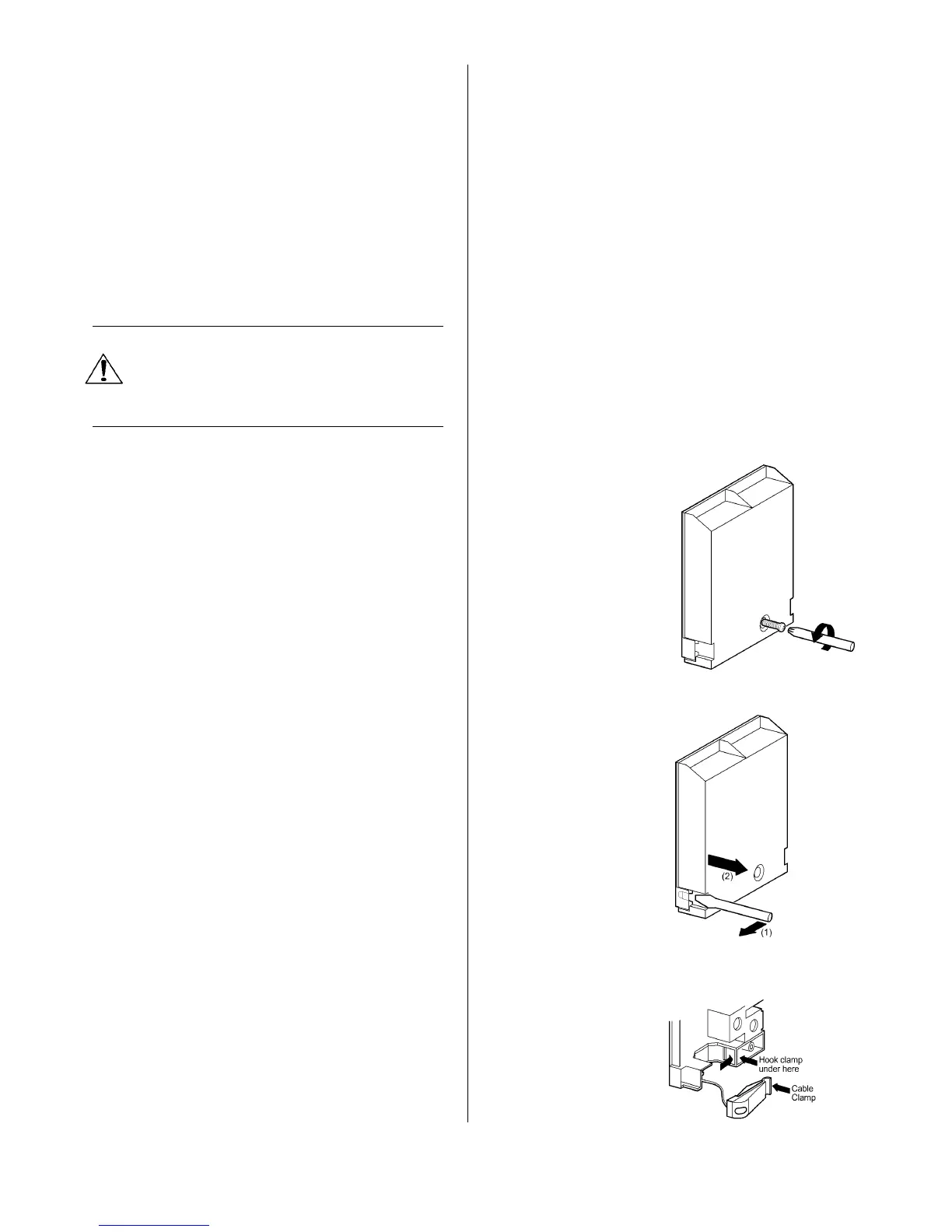
· First remove retaining screw with pozidrive
screwdriver. See Fig. 4.
· Prise cover loose using screwdriver in position
(1) then lever off with screwdriver in position (2)
at either side. See Fig. 5.
· Lift cover and remove screw from cable clamp.
See Fig. 6.
Fig. 4
Fig.5
Fig.6



 To Next Page