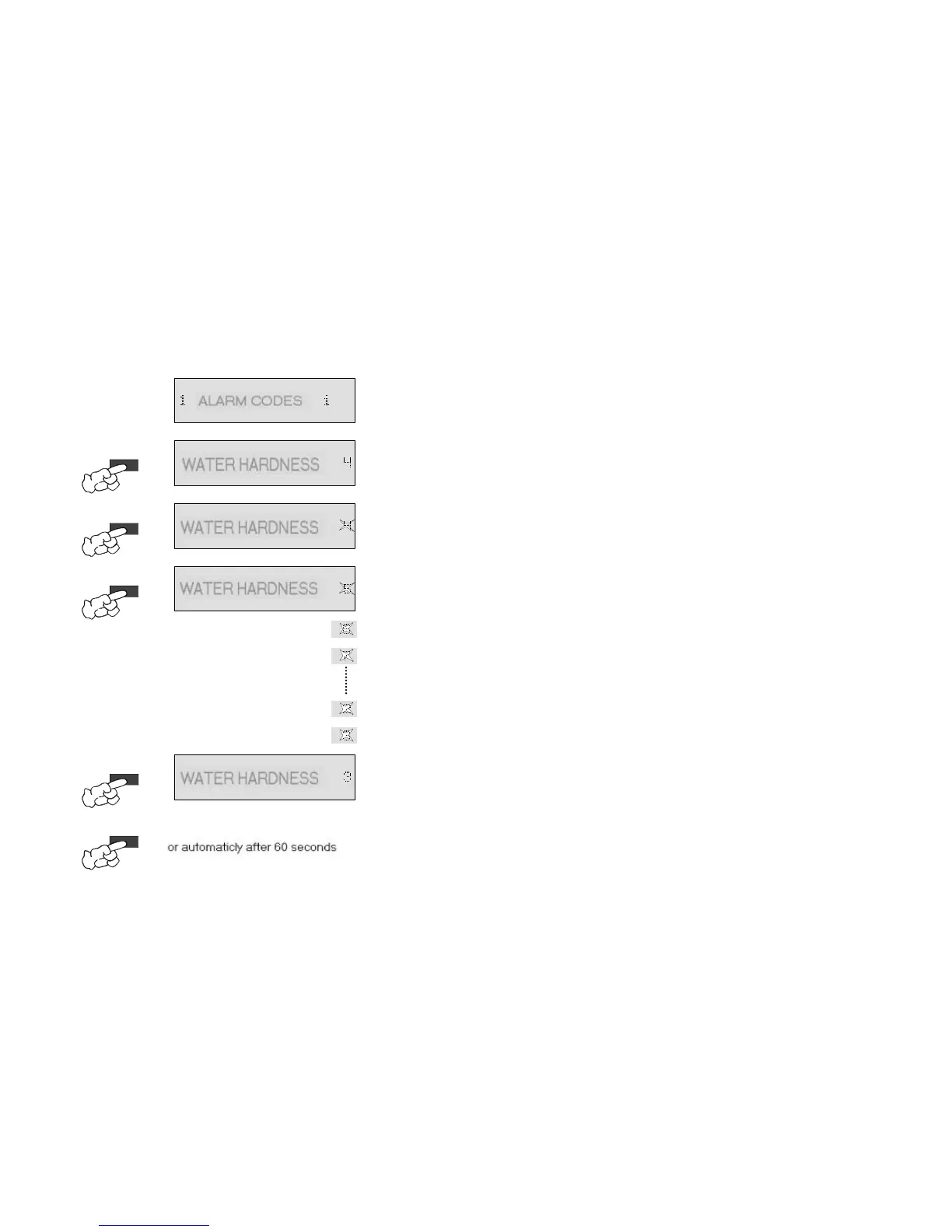
8.4.9. Service menu / Water hardness
2.
Ä
Scroll through to the water hardness option with the option button.
Ä
Service option is shown in the text line of the display.
Ä
(Example "
")
3.
Ä
The water hardness setting is activated by pressing the Ok/Start button.
Ä
The currently set value appears in the text line of the display
Ä
The text part "WATER HARDNESS" is illuminated, the hardness flashes.
4.
Ä
The water hardness can now be changed with each push of the option button.
Ä
However, in the service menu this is only possible in one direc
Ä
Sequence: ... - 4 - 5 - 6 - 7 - 8 - 9 - 10 - 1 - 2 - 3 - 4 - 5 - ...
Ä
The text part "WATER HARDNESS" is illuminated, the hardness setting flashes.
5.
Ä
The new water hardness setting is taken over by pressing the Ok/Start button.
Ä
The new water hardness setting is shown in the text line of the display.
(Example "
After the button has been pushed for the last time, the service menu can be quitted as follows.
w
w
w
...by pressing the Reset button, the function is quitted and "SELECT



 To Next Page