10
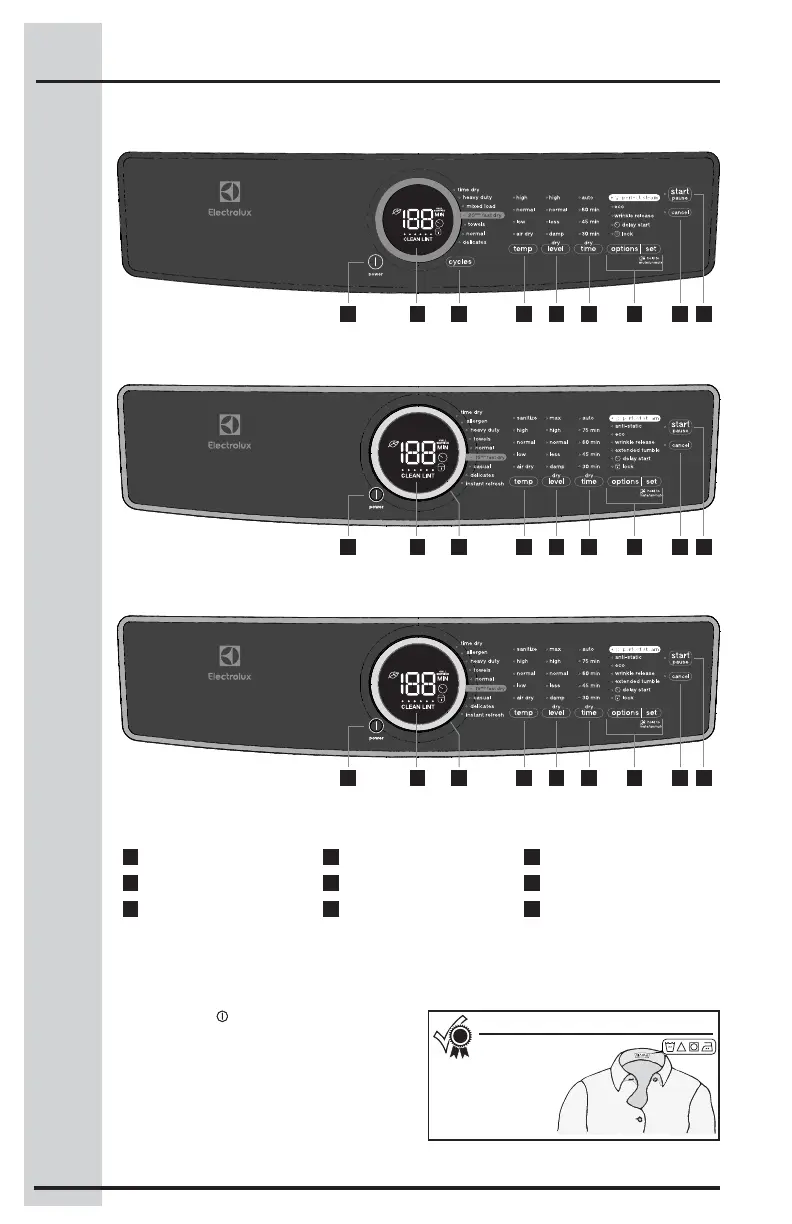
Press the power button to turn on the unit.
Turn the cycle selector ring (on select models)
in either direction or repeatedly press the cycles
button (on other models) to scroll through the
cycles.
To change the cycle once it has begun, press
the cancel button before selecting a new cycle.
Just turning the cycle selector ring or pressing
the cycles button will not change the cycle.
Cycle Selection
Operating Instructions
Follow the fabric care
label instructions
on items to
be dried.
For best results
1
power
2
cycle status display
3
cycle selector
4
temperature
5
dryness level
6
drying time
7
options/set
8
cancel
9
start/pause
This manual covers many models and not all cycles, options, or features listed are available on every model. Consoles
shown above for reference only. Your model may diff er.
2 71 63 854 9
600 Series
2 71 63 854 9
500 Series
2 71 63 854 9
400 Series



 To Next Page