Removing the dirt:
1. –
Remove immediately: melting plas-
tic, plastic foil, and food containing
sugar. Use a special glass ceramic
scraper. Put the scraper on the glass
ceramic surface at an acute angle and
slide the blade on the surface.
– Stop the appliance and let it cool
down before you clean: limescale
rings, water rings, fat stains, shiny met-
allic discolorations. Use a special
cleaner for glass ceramic or stainless
steel.
2. Clean the appliance with a damp cloth
and some detergent.
3. At the end rub the appliance dry with
a clean cloth.
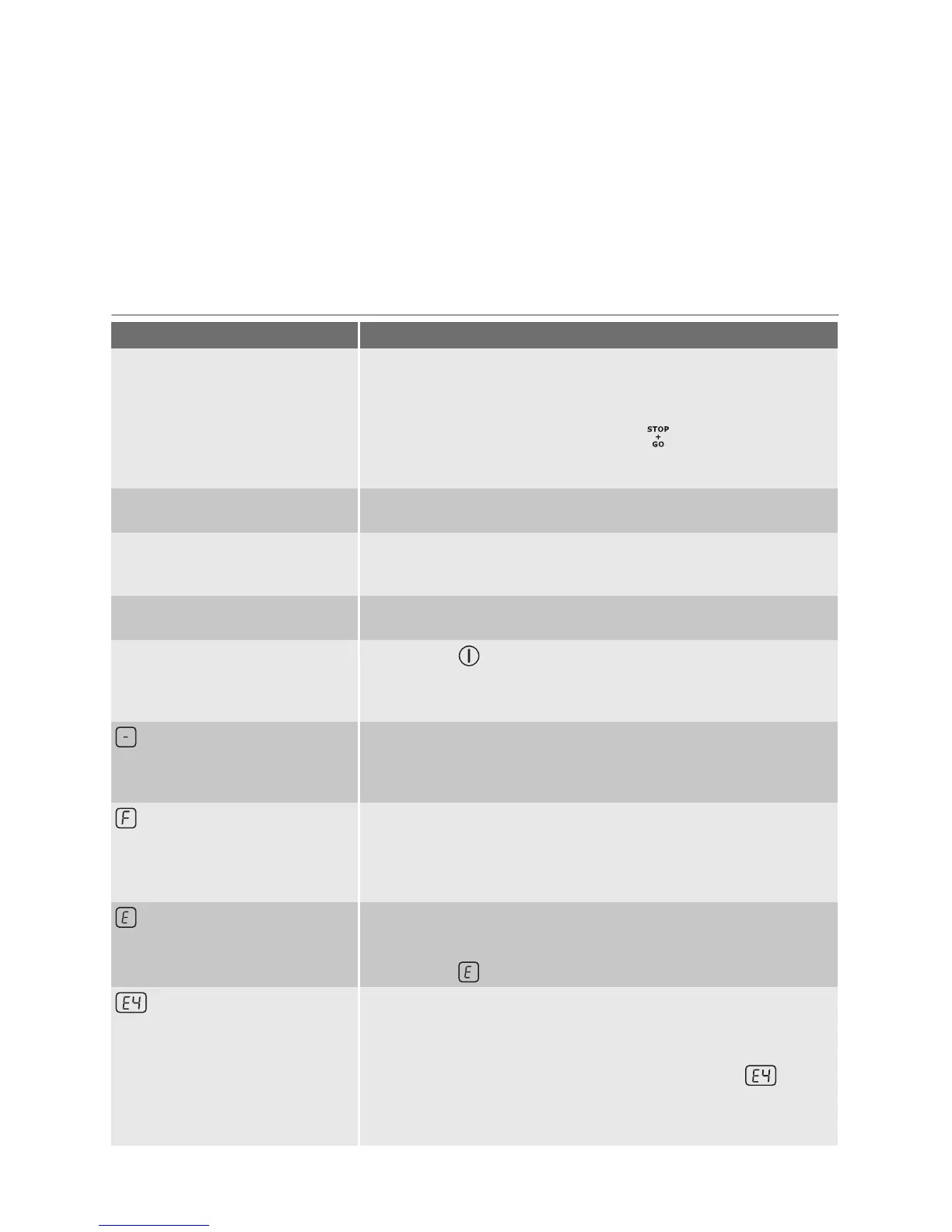
What to do if…
Problem Possible cause and remedy
You cannot start the appliance or
operate it.
• You touched 2 or more sensor fields at the same time. Only
touch one sensor field.
• There is water or fat stains on the control panel. Clean the control
panel
•
The child safety device or key lock or
operates. See the
chapter Operating the appliance.
• Start the appliance again and set the heat setting in 10 seconds.
A sound operates when the ap-
pliance is off.
You covered one or more sensor fields. Uncover the sensor fields.
The residual heat indicator does
not come on.
The cooking zone is not hot because it operated only for a short
time. If the cooking zone is supposed to be hot, speak to the After
Sales Service.
Heat setting alternates The Power management is active. See the section Power man-
agement.
A sound operates and appliance
starts and stops again. After 5
seconds one more sound oper-
ates.
You covered . Uncover the sensor field.
comes on
• The automatic switch-off operates. Stop the appliance and start
it again.
Overheating protection for the cooking zone operates. Switch off
the cooking zone. Switch on the cooking zone again.
comes on
• No cookware on the cooking zone. Put cookware on the cook-
ing zone.
• Not correct cookware. Use the correct cookware.
• The diameter of the bottom of the cookware is too small for the
cooking zone. Move cookware to a smaller cooking zone.
and number come on.
There is an error in the appliance.
Disconnect the appliance from the electrical supply for some time.
Disconnect the fuse from the electrical system of the house. Con-
nect again. If
comes on again, speak to the after sales service.
come on
There is an error in the appliance, because a cookware boils dry
or you use not correct cookware. Overheating protection for the
cooking zone operates. The automatic switch-off operates.
Switch off the appliance. Remove the hot cookware. After approx-
imately 30 seconds switch on the cooking zone again.
should
disappear, residual heat indicator can stay. Cool down the cook-
ware and check it with the section Cookware for the induction
cooking zone.
If you tried the above solutions and cannot
repair the problem, speak to your dealer or
the Customer Care Department. Give the da-
ta from the rating plate, three-digit-letter
10 electrolux




 To Next Page