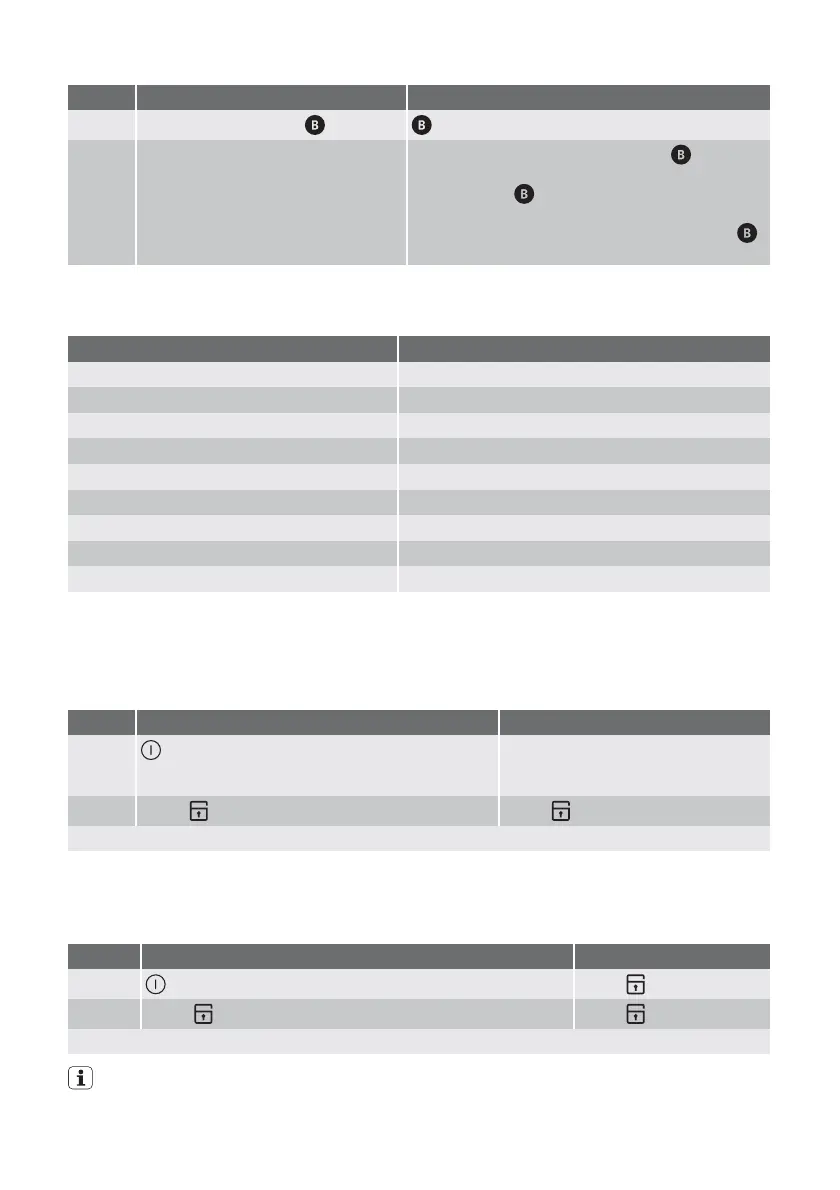
Step Control panel Display
1.
Select warm-up setting display flashes
2. Select the desired heat setting be-
tween 1 and 8
The desired heat setting is displayed. display
lights up.
As long as the
display is lit, the appliance is
working at full power.
After the automatic warm-up is completed, the
display goes out.
The length of time that the automatic warm
up function operates depends on the heat
setting selected.
Heat setting Length of the automatic warm up [min:sec]
1 0:12
2 0:12
3 3:07
4 5:51
5 10:12
6 2:01
7 2:28
8 2:52
9 ---
Using the child safety device
The child safety device prevents unintention-
al use of the appliance.
Switching on the child safety device
Step Control panel Pilot light
1.
Switch on appliance. Do not set a heat setting.
lights up. The operational readiness
indicators of the individual cooking
zones light up.
2.
Touch for 4 seconds above lights up
The child safety device is switched on.
Overriding the child safety device
The child safety device can be switched off
in this way for a single cooking session; it re-
mains activated afterwards.
Step Control panel Pilot light
1.
Switch appliance on above lights up
2.
Touch for 4 seconds above goes out
Until the appliance is next switched off, it can used as normal.
After overriding the child safety device, a heat setting or a function must be set within
approx. 10 seconds, otherwise the appliance automatically switches itself off.
6 electrolux





 To Next Page