Controls
i!_!_i!i_ii_!i!_!_i!i_ii_!i!_!_i!i_ii_!i!_!_i!i_ii_!i!_!_i!i_ii_!i!_!_i!i_ii_!i!_!_i!i_ii_!i!_!_i@ii_i
Setting cooling temperatures
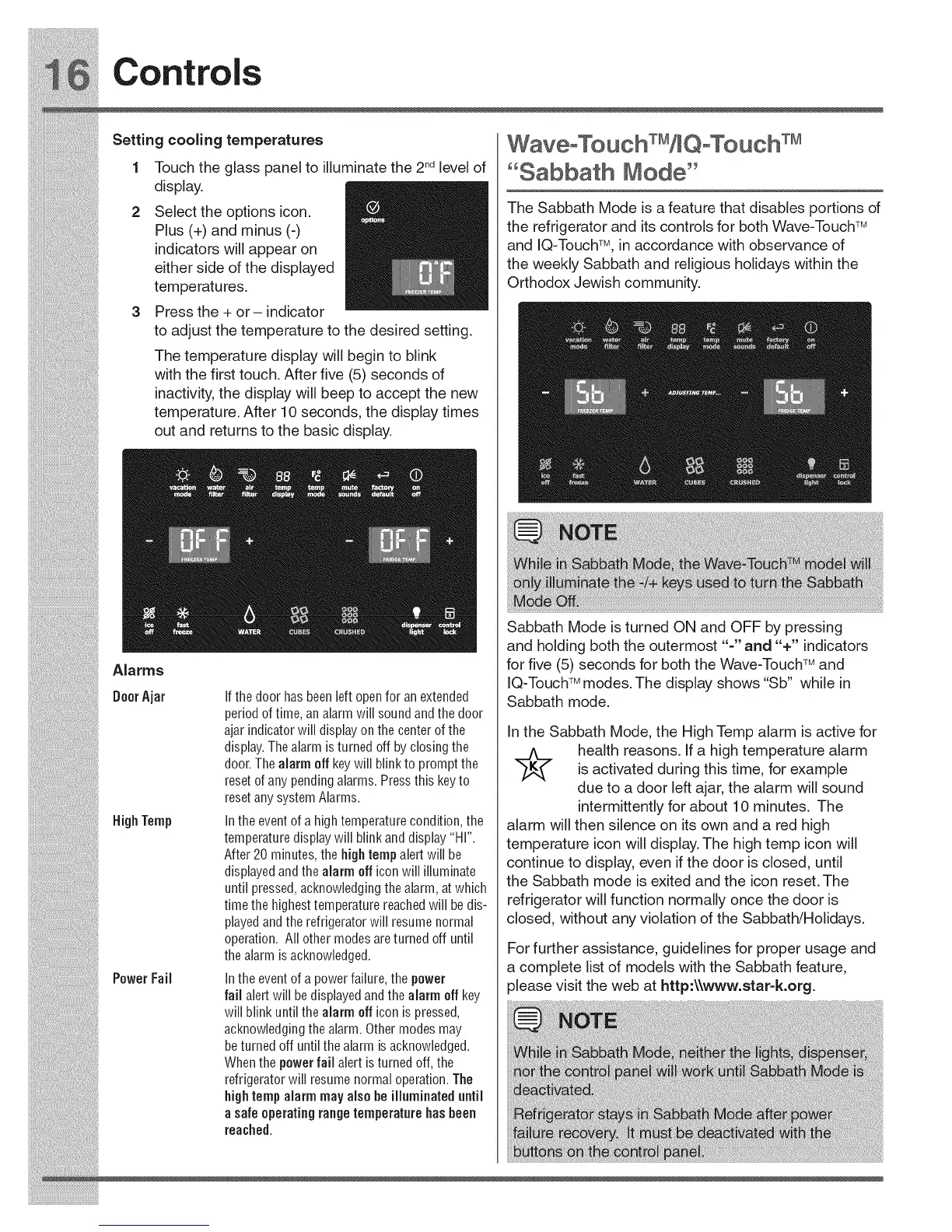
Touch the glass panel to illuminate the 2ndlevel of
display.
Select the options icon.
Plus (+) and minus (-)
indicators will appear on
either side of the displayed
temperatures.
Press the + or - indicator
to adjust the temperature to the desired setting.
The temperature display will begin to blink
with the first touch. After five (5) seconds of
inactivity, the display will beep to accept the new
temperature. After 10 seconds, the display times
out and returns to the basic display.
"Sabbath Mode"
The Sabbath Mode is a feature that disables portions of
the refrigerator and its controls for both Wave-Touch TM
and IQ-Touch% in accordance with observance of
the weekly Sabbath and religious holidays within the
Orthodox Jewish community.
i!_!_i!i_ii_!i!_!_i!i_ii_!i!_!_i!i_ii_!i!_!_i!i_ii_!i!_!_i!i_ii_!i!_!_i!i_ii_!i!_!_i!i_ii_!i!_!_i@ii_i





 To Next Page