EElleeccttrroonniicc CCoonnttrrooll
3-15
SSeettttiinngg PPrreeffeerreenncceess
CCuussttoomm MMooddee
CUSTOM MODE allows up to 3 household
members to personalize up to 3 favorite cycles
each.
To enter custom users and personalize favorite
cycles:
1. Use the scroll up or scroll down buttons until
you reach set prefs. Press the select button to
enter the preference menu.
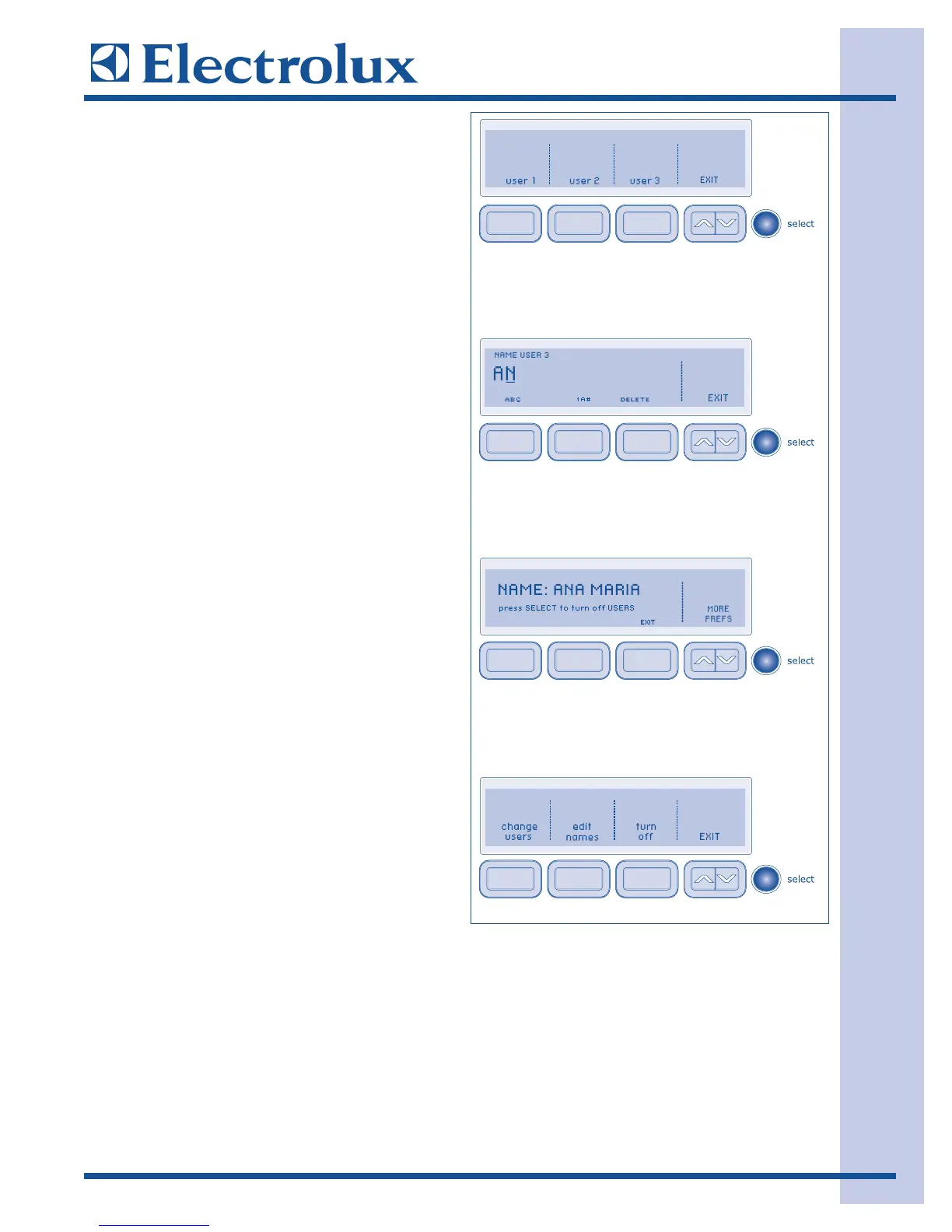
2. Press select again to enter CUSTOM MODE.
3. Press the button for user 1, user 2 or user 3.
4. Press select.
Press the button under ABC to name the favorite
cycle alphabetically. Use the button under 1A#
to add numbers, foreign language characters or
symbols to the name.
Rotate the cycle selector knob in either direction
to select the characters in the name, pausing after
each character to let the cursor advance. Press the
button under DELETE to erase incorrect entries.
There is a blank character between Z and A for
inserting spaces in your custom name. Pause
momentarily on this character as you would to
insert any other character, then continue.
When the name has been entered, press select to
save the name.
To edit names while in CUSTOM MODE, turn the
dryer off by pressing cancel. Press any other
button to wake the dryer up. Screen will display
“
TTOO CCHHAANNGGEE OORR TTUURRNN OOFFFF UUSSEERRSS PPRREESSSS
SSEELLEECCTT
”. You must press select within 5 seconds
or dryer will return to normal operation with
previous user selected. After pressing select you
have the choice of change users, edit names, turn
off or EXIT. Make your selection and follow the
directions displayed.
Each custom user may select up to 3 favorite
cycles. The washer will remember cycle settings,
options, preferences, etc. for each user.




 To Next Page