Heat setting The hob deacti‐
vates after
7 - 9 1.5 hour
When you use Pan Fry the
hob deactivates after 1.5
hours. For Sous Vide the
hob deactivates after 4
hours.
6.3 Using the cooking zones
Place the cookware in the centre of the
selected cooking zone. Induction cooking
zones adapt to the dimensions of the
bottom of the cookware automatically.
Once you place a pot on the selected
cooking zone the hob automatically
detects it and the relevant slider appears
on the display. The slider is visible for 8
seconds, after that time the display goes
back to the main view. To close the slider
faster tap the screen outside of the slider
area.
When other zones are active the heat
setting for the zone you want to use may
be limited. Refer to "Power
Management".
Make sure that the pot is
suitable for induction hobs.
For more information on
cookware types refer to
"Hints and tips". Check the
size of the pot in "Technical
data".
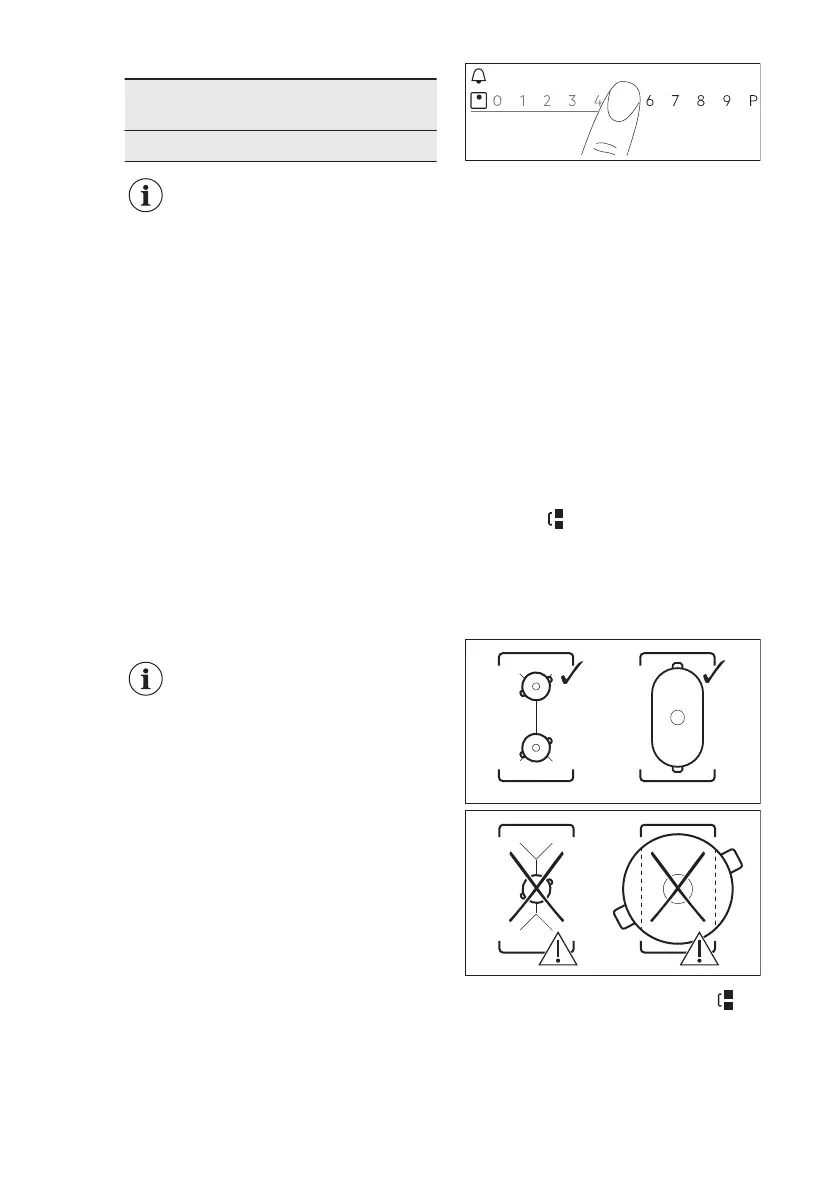
6.4 Heat setting
1. Activate the hob.
2. Place the pot on the selected cooking
zone.
The slider for the active cooking zone
appears on the display and is active for 8
seconds.
3. Touch or slide your finger to set the
desired heat setting.
The symbol turns red and becomes
bigger.
You can also change the heat setting
while cooking. Touch the zone selection
symbol on the main view of the control
panel and move you finger to the left or
right (to lower or increase the heat
setting).
6.5 Bridge function
This function connects two cooking
zones and they operate as one with the
same heat setting.
You can use the function with large
cookware.
1. Place the cookware on two cooking
zones. The cookware must cover the
centres of both zones.
2. Touch to activate the function.
The zone symbol changes.
3. Set the heat setting.
The cookware must cover the centres of
both zones but not go beyond the area
marking.
To deactivate the function, touch . The
cooking zones operate independently.
www.electrolux.com14



 To Next Page