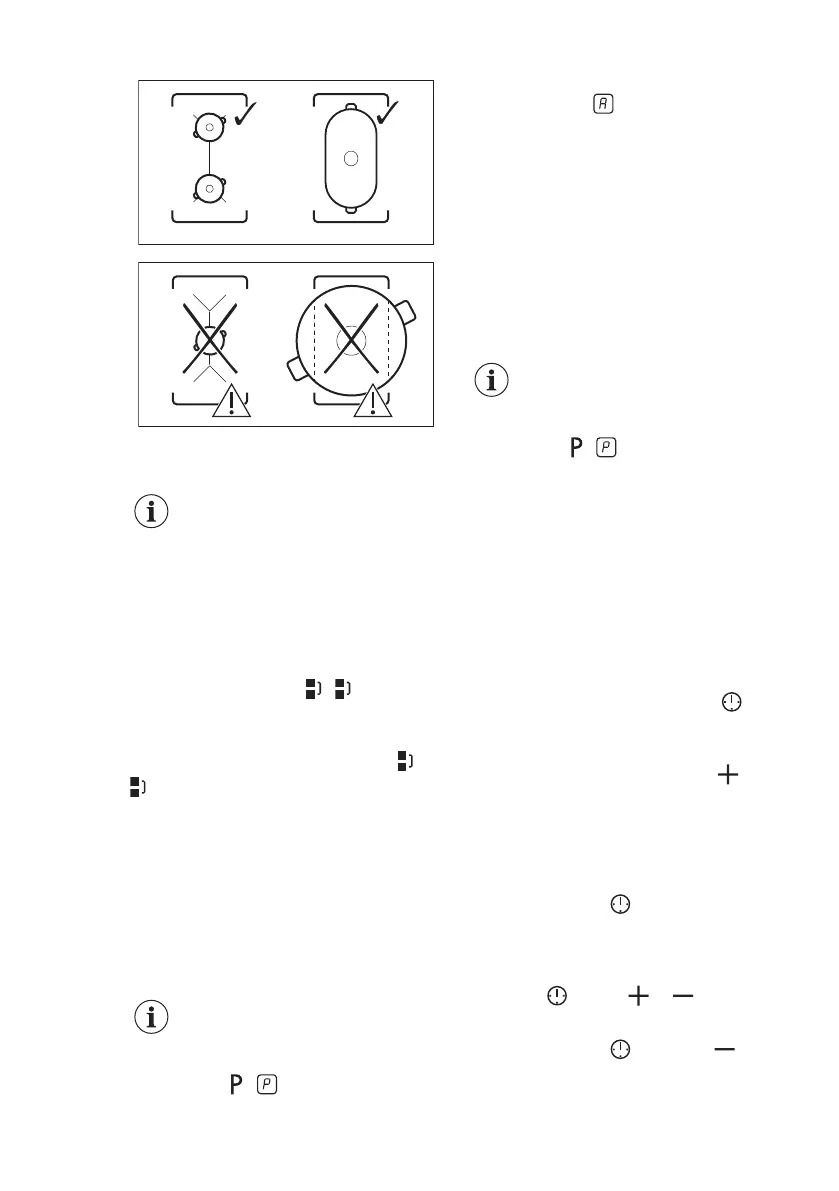
5.5 Bridge
The function operates when
the pot covers the centres of
the two zones.
This function connects two cooking
zones and they operate as one.
First set the heat setting for one of the
cooking zones.
To activate the function for left / right
cooking zones: touch / . To set or
change the heat setting touch one of the
left / right control sensors.
To deactivate the function: touch /
. The cooking zones operate
independently.
5.6 Automatic Heat Up
Activate this function to get a desired
heat setting in a shorter time. When it is
on, the zone operates on the highest
setting in the beginning and then
continues to cook at the desired heating
setting.
To activate the function the
cooking zone must be cold.
To activate the function for a cooking
zone: touch ( comes on).
Immediately touch a desired heat setting.
After 3 seconds comes on.
To deactivate the function: change the
heat setting.
5.7 PowerBoost
This function makes more power
available to the induction cooking zones.
The function can be activated for the
induction cooking zone only for a limited
period of time. After this time the
induction cooking zone automatically
sets back to the highest heat setting.
Refer to “Technical data”
chapter.
To activate the function for a cooking
zone: touch . comes on.
To deactivate the function: change the
heat setting.
5.8 Timer
Count Down Timer
You can use this function to set how long
the cooking zone should operate for a
single cooking session.
First set the heat setting for the cooking
zone then set the function.
To set the cooking zone: touch
again and again until the indicator of a
necessary cooking zone comes on.
To activate the function: touch of
the timer to set the time (00 - 99
minutes). When the indicator of the
cooking zone starts to flash slowly the
time counts down.
To see the remaining time: set the
cooking zone with . The indicator of
the cooking zone starts to flash quickly.
The display shows the remaining time.
To change the time: set the cooking
zone with . Touch or .
To deactivate the function: set the
cooking zone with and touch . The
remaining time counts back to 00. The
indicator of the cooking zone goes out.
ENGLISH 11



 To Next Page