ENGLISH
7
BEFORE FIRST USE
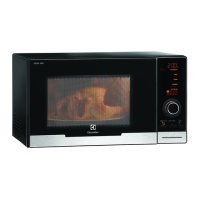
CONTROL PANEL
1
2
3
4
5
6
7
DIGITAL DISPLAY indicators
Microwave
Clock
Cooking stages
Plus/Minus
AUTO COOK indicators
AUTO COOK button
AUTO DEFROST button
POWER LEVEL button
TIMER/WEIGHT knob
START/+30 button
STOP button
DOOR OPENING button
Auto defrost bread
Auto defrost
Weight
1
2
3
4
5
6
7
8
9
8
9
ECON MODE
The oven is set in ‘ENERGY SAVE’ mode (‘Econ’).
1. Plug in the oven.
2. The display will show: ‘Econ’.
3. The display will count down from 3:00 to zero.
4. When zero is reached, the oven goes into
‘Econ’ mode and the display goes blank.
• To cancel Econ mode, set the clock.
SETTING THE CLOCK
The oven has a 12 and 24 hour clock.
Example: To set the clock to 11:30 (12 hour
clock).
1. Open the door.
2. The display will show: ‘Econ’.
3. Press and hold the START/+30 button for 5
seconds. The oven will beep. The display will
show:
4. Rotate the TIMER/WEIGHT knob to adjust
the hour.
5. Press the START/+30 button once then rotate
the TIMER/WEIGHT knob to adjust the
minutes.
6. Press the START/+30 button.
7. Check the display:
8. Close the door.
• You can rotate the TIMER/WEIGHT knob
clockwise or anti-clockwise.
• If you press the STOP button the clock will
not be set. The display will show: ‘Econ’.








 To Next Page